
A customer success onboarding checklist takes a new account from a signed deal to its first verified outcome. It should record the customer's goal, every handoff, the owner of each task, the due date and proof that the work happened. A completed setup isn't the same as a customer getting value, and that's the gap this checklist closes.
Use the copy-ready checklist below, for a CSM-led B2B software rollout. It separates your team's work from the customer's work and adds an exit gate to each phase, so you'll know when a phase is really done. You'll also find a sample account, a lightweight version for self-serve customers and a practical way to handle promises made during sales.
- Start with the signed scope and sales commitments, not a generic welcome email.
- Name an internal owner and a customer owner for every dependency.
- Use phase exit evidence, not task completion alone, to approve go-live.
- Measure first value and adoption separately from technical setup.
- Hand over unresolved commitments and next actions to the ongoing CSM.
What should a customer success onboarding checklist include?
A customer success onboarding checklist should include sales handoff, kickoff, access and configuration, first-value validation, enablement and ongoing success handoff. Each task needs an accountable owner, a customer-side dependency when applicable, a target date and a link to evidence. The checklist ends when the customer can use the agreed workflow and the ongoing CSM has accepted the account. It doesn't end when a project board looks green.
Gainsight's customer onboarding guidance identifies customer success, technical teams, education, sales, support and executive sponsors as contributors to onboarding. Salesforce's customer success training likewise recommends naming the customer objectives, contacts, performance owners and training approach before work starts. Both support a shared plan, but your team still has to decide who signs off on each phase.
For a separate account-level goal document, use the customer success plan template. For tools that manage projects or client portals, see customer onboarding software. The checklist here is the operating record that ties those pieces together.
Copy-ready customer success onboarding checklist
The customer success onboarding checklist below has six phases, from sales acceptance through the ongoing account handoff. Copy the table into a spreadsheet or project tool, or download the file, then replace the illustrative owners and due-date timing and keep the evidence column. Each row is one task with a visible acceptance condition.
Customer success onboarding checklist
One row per task, 27 tasks in six phases. Owners, due-date timing and evidence are illustrative: replace them with names, real dates and links.
| Phase | Task | Accountable owner | Customer owner | Due date | Evidence | Status | Escalation |
|---|---|---|---|---|---|---|---|
| Sales handoff | Confirm purchased scope and exclusions | Account executive | Sponsor | Before kickoff | Signed scope linked | Not started | CS lead |
| Sales handoff | Record promised outcomes and deadlines | Account executive | Sponsor | Before kickoff | Promise log reviewed | Not started | Sales lead |
| Sales handoff | Name the onboarding lead and ongoing CSM | CS lead | Sponsor | Before kickoff | Ownership accepted | Not started | CS director |
| Sales handoff | Identify decision-maker, champion and admin | Onboarding lead | Sponsor | Before kickoff | Contact map confirmed | Not started | Account executive |
| Sales handoff | Log open risks and dependencies | Onboarding lead | Project lead | Before kickoff | Risk list acknowledged | Not started | CS lead |
| Kickoff | Confirm business outcome and first-value event | Onboarding lead | Sponsor | Kickoff | Outcome approved | Not started | CS lead |
| Kickoff | Agree milestones and decision dates | Onboarding lead | Project lead | Kickoff | Shared plan accepted | Not started | Sponsor |
| Kickoff | Agree communication and escalation channels | Onboarding lead | Project lead | Kickoff | Written working agreement | Not started | CS lead |
| Kickoff | Assign every customer-side prerequisite | Implementation lead | Admin | Kickoff | Named owners in plan | Not started | Project lead |
| Kickoff | Send decision log and next actions | Onboarding lead | Project lead | After kickoff | Summary acknowledged | Not started | Sponsor |
| Setup | Provision agreed workspace and permissions | Implementation lead | Admin | Before test | Access test recorded | Not started | Technical lead |
| Setup | Verify integration prerequisites | Technical lead | Admin | Before test | Connection test result | Not started | Project lead |
| Setup | Validate sample or migrated data | Technical lead | Data owner | Before test | Reconciliation signed | Not started | Sponsor |
| Setup | Confirm required security approvals | Security owner | Security contact | Before go-live | Approval reference | Not started | Sponsor |
| Setup | Record configuration and exceptions | Implementation lead | Admin | Before training | Configuration record | Not started | CS lead |
| First value | Run the agreed customer workflow | Onboarding lead | Workflow owner | At pilot | Workflow result captured | Not started | Project lead |
| First value | Compare result with success criterion | Onboarding lead | Sponsor | At pilot | Outcome accepted | Not started | CS lead |
| First value | Resolve or accept launch blockers | Technical lead | Project lead | Before go-live | Decision log signed | Not started | Sponsor |
| First value | Obtain customer go-live approval | Onboarding lead | Sponsor | At go-live | Approval recorded | Not started | CS director |
| Enablement | Train admins on routine changes | Enablement lead | Admin | Before handoff | Practice task completed | Not started | Project lead |
| Enablement | Train end users on the primary workflow | Enablement lead | Team lead | Before handoff | User exercise completed | Not started | Project lead |
| Enablement | Publish help and support contacts | Support lead | Admin | Before handoff | Resource link confirmed | Not started | CS lead |
| Enablement | Check usage of the target workflow | Ongoing CSM | Team lead | After go-live | Usage review logged | Not started | CS lead |
| Handoff | Review all outstanding commitments | Onboarding lead | Project lead | At handoff | Open items accepted | Not started | CS director |
| Handoff | Confirm first-value evidence and risks | Ongoing CSM | Sponsor | At handoff | Success summary accepted | Not started | CS lead |
| Handoff | Agree next review and operating cadence | Ongoing CSM | Sponsor | At handoff | Calendar invitation | Not started | CS lead |
| Handoff | Transfer owner, notes and customer contacts | Onboarding lead | Project lead | At handoff | Account record acknowledged | Not started | CS director |
How to use it: Set Status to Not started, Blocked, In progress or Accepted. Replace generic job titles with actual names, add a real date and store an evidence URL or document reference. A task marked Accepted needs the stated proof, not just a ticked box. Don't put credentials, raw customer exports or sensitive security findings in a shared tracker. They're better kept in your secured systems.
How do you run onboarding without losing sales commitments?
You run onboarding without losing sales commitments by turning every material promise into a confirmed record before kickoff. The account executive supplies the original context, the onboarding lead checks scope and the customer confirms the expected outcome. An internal task alone can't prove what the customer was told, and that's exactly where promises go missing.
A promise record needs the exact wording, the source of the statement, who confirmed it, the responsible delivery owner, the agreed due date and acceptance evidence. Keep a promise separate from a proposed idea. They're different records, and you shouldn't merge them. A salesperson's suggestion definitely shouldn't silently become a contractual obligation, and a task completed internally shouldn't be marked delivered before the customer accepts the result.
Capture the handoff before the kickoff
The sales handoff should capture the purchased package, the reason the customer bought, agreed deliverables, promised deadlines, stakeholder relationships and open objections. Don't ask the customer to repeat details the sales team already has. Ask the account executive to distinguish signed terms from exploratory discussions. That's the fastest way to avoid rework.
Use a short internal handoff meeting to resolve contradictions. If the order form excludes an integration but the discovery notes promise it, pause that task and obtain a documented scope decision. Record who will explain the outcome to the customer, rather than letting implementation discover the mismatch at go-live.
Track each commitment to customer acceptance
A commitment register should link a promise to the specific onboarding milestone that fulfills it. The record is accepted only when a named person confirms its scope. Delivery needs evidence and verification by a reviewer who isn't the person who did the work.
Our own product, The Customer Success Manager, is a focused commitment ledger built for that narrow gap. Teams record who confirmed a promise, who owns it and whether delivery was verified. It isn't a CRM or a customer health-scoring platform.
Who owns each customer onboarding phase?
The onboarding lead owns coordination, but the customer success onboarding checklist must show the people who can actually finish each task. Sales owns the original commercial context, technical staff own configuration, the customer owns prerequisites and the ongoing CSM owns adoption after handoff. The sponsor resolves scope or priority disputes that task owners can't settle.
The ownership sequence below is a recommended operating pattern. It's not a universal service-level commitment. Adjust the timing to your contract and customer resources.
- Account executiveTransfer scope, promises and stakeholder context Before kickoff
- Onboarding leadConfirm success criteria and shared plan At kickoff
- Technical lead and customer adminComplete setup, data checks and access testing Before pilot
- Customer workflow ownerPerform the first real use case At pilot
- SponsorAccept go-live and open exceptions At launch
- Ongoing CSMAccept commitments, risks and next review At handoff
A phase owner doesn't need to do every task personally. They do need to know what's blocked, which person must act and what proof closes the task. Avoid assigning a whole department as the owner; it's rarely clear who'll act. It's too vague to act on. When several people appear responsible, nobody's got the clear next action.
What counts as a completed onboarding milestone?
A completed onboarding milestone has an agreed outcome and verifiable acceptance evidence. Setup is complete when the agreed configuration works, first value is complete when the customer performs the target workflow and handoff is complete when the ongoing CSM accepts the account. Each phase should have a clear exit gate.
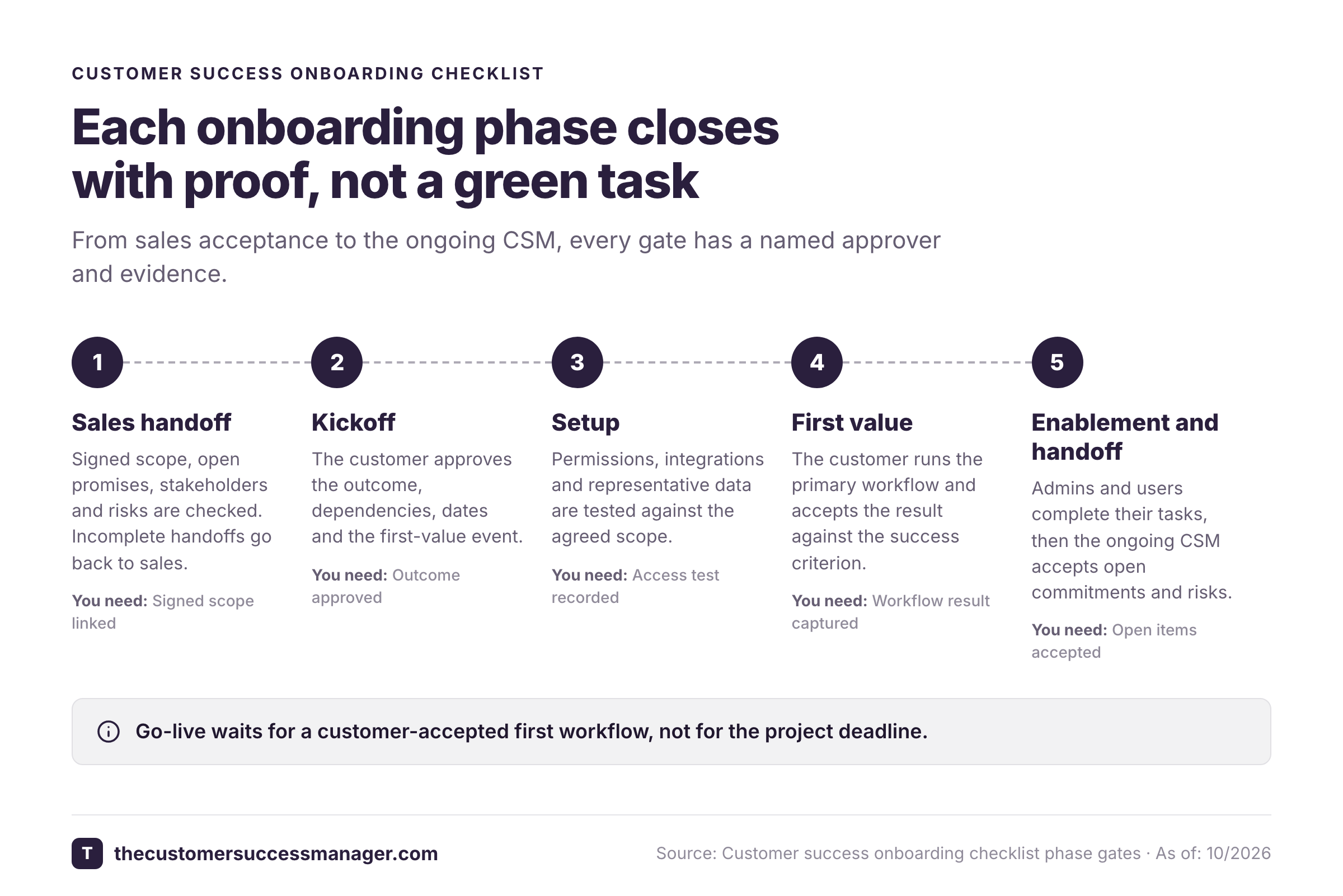
Accept the sales handoff
Check signed scope, open promises, stakeholder names and risks. Reject incomplete handoffs with named questions for sales.
Approve the kickoff plan
Confirm the outcome, customer dependencies, dates, escalation route and the first-value event with the customer project lead.
Validate the configured environment
Test permissions, integrations and representative data against the agreed scope. Attach results and log exceptions.
Verify first value
Have the customer perform the primary workflow and accept the result against the agreed success criterion.
Confirm enablement
Ask an admin and a representative end user to complete their own tasks, then confirm support routes are known.
Accept the ongoing handoff
Transfer unresolved promises, risks, success evidence and next actions. The receiving CSM explicitly accepts ownership.
A practical go-live decision
A go-live decision should distinguish a critical blocker from a tolerable exception. Don't call the account live just because the project deadline arrived. You'd be guessing. Indeed, a deadline says nothing about the customer's result. The sponsor can accept a known noncritical gap with an owner and deadline, but critical access failures or an unverified core workflow should remain blocked.
Use this compact release gate in the customer meeting, where it's easy to confirm each point. Each item needs an evidence reference and an explicit approver, and they're easy to collect during the call.
- The customer confirms the primary use case and success criterion.
- The agreed access and data tests passed.
- The first real workflow produced the expected result.
- The customer admin knows how to operate the setup.
- Open exceptions have owners, due dates and customer approval.
- The sponsor or delegated approver recorded a go-live decision.
How do you tailor the checklist for different customers?
Tailor the customer success onboarding checklist to the purchased scope, implementation complexity and the customer's available staff. Keep the same ownership and evidence fields, but remove tasks that don't apply. High-touch customers may need a formal pilot and sponsor approval, while self-serve customers can demonstrate first value through a tracked product event.
| Onboarding model | Customer task | Internal owner | Proof of first value | Handoff rule |
|---|---|---|---|---|
| Self-serve | Complete the core setup action | Digital CS owner | Recorded successful product event | Route blocked accounts to human help |
| Assisted | Join kickoff and complete one workflow | CSM | Customer-approved result | CSM accepts open actions |
| Complex rollout | Supply data, access and test users | Implementation lead | Pilot result plus sponsor approval | Ongoing CSM accepts risks and exceptions |
Gainsight recommends aligning onboarding to customer goals and first-value outcomes rather than treating every account identically. Salesforce describes high-touch, low-touch and hybrid engagement models. The operating principle is consistent. Change the amount of help, but don't change the definition of a successful outcome.
Example: a customer that bought reporting automation
Consider an illustrative customer called Harbor Analytics, which isn't a real account. The customer bought reporting automation to replace a weekly manual export. Sales discussed a dashboard, but the signed scope covers only the data connector and a standard report. The onboarding lead records the dashboard request as a proposed change, not an accepted commitment.
At kickoff, Harbor's operations lead agrees that first value means generating the weekly report from its own test data. The customer admin owns credentials and sample data. The implementation lead owns configuration and the ongoing CSM owns the handoff record. When the report runs, the operations lead signs off on the result and the team records the evidence link.
The remaining dashboard request goes into an exception log with a decision owner and a follow-up date. The ongoing CSM accepts that record during handoff. The account can progress, and nobody's pretending that an unpurchased feature was promised or delivered.
Which customer onboarding metrics should you track?
Track customer onboarding with first-value time, milestone acceptance, unresolved blockers and early workflow adoption. A checklist completion percentage is useful for workload visibility, but it can't replace proof that the customer reached the outcome they bought. Compare accounts within the same onboarding model before drawing conclusions.
Gainsight's customer onboarding guidance names time to first value, onboarding completion, feature adoption and early support volume as useful measures. Salesforce advises defining performance metrics that establish indicators of success for the customer. Start with a few measurements you can act on. You'll add more once they're trusted. A large dashboard that nobody reviews won't help anyone.
| Metric | Calculation or rule | Evidence source | What to do when it slips |
|---|---|---|---|
| Time to first value | Date of first accepted outcome minus contract date | Accepted outcome record | Review blockers before adding training |
| Milestone acceptance rate | Accepted required milestones divided by required milestones | Phase gate tracker | Find the phase with stalled approval |
| Open commitments | Confirmed promises without verified delivery | Commitment register | Assign owner and next customer update |
| Core workflow adoption | Target users completing the agreed workflow divided by target users | Product usage report | Contact users missing the first action |
| Unresolved blockers | Blocked tasks past their agreed decision date | Issue and decision log | Escalate to the named sponsor |
The metric definitions above aren't industry benchmarks, so don't compare them with another company's numbers. For example, an account with an accepted pilot but no repeat use has achieved first value, yet still needs adoption work. Conversely, a customer can complete training without producing a usable result. Those accounts shouldn't receive the same success label, since they're in different places.
How do you hand off onboarding to ongoing customer success?
Hand off onboarding to ongoing customer success with an accepted account summary, not a project link alone. A link isn't a handoff, and it's no substitute for the summary. The receiving CSM needs the customer goal, verified first-value evidence, open commitments, risks, sponsor contacts and next scheduled decision. The customer should know who owns each unresolved item after the transition. They shouldn't have to ask, and you won't have to chase.
Use an acceptance note, not a vague status update
The acceptance note should answer what the customer bought, what they achieved, what remains open, who will act and when the customer will hear back. Link the signed scope and evidence rather than pasting sensitive documents into the note. The receiving CSM mustn't have to chase the implementation team for the source.
A useful handoff message is short enough to read before a customer call. It might say: Harbor Analytics generated and accepted its first weekly report. The connector is live, the dashboard request is outside current scope and the sponsor will decide whether to request a change. The ongoing CSM owns the next review and has accepted the open item.
Don't close onboarding with unowned promises
An unresolved promise can stay open after onboarding, but it can't be ownerless. If a promised feature is delayed, record the customer's acknowledgment, the revised decision date and the next communication owner. The team shouldn't mark it delivered solely because a ticket was closed.
FAQ
A customer success onboarding checklist works best when the customer can see what comes next and the CS team can prove what has been accepted. These answers cover the common scope, ownership and completion questions that remain after the template.
What is a customer success onboarding checklist?
A customer success onboarding checklist is a task and evidence record that takes a new account from sales handoff to first value and ongoing CSM ownership. Each task has an owner, date and acceptance condition.
How long should customer onboarding take?
Customer onboarding should take as long as the agreed first-value outcome requires. Set the timeline from the purchased scope, customer prerequisites and pilot criteria rather than applying one deadline to every account.
Who owns customer onboarding?
The onboarding lead coordinates customer onboarding, while sales, implementation, the customer admin and the ongoing CSM own specific deliverables. Name one accountable person per task and an escalation owner for blocked decisions.
What is the difference between onboarding and implementation?
Implementation configures and tests the purchased solution. Customer onboarding also confirms business outcomes, trains users, verifies first value and transfers responsibility to the ongoing success team.
When is onboarding complete?
Onboarding is complete when the customer has accepted the agreed first-value result and the ongoing CSM has accepted open commitments and next actions. A finished setup checklist alone isn't enough.