The best knowledge base software depends on who reads the articles. For a customer-facing help center, Zendesk Guide, Help Scout Docs and Document360 are the strongest fits. For an internal wiki your team trusts, Confluence, Guru, Notion and Slite do the job, and Intercom fits teams that want help center articles to power an AI agent. This guide compares eight tools for customer success and support teams on what they cost, what the plan really includes and who keeps the articles accurate.
It covers knowledge bases for B2B customer success, support and onboarding teams. It leaves out personal note-taking apps and self-hosted open-source wikis, which serve a different reader.
- tools compared
- 8
- of 8 publish a price
- 6
- offer a free plan
- 3
- G2 rating range
- 4.1 to 4.7
Best knowledge base software at a glance
 Best help center inside a support suiteZendesk GuidePer-article audience rules and search reports that show what customers looked for and didn't find.
 Best for small support and CS teamsHelp Scout DocsA branded Docs site with unlimited articles on paid plans, next to a shared inbox.
 Best dedicated knowledge baseDocument360Reviewer roles, versioning and a public, private or mixed site in one project.
 Best when an AI agent answers from your articlesIntercomHelp center articles feed Fin, which is billed per resolution.
 Best internal wiki if you run JiraConfluenceSpaces, page permissions and a free plan for up to 10 users.
 Best for verified answers in the flow of workGuruEvery card has a verifier, and answers appear in Slack, Teams and the browser.
 Best flexible workspace with a wikiNotionWiki pages, databases and web publishing in one tool, with verification on Business.
 Best simple wiki with review datesSliteDoc verification and AI answers that rank verified docs higher.
 Our product · for the gap a knowledge base leavesThe Customer Success ManagerTracks what your team promised a specific customer, with evidence and an owner.
| Tool | Type of tool | What it handles | Starting price (USD) | G2 rating |
|---|---|---|---|---|
| Zendesk Guide | Help desk with built-in help center | Public help center tied to tickets and search analytics | Help center comes with Suite plans: from $55 per agent per month billed annually ($69 monthly) on Suite Team | 4.3 (6,700) |
| Help Scout Docs | Shared inbox with built-in help center | Public Docs site plus private collections beside the inbox | From $25 per user per month billed annually ($30 monthly) on Standard; Free plan with 1 Docs site and 10 articles | 4.4 (428) |
| Document360 | Dedicated knowledge base platform | Public, private or mixed knowledge base with review workflows | Custom, no public price (quote only, free plan closed to new sign-ups since November 2024) | 4.7 (501) |
| Intercom | Support platform with help center and AI agent | Help center articles feed the Fin AI agent | From $29 per seat per month on Essential; Fin AI Agent $0.99 per resolution | 4.5 (3,368) |
| Confluence | Team wiki and internal knowledge base | Spaces and pages for internal playbooks, onboarding and handoffs | Free for up to 10 users; Standard $720 per year for up to 10 users on annual billing ($7.15 per user per month on monthly billing) | 4.1 (4,300) |
| Guru | Verified internal knowledge delivered in the flow of work | Verified answers in Slack, Teams, the browser and your help desk | Custom, no public price (one custom package, talk to sales) | 4.7 (2,300) |
| Notion | Flexible workspace used as a team wiki | Wiki pages with verified status, databases and web publishing | Free; Plus $10 and Business $20 per member per month billed yearly ($12 and $24 monthly) | 4.6 (9,000) |
| Slite | Team knowledge base with doc verification | Docs with review dates and AI answers that prefer verified docs | Basic $10 and Pro $20 per user per month billed yearly; no free plan, 14-day trial | 4.6 (270) |
| The Customer Success Manager Our product | Customer commitment tracking | Records what your team promised each customer and whether delivery was verified | Access code | No reviews yet |
Prices as published by each vendor and checked on October 18, 2026. Quote only means the vendor shows no price. G2 ratings and review counts are rounded values from search listings, because G2 blocks automated access. The Zendesk rating covers the Zendesk suite and the Help Scout rating covers the whole product.
What is knowledge base software?
Knowledge base software lets you write, organize and search articles so that customers or colleagues find an answer without asking a person. Most tools add categories, templates, permissions, search and a way to see what people looked for and didn't find.
For a customer success team, the software does four jobs.
- It deflects repeat questions, because one good help center article answers the setup question once instead of five times a week.
- It speeds up onboarding, since new customers and new CSMs read the same how-to articles (our guide to the best customer onboarding software covers the tools that run the project itself).
- It keeps handovers consistent, because playbooks and account notes live in one place when an account changes owner.
- It gives your AI tools something true to read, because they answer from your articles, and stale articles produce stale answers.
Does knowledge base software include AI search?
Most of the tools in this guide now answer questions in plain language from your articles, but the plan and the price differ. Zendesk offers generative search over help center content, and Document360's Eddy AI returns cited answers that respect a reader's access rights. Intercom's Fin answers customers from help center articles at $0.99 per resolution, and Guru returns answers with citations in Slack, Teams and the browser. Notion AI and Confluence's Rovo sit on higher plans (Business and Standard or above), Slite's Ask allows 30 questions per seat on Basic, and Help Scout charges $0.75 per AI Answers resolution.
Is a wiki the same as a knowledge base?
A wiki and a knowledge base aren't quite the same thing. A wiki is a set of pages that anyone on a team can edit, usually for internal use. A knowledge base is a curated set of answers with an owner, a structure and often a public face. Tools like Confluence and Notion are wikis that teams turn into knowledge bases. Tools like Zendesk Guide and Document360 start from the knowledge base.
Internal vs customer-facing knowledge base
A customer-facing knowledge base answers customers, and an internal one answers your own team. Most customer success teams need both, and the tools split along that line.
- Customer-facing (help center): public articles, a branded site, search that reports failed searches, sometimes languages. Zendesk Guide, Help Scout Docs, Document360 and Intercom live here.
- Internal (wiki or team knowledge base): playbooks, renewal checklists, handover notes, pricing rules. Confluence, Guru, Notion and Slite live here.
Document360 and Notion can do both, but they're strongest on the side listed above. If you are also choosing a platform that scores account health, see our guide to the best customer retention software. Zendesk, Intercom and Help Scout also let you keep private articles for agents.
The 8 best knowledge base tools, reviewed
Each entry starts with the kind of team the tool fits, then says what that team gets and what it will miss. The expandable part shows how the tool works in practice. G2 notes are the most common themes in reviews, not our own testing.
The first four tools are built mainly for customer-facing help centers.
Zendesk Guide
Zendesk Guide
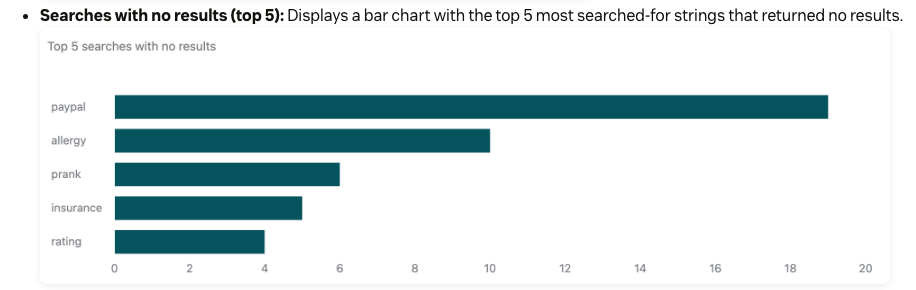
A help center that sits inside the Zendesk support suite, with per-article viewing permissions, search analytics that show searches with no results and generative search over your articles.
Fits a support team that already runs on Zendesk and wants the help center in the same suite as its tickets.
Picture a team of ten agents answering the same onboarding questions. In Zendesk the help center, the ticket queue and the search reports share one account, so a ticket spike on one topic points straight at the article that needs writing. What that team misses is a standalone option: Support Team lists no help center features, so the knowledge base cost starts at Suite Team.
- your support team already runs on Zendesk and you want articles, ticket data and zero-result search reports in one suite
- you need audience-restricted articles (up to 10 user segments per article) or up to 5 help centers, which start on Suite Professional
- you only need a standalone knowledge base: the help center sits in Suite plans, and Support Team lists no help center features
- you need a multilingual help center on a budget: 40+ languages need Suite Professional at $115 per agent per month billed annually, while Suite Team has one default language
- Users like
- a user-friendly interface and quick set-up of a self-service help center
- Users dislike
- cost and complicated pricing
- Source: G2, 6,700 reviews
How it works in practice
Articles live in a help center organized into categories and sections. Viewing rules are set per article through user segments, up to 10 per article, built from tags, organizations or groups. Permissions can't be applied to a whole category or section. By default only knowledge admins edit and publish, and separate edit and publish rights need Enterprise.
The search analytics show how many searches returned no results and the top zero-result search strings, which tells you which articles to write next. Generative search answers from help center content. Suite Team has one help center and one default language, while Suite Professional allows up to 5 help centers and 40+ languages. The Copilot add-on costs $50 per agent per month.
Zendesk lists apps for Slack, Jira, Salesforce Sales Cloud and HubSpot.
- Starting price
- Help center comes with Suite plans: from $55 per agent per month billed annually ($69 monthly) on Suite Team
- Plan with help center
- Suite Team and up
- Help centers
- 1 on Suite Team, up to 5 on Suite Professional
- Languages
- 1 default on Suite Team, 40+ on Suite Professional
- Copilot add-on
- $50 per agent per month
Help Scout Docs
Help Scout Docs
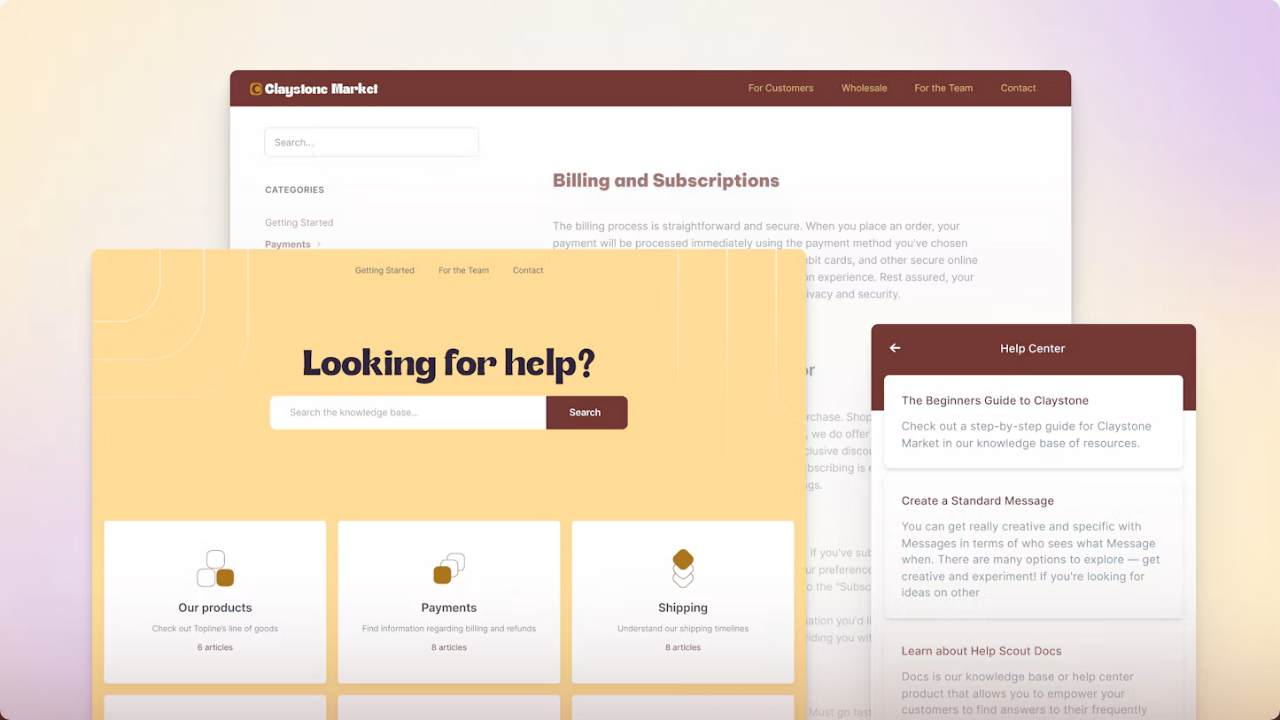
A shared inbox with a Docs help center on its own subdomain, unlimited articles on paid plans, private collections for internal docs and a report of searches that found nothing.
Fits a small or mid-size support or customer success team that wants a branded help center and a shared inbox without a heavy suite.
Picture a six-person team that answers customers by email and wants the same answers on a public Docs site. Help Scout keeps both in one account, and paid plans allow unlimited articles. What it misses is fine control over who sees which article, because the product describes public Docs sites plus private collections, not audience segments per article.
- you run a small or mid-size support or CS team and want a branded help center and an inbox from $25 per user per month
- you want a failed-searches report and private collections for internal docs next to the inbox
- you need linked translations of one article: translation means one Docs site per language, AI Assist (beta, Plus and Pro) or a third-party tool
- you need per-article audience restrictions: the pages describe public Docs sites plus private collections, not user segments
- Users like
- a clean interface and the shared inbox plus knowledge base combination (whole product)
- Users dislike
- limited reporting and customization (whole product)
- Source: G2, 428 reviews
How it works in practice
A Docs site sits on its own subdomain or a custom domain. Content is organized in collections and categories, and an article belongs to one collection but can sit in several categories. By default every Help Scout user can edit, publish and delete articles, and owners and admins can restrict that. Private collections hold internal documentation.
The Docs report lists popular articles and a failed searches table. Free allows 1 Docs site and 10 articles, Standard 2 sites, Plus 3 and Pro 5, and an extra site costs $20 per month billed annually. Translation means one Docs site per language, AI Assist translation (beta, Plus and Pro) or tools such as Weglot, Crowdin and Transifex. AI Answers costs $0.75 per resolution.
Salesforce and HubSpot integrations are Plus only. Slack and Jira connect to the inbox.
- Starting price
- From $25 per user per month billed annually ($30 monthly) on Standard; Free plan with 1 Docs site and 10 articles
- Docs sites
- 1 Free, 2 Standard, 3 Plus, 5 Pro
- Articles
- Unlimited on paid plans, 10 on Free
- Extra Docs site
- $20 per month billed annually
- AI Answers
- $0.75 per resolution
Document360
Document360
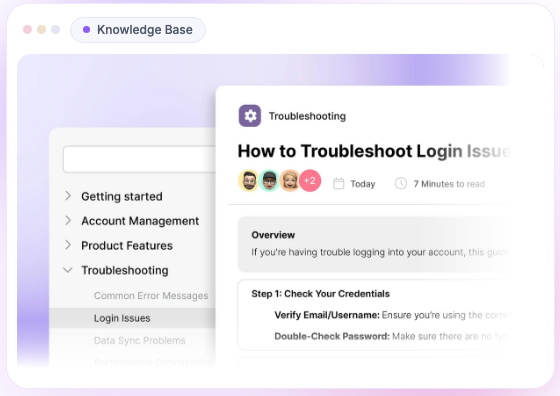
A standalone knowledge base platform with a public, private or mixed site per project, role-based editing, a review workflow and cited AI search.
Fits a team that treats the knowledge base as a product with writers, reviewers and a release process.
Picture a company that publishes setup guides for customers and keeps a private version for its own staff. Document360 runs both from one project, with a reviewer who signs off before anything goes live. What that team misses is a price it can budget with before a sales call, and a ticketing tool, because Document360 is a knowledge base only.
- you need review workflows, versioning and role-based editing for a customer-facing knowledge base
- your help desk is Zendesk, Freshdesk, Intercom or Salesforce and you want agents to search articles from inside it
- you need a price to budget with before a sales call: the pricing page shows no plan prices or limits
- you want ticketing and an AI agent in the same tool: Document360 is a standalone knowledge base that connects to a help desk
- Users like
- ease of use, a clean editor and responsive support
- Users dislike
- a learning curve for advanced features and occasional slow loading
- Source: G2, 501 reviews
How it works in practice
A project is one knowledge base, public, private or mixed, with reader groups and content-level access control. Writers work in a WYSIWYG or Markdown editor. The four default content roles are Editor, Draft Writer (can edit but not publish or delete), Reviewer (can only comment on assigned articles) and None, and custom roles are available. A workflow designer routes drafts to reviewers, and version history allows rollback.
Eddy AI generates articles, powers AI search with cited answers and runs a chatbot grounded in the knowledge base, and it respects the access rights of a logged-in reader. The official pages don't say clearly which plan includes which AI feature, so check that in the quote.
Documented connectors include Slack, Microsoft Teams, Zendesk, Freshdesk, Intercom, Salesforce and Zapier. We didn't find a Jira or HubSpot connector on the integrations page.
- Starting price
- Custom, no public price (quote only, free plan closed to new sign-ups since November 2024)
- Content roles
- Editor, Draft Writer, Reviewer, None, plus custom roles
- Site types
- Public, private or mixed per project
- Connectors
- Slack, Teams, Zendesk, Freshdesk, Intercom, Salesforce
Intercom
Intercom
A support platform where help center articles also power Fin, an AI agent that answers customers from your content and flags gaps from conversations it could not resolve.
Fits a team that supports customers in Intercom and wants its help center articles to power an AI agent.
Picture a SaaS team where most questions arrive in chat. In Intercom the same articles show in the help center, in the Messenger and to Fin, the AI agent, and Fin flags gaps from conversations it could not resolve. What that team misses is cost control: the help center comes bundled in per-seat plans, and Fin is billed per resolution.
- your team already supports customers in Intercom and wants one help center whose articles feed Fin
- you want to pay for AI only when it resolves a conversation
- you want a standalone knowledge base: the help center is bundled into per-seat plans, and a private, multilingual help center needs Advanced at $85 per seat per month
- you need predictable AI cost: Fin bills per resolution, and reviewers call per-resolution pricing expensive at scale
- Users like
- automation and integrations, and Fin answers drawn from the company's own articles
- Users dislike
- pricing that gets confusing and expensive with add-ons
- Source: G2, 3,368 reviews
How it works in practice
The Essential plan has a public help center with English as the only language. A private, multilingual help center needs Advanced at $85 per seat per month, and Articles supports 64 languages, although every collection, section and article needs its own translated version. Audience rules are set per article, not per collection.
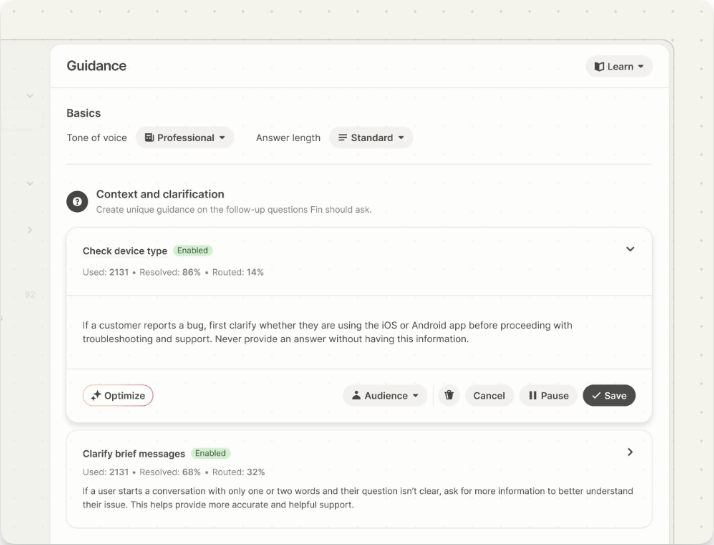
Fin answers from a content library that can include help center articles, internal support content, PDFs and webpages, shaped by audiences, guidance and tone settings. Fin costs $0.99 per resolution and $9.99 per qualification, at most one outcome per conversation. Fin's Suggestions point out content updates, new content and duplicates based on unresolved conversations.
Intercom lists integrations with Salesforce, HubSpot, Slack, Jira, Zendesk and Linear.
- Starting price
- From $29 per seat per month on Essential; Fin AI Agent $0.99 per resolution
- Plans
- Essential $29, Advanced $85, Expert $132 per seat per month
- Fin
- $0.99 per resolution, $9.99 per qualification
- Multilingual
- Advanced or higher, 64 languages
The next four are built mainly for internal knowledge bases.
Confluence
Confluence
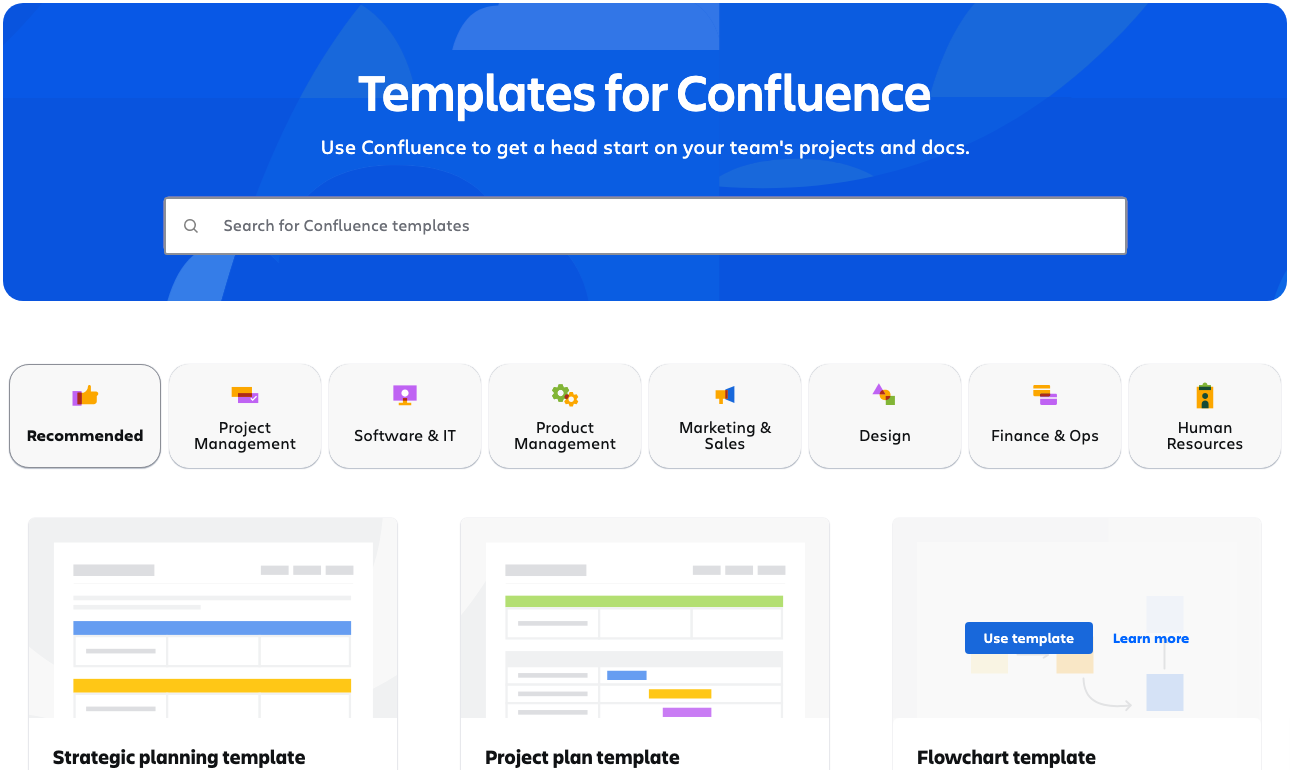
Atlassian's team wiki: pages inside spaces with space and page permissions, a template library and Rovo AI search that reaches connected tools.
Fits a company that already runs on Jira and wants one wiki for CS playbooks, onboarding docs and engineering handoffs.
Picture a CS team that needs the escalation process, the renewal checklist and the release notes from engineering in one place the whole company can search. Confluence gives each team a space with its own permissions, and the free plan covers up to 10 users. What that team misses is answers pushed into the CRM or help desk while reps work, because the core product has no ticket-side answer card.
- your company already runs on Jira and Atlassian and CS needs a shared wiki for playbooks, onboarding docs and engineering handoffs
- you want per-space and per-page permissions with free guest access on Standard
- reps need answers pushed into the CRM or help desk while they work: there is no ticket-side answer card in the core product
- you need a free plan for a larger team: Free stops at 10 users and 2 GB
- Users like
- ease of use and team collaboration
- Users dislike
- pages that are not intuitive and slow performance
- Source: G2, 4,300 reviews
How it works in practice
Content lives in pages inside spaces, and access is managed through space roles and per-page restrictions. The Free plan has 2 GB of storage and no customizable permissions. Standard costs $720 per year for up to 10 users on annual billing, or $7.15 per user per month on monthly billing at 10 users, and adds advanced permissions, free guest access, 250 GB of storage and Rovo search, chat and agents. Premium costs $1,400 per year for up to 10 users, adds unlimited pages and spaces and unlimited storage, and includes more Rovo credits (70 per user per month versus 25 on Standard). The per-user price falls as the user tier grows: at 300 users the monthly prices on Atlassian's page were $5.78 for Standard and $11.16 for Premium.
We found no documented review date or expiry workflow, so keeping pages fresh depends on page owners, automation rules or add-on apps. Rovo can search connected tools such as Slack, Microsoft Teams, Salesforce and Zendesk.
Jira connects natively because both products are Atlassian's.
- Starting price
- Free for up to 10 users; Standard $720 per year for up to 10 users on annual billing ($7.15 per user per month on monthly billing)
- Free plan
- 10 users, 2 GB
- Standard
- 250 GB storage, 250,000 users per site
- Rovo credits
- 25 per user per month on Standard, 70 on Premium
- Premium
- $1,400 per year for up to 10 users
Guru
Guru
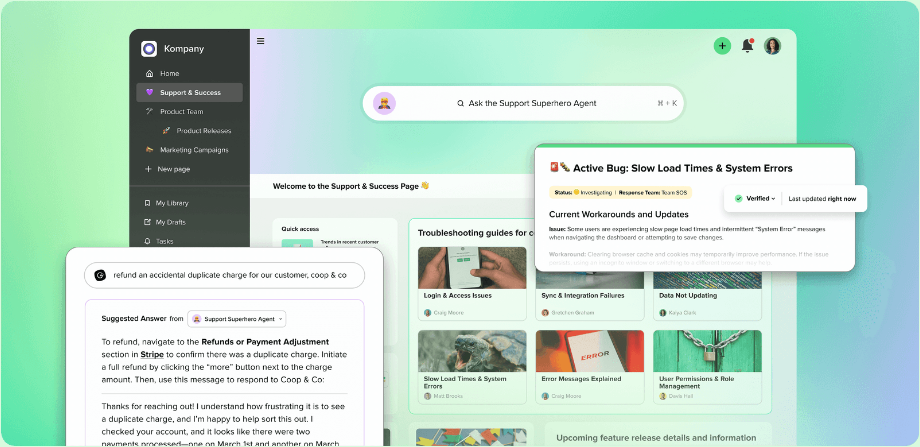
A knowledge platform built around verification: every card has a verifier and a review interval, and answers appear with citations in the browser extension, Slack and Teams.
Fits reps who work in Zendesk, Slack, Teams or CRM tabs all day and need verified answers without leaving them.
Picture a support and success team of forty where the pricing rules change every quarter. A rep types a customer question in Slack and gets the current answer with its source, because the card behind it has a named verifier and a review interval. What that team misses is a published price and a long-form wiki, since Guru is built for short verified answers and reviewers report slow search on large libraries.
- reps work in Zendesk, Slack, Teams or CRM tabs all day and need verified answers with citations in the flow of work
- you want an accountability model: a verifier per card, review intervals and an audit of auto-verification decisions
- you need a published price or self-serve checkout: the pricing page is quote only
- you have a small library and mostly need a simple wiki for long documents: reviewers report slow or irrelevant search on large libraries
- Users like
- answers inside Slack, email or CRM through the browser extension
- Users dislike
- slow or irrelevant search on large content libraries
- Source: G2, 2,300 reviews
How it works in practice
Content sits in collections of cards and pages governed by roles (Admin, Creator, Owner, Viewer and custom roles). The verifier of a card is a person or a group, and the review interval is 30, 60, 90 days, 6 months, 1 year or none. Reminders go to the verifier. A card unverifies when someone other than the verifier edits it, and anyone can unverify a card that looks wrong.
Knowledge Agents review cards and external sources daily and log each decision in a Quality Log. Answers come with citations through a browser extension for Chrome, Edge and Opera, plus Slack, Microsoft Teams and MCP for AI tools. Guru lists integrations with Salesforce, Zendesk, Intercom, Freshdesk, Help Scout and HubSpot Service Hub.
The pricing page shows one custom package with no per-seat price.
- Starting price
- Custom, no public price (one custom package, talk to sales)
- Verification intervals
- 30, 60, 90 days, 6 months, 1 year or none
- Delivery
- Browser extension, Slack, Microsoft Teams, MCP
- Roles
- Admin, Creator, Owner, Viewer, custom
Notion
Notion
A flexible workspace where a page becomes a wiki, owners can verify pages until a date, and any page can be published to the web as a Notion Site.
Fits a team that wants wiki, databases and projects in one flexible workspace and is willing to design the structure.
Picture a CS ops lead who keeps account plans, onboarding checklists and the team wiki in the same workspace. Notion makes that easy, and external guests are free. What that team misses is built-in discipline: verification only helps if owners act, and reviewers describe stale pages piling up.
- you want one workspace where wiki, databases and projects live together and can pay Business pricing for page verification
- you need to share pages with many external customers or partners as free guests, or publish a public site from pages
- nobody will own content upkeep: verification only helps if owners act, and reviewers report stale pages piling up
- you need native Salesforce, HubSpot or Zendesk integrations: only Slack and Jira were confirmed in this research
- Users like
- a flexible mix of database and wiki for documentation
- Users dislike
- a steep learning curve and pages that need upfront planning
- Source: G2, 9,000 reviews

How it works in practice
A standalone page becomes a wiki through Turn into wiki, which adds Home, All pages and Pages I own views. The creator is the page owner by default. On Business and Enterprise an owner can verify a page until a date or indefinitely, and when verification expires the owner is notified by inbox and email. Verified pages show a blue check in mentions and search.
Free allows 10 external guests and Plus and above allow unlimited guests. Plus costs $10 per member per month billed yearly ($12 monthly) and Business $20 ($24 monthly). Notion AI and Enterprise Search sit on Business and Enterprise and answer with citations from workspace pages and connected apps such as Slack and Google Drive, limited to what the asker can access. Custom Agents cost $10 per 1,000 credits.
Any page can be published to the web as a Notion Site, and search indexing is opt-in. In this research we confirmed Slack and Jira connections but not native Salesforce, HubSpot or Zendesk.
- Starting price
- Free; Plus $10 and Business $20 per member per month billed yearly ($12 and $24 monthly)
- Verify any page
- Business and Enterprise
- External guests
- 10 on Free, unlimited on Plus and above
- Notion AI
- Business and Enterprise
- Custom Agents
- $10 per 1,000 credits
Slite
Slite
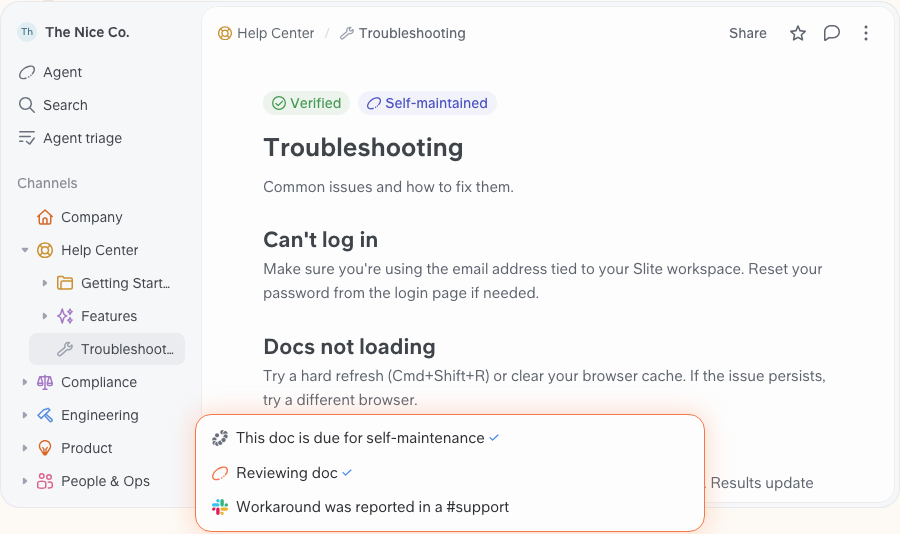
A team knowledge base where each doc has a verification status and review date, and Ask answers with citations while ranking verified docs higher.
Fits a team that wants a simple wiki where every doc has an owner and a review date, and AI answers prefer the docs that are verified.
Picture a twelve-person customer success team that keeps playbooks and QBR templates in docs and shares some of them with contractors. Slite marks each doc as verified, outdated or expired and ranks verified docs higher in AI answers. What that team misses is a free plan and deep integrations, because there is only a 14-day trial and reviewers mention weaker integrations.
- you want AI answers that prefer verified docs and ignore outdated ones, with simple owner-based review dates
- you share with contractors or customers as free guests (5 per paying member) at a lower seat price than Notion Business
- you need a free tier: Slite has only a 14-day trial
- you rely on Zendesk: no Zendesk integration was found, and cross-tool search is Pro only at $20 per user
- Users like
- ease of use and a clean interface
- Users dislike
- weaker integrations for specific workflows
- Source: G2, 270 reviews
How it works in practice
Each doc carries a status: Verified, Verification expired, Outdated, Verification requested or No status. Verifying sets a review period such as three months, and the owner is notified when it passes. Ask answers with citations, ranks verified docs higher and ranks outdated docs lower, and Slite Agent leaves outdated docs out.
Basic costs $10 per user per month billed yearly and includes Ask with 30 questions per seat per month. Pro costs $20 and adds Slite Agent, search across connected tools, fact-checking and a custom domain for public docs. Guests are free, up to 5 per paying member, and see only what is shared with them.
Slite lists Slack and Jira integrations. We found no Zendesk integration.
- Starting price
- Basic $10 and Pro $20 per user per month billed yearly; no free plan, 14-day trial
- Ask on Basic
- 30 questions per seat per month
- Pro adds
- Slite Agent, cross-tool search, fact-checking
- Guests
- Free, up to 5 per paying member
Who keeps the articles accurate
A knowledge base stays accurate only when someone owns each review date. The tool matters less than whether it makes ownership visible, so choose one that assigns an owner per article and reminds that person.
Four tools in this list build that in. Guru gives every card a verifier and a review interval. Slite attaches a status and a review date to each doc and uses it in AI ranking. Notion lets owners verify pages until a date, on Business and above. Document360 routes drafts through reviewers before publishing, which controls quality at the start rather than later. Confluence, Zendesk, Help Scout and Intercom leave freshness to your process, but Zendesk and Help Scout report failed searches and Intercom's Fin suggests content updates.
- AuthorWrites the article and names a reviewer At publish
- ReviewerChecks facts against the product and signs off Before it goes live
- CS leadReads zero-result searches and writes the missing articles Weekly
- Article ownerRe-verifies or retires the article Every 90 days
- CS opsReviews every article that mentions a changed feature or price At each product release
What should a knowledge base article template include?
A useful template makes the article findable, answers the question first and names who keeps it current. Use it in any of the tools above, because none of them needs more than a text field for each part.
- Title written as the question a customer or colleague would type
- One-sentence answer in the first line
- Numbered steps with one action per step
- A screenshot or example for every step that has a screen
- Owner, reviewer and next review date
- Links to two or three related articles
How to choose knowledge base software
Choosing knowledge base software comes down to the audience first, then who writes and reviews, then what the free plan and the AI add-on really include.
- Public help center for a team that already uses ZendeskZendesk Guide (Suite Team and up)
- Public help center and shared inbox for a small teamHelp Scout Docs
- Public and private knowledge base with reviewer sign-offDocument360 (quote)
- AI agent that answers from your articlesIntercom with Fin
- Internal wiki and you run JiraConfluence
- Verified answers inside Slack, Teams or the browserGuru
- One workspace for wiki, databases and projectsNotion
- Small team that wants review dates and AI answersSlite
Who will write the articles
If one person writes, any tool works, but if five people write, you need roles. Document360 has four default content roles, Help Scout lets every user publish by default unless an admin restricts it, and Zendesk limits editing to knowledge admins by default.
What the free plan really includes
Three tools list a free plan. Confluence Free covers up to 10 users and 2 GB with no customizable permissions. Help Scout Free allows 1 Docs site, up to 10 articles and 5 users. Notion Free works for individuals and limits team features, with 10 external guests. Slite has a 14-day trial only, and Document360 has closed its free plan to new sign-ups.
What the AI add-on costs
The cost of the AI add-on depends on three numbers: the seat price, the AI price and the plan that unlocks private articles or more languages. Intercom needs Advanced at $85 per seat per month for a private, multilingual help center, and Zendesk needs Suite Professional at $115 per agent per month billed annually for 40+ languages.
- Who reads the articles: customers, your team or both
- Who writes them and who reviews them
- What the plan with private articles and your languages costs
- What the AI add-on costs at your volume
- Whether answers must appear in Slack, the CRM or the help desk
- Who gets the reminder when an article expires
The gap a knowledge base doesn't close
A knowledge base stores answers. It doesn't record what your team promised a specific customer. Those promises live in call notes, QBR decks and Slack threads, and they disappear when an account changes owner.
The Customer Success Manager is a different kind of tool, not a knowledge base. It keeps one evidence-backed record of every customer commitment: who confirmed it, what exactly was promised, who owns it and whether delivery was verified. People confirm and verify each entry, and you can ask about open promises in Claude or ChatGPT. It doesn't replace any tool above, and it isn't a customer success platform.
FAQ
What is the best knowledge base software for a customer success team?
The best knowledge base software for a customer success team depends on whether customers or colleagues read the articles. Pick Help Scout Docs or Zendesk Guide when customers read them, Guru or Slite when your own team does, and Intercom when an AI agent should answer from them.
What is the best free knowledge base software?
The best free knowledge base software depends on team size. Confluence Free covers up to 10 users and 2 GB. Help Scout Free allows 1 Docs site and 10 articles, and Notion Free works for individuals with limits for teams. All three have paid plans once you outgrow the limits.
What is the difference between a knowledge base and a wiki?
A wiki is a set of pages a team edits together, usually for internal use. A knowledge base is a curated set of answers with an owner and structure, often public. Many teams turn a wiki into a knowledge base by adding owners and review dates.
How much does knowledge base software cost?
Prices run from free plans to quote-only packages, and the plan that holds the knowledge base varies. Help Scout starts at $25 per user per month billed annually, Slite at $10, Zendesk Suite Team at $55 per agent and Intercom at $29 per seat. Document360 and Guru publish no price.
How do I keep knowledge base articles up to date?
To keep knowledge base articles up to date, give every article an owner and a review date, and read zero-result searches every week. Guru, Slite and Notion Business build review dates in, and Zendesk and Help Scout show failed searches.
What is the best knowledge base software for a small business?
For a small business, Help Scout Docs fits a customer-facing help center from $25 per user per month billed annually, and its Free plan allows 1 Docs site with 10 articles. For an internal wiki, Slite Basic starts at $10 per user per month, and Confluence Free covers up to 10 users.