The best customer engagement software for a B2B customer success team depends on where you need to reach customers. Intercom and Customer.io send triggered messages, Pendo and Userpilot guide users inside your product, Gainsight and ChurnZero run plays across whole accounts, and HubSpot Service Hub and Front handle the one-to-one conversations a CSM owns. This guide compares those eight tools on how they run engagement for existing customers, what each plan unlocks, what it costs and who should skip it.
The list covers engagement with customers who already pay you. It leaves out B2C campaign platforms built for retail and app marketing, such as Braze or MoEngage, and contact-center phone systems.
Best customer engagement software at a glance
 Best for in-app and email journeys answered in one inboxIntercomSeries mixes product tours, checklists, banners and email, and replies land in the support inbox. Proactive campaigns are a paid add-on.
 Best for event-triggered lifecycle messagingCustomer.ioAccounts are modeled as objects, so one plan change can notify every admin on the account.
 Best for usage analytics with guides on topPendoFree up to 500 monthly active users, and account usage syncs to Salesforce every night.
 Best for enterprise digital CS programsGainsight Customer SuccessPrograms start from health, usage or lifecycle data and can hand a step to a CSM.
 Best for mid-market plays with in-app messagesChurnZeroPlays fire on ChurnScore, usage or lifecycle and mix emails, in-app announcements and CSM tasks.
 Best if your accounts live in HubSpot CRMHubSpot Service HubHealth alerts, tasks and sequences sit on the same records as deals and tickets.
 Best for shared account emailFrontEvery customer thread gets an owner, internal comments and a reply-time goal.
| Tool | Engagement job | What it acts on | Starting price (USD) | Rating |
|---|---|---|---|---|
| Intercom | Support platform with help center and AI agent | Help center articles feed the Fin AI agent | From $29 per seat per month on Essential (billed annually, $39 monthly); proactive campaigns need the Proactive Support Plus add-on at $99 per month; Fin AI Agent $0.99 per outcome | 4.5 (3,930) |
| Customer.io | Lifecycle messaging platform | Product events and account objects to triggered email, in-app and push journeys | Essentials from $100 per month (5,000 profiles, billed monthly); Premium from $1,000 per month billed yearly; Enterprise custom | 4.4 (976) |
| Pendo | Product analytics and in-app guides | Usage data and account metadata to targeted in-app guides and NPS, synced to Salesforce | Free up to 500 monthly active users; Base, Core and Ultimate are quote only (priced by MAU) | 4.4 (1,558) |
 Userpilot Userpilot | In-app engagement and product analytics | Segment-triggered in-app flows, surveys and retention reports | $299 per month (Starter, up to 2,000 MAU), Growth from $849 per month | 4.6 (950) |
| Gainsight Customer Success | Customer success platform | Account signal to owned CTA, success plan and customer-verified outcome | Request Pricing for Essentials and Enterprise | 4.5 (1,764) |
| ChurnZero | Mid-market customer success platform | ChurnScores, segments and plays that mix emails, in-app messages and CSM tasks | Custom, no public price on the vendor site (Capterra lists a $12,000 per year starting price) | 4.7 (1,600) |
| HubSpot Service Hub | CRM-native service and customer success suite | Customer success workspace, health scores and playbooks on CRM data | From $90 per seat per month on Professional billed annually (list price $100), plus a $1,500 one-time onboarding fee | 4.4 (3,018) |
| Front | Shared inbox for account conversations | Customer emails and chats to an owned, SLA-tracked conversation with CRM account context | Starter $25 per seat per month billed annually ($35 monthly, up to 10 seats); Professional $65 ($85 monthly, up to 50 seats); Enterprise $105, annual only | 9.2/10 (TrustRadius, 119) |
 The Customer Success Manager Our product The Customer Success Manager Our product | Customer commitment tracking | Records what your team promised each customer and whether delivery was verified | Access code | No reviews yet |
Prices as published by each vendor and checked on October 20, 2026. Quote only means the vendor shows no figure. HubSpot's $90 is the discounted annual price shown on its pricing page, next to a $100 list price. Ratings are G2 except Front (TrustRadius, out of 10). G2 blocked direct access for Pendo, Userpilot, Gainsight and ChurnZero, so their ratings and counts come from G2 search listings collected between October 17 and 20, and counts vary slightly between snapshots.
What is customer engagement software?
Customer engagement software manages proactive, personalized interactions with customers across channels such as email, in-app messages, chat and surveys. It uses customer data to decide who gets which message and when, and it records what happened so the next touch can build on it. Vendors also call it a customer engagement platform (CEP). A customer data platform (CDP) is a different tool: it collects and unifies customer data, but it doesn't run the messages or conversations itself.
For a B2B customer success team, engagement works at two levels at once. A message reaches a person, but the decision to send it usually depends on the account: its plan, its renewal date, its health score or how many of its users adopted a feature. Tools that only see individual users struggle with that, which is why account-level targeting gets attention in every review below.
Four jobs engagement software does for a CS team
Most products sold as customer engagement software cover one or two of these jobs well. Few cover all four.
- Guide users inside the product. Tooltips, product tours, checklists and in-app surveys reach users while they work. Pendo, Userpilot and Intercom lead here.
- Send lifecycle messages at scale. Event- or date-triggered email, in-app and push journeys for onboarding, adoption and renewal. Customer.io and Intercom fit, and Gainsight and ChurnZero do it from CS data.
- Run account plays. A health drop, a usage change or an upcoming renewal starts a sequence that mixes automated messages with tasks for the CSM. Gainsight, ChurnZero and HubSpot Service Hub are built for this, and our customer retention software comparison covers their health scoring in more depth.
- Handle the conversation. Replies and inbound requests need an owner, context and a response time. Front and Intercom handle the shared inbox, and HubSpot logs it on the CRM record.
Customer engagement software vs CRM vs customer success platform
A CRM is the system of record, customer engagement software acts on that record, and a customer success platform decides which accounts need action. The overlap is real: HubSpot Service Hub is a CRM product with a CS workspace, and Gainsight and ChurnZero both send messages.
| Tool type | Main question it answers | Typical data | Typical owner |
|---|---|---|---|
| CRM | Who is the customer, what did they buy, what is the pipeline? | Accounts, contacts, deals, activities | Sales and RevOps |
| Customer engagement software | Which message reaches which user, in which channel, and when? | Product events, user and account attributes, message history | Lifecycle, product marketing or CS ops |
| Customer success platform | Which accounts are at risk or ready to grow, and what should the CSM do next? | Health scores, usage, renewals, tasks | CS leaders, CSMs and CS ops |
If your CRM already holds clean account data, the engagement tool should read it. If it doesn't, sort that out first, because every trigger in the tools below is only as good as the data behind it.
From product signal to CSM reply
Engagement for a CS team runs in four steps: capture a usage signal, turn it into a trigger, reach the right users, then handle the reply. Most failures happen in the handoffs between tools, not inside one tool.
- Step 1Capture usage
- Pendo
- Userpilot
Breaks when Pendo writes account usage to Salesforce once a night, so a health score can lag by a day - Step 2Score and trigger
- Gainsight Customer Success
- ChurnZero
- HubSpot Service Hub
Breaks when a health change starts a play that nobody owns - Step 3Reach users at scale
- Intercom
- Customer.io
Breaks when the same user gets one nudge from the CS platform and another from the messaging tool - Step 4Handle the reply
- Front
- Intercom
Breaks when the reply lands in one rep's personal inbox and the account team never sees it - Across allKeep what was promised
- The Customer Success Manager
Records what your team committed to in the reply, with the owner, due date and evidence
Two practical rules follow from the flow. Decide which tool owns each user-facing channel, so in-app messages don't come from two systems. And route every reply to an automated message to the person who owns that account.
The 8 best customer engagement tools for CS teams, reviewed
Each review explains how the tool runs engagement for existing B2B customers, when to choose it and when to skip it. Prices appear once, in the card, and the rating comes from G2 unless the card says otherwise.
Intercom
A support platform where help center articles also power Fin, an AI agent that answers customers from your content and flags gaps from conversations it could not resolve.
Intercom fits a CS or support team that already answers customers in Intercom and wants proactive in-app and email journeys that end in the same inbox.
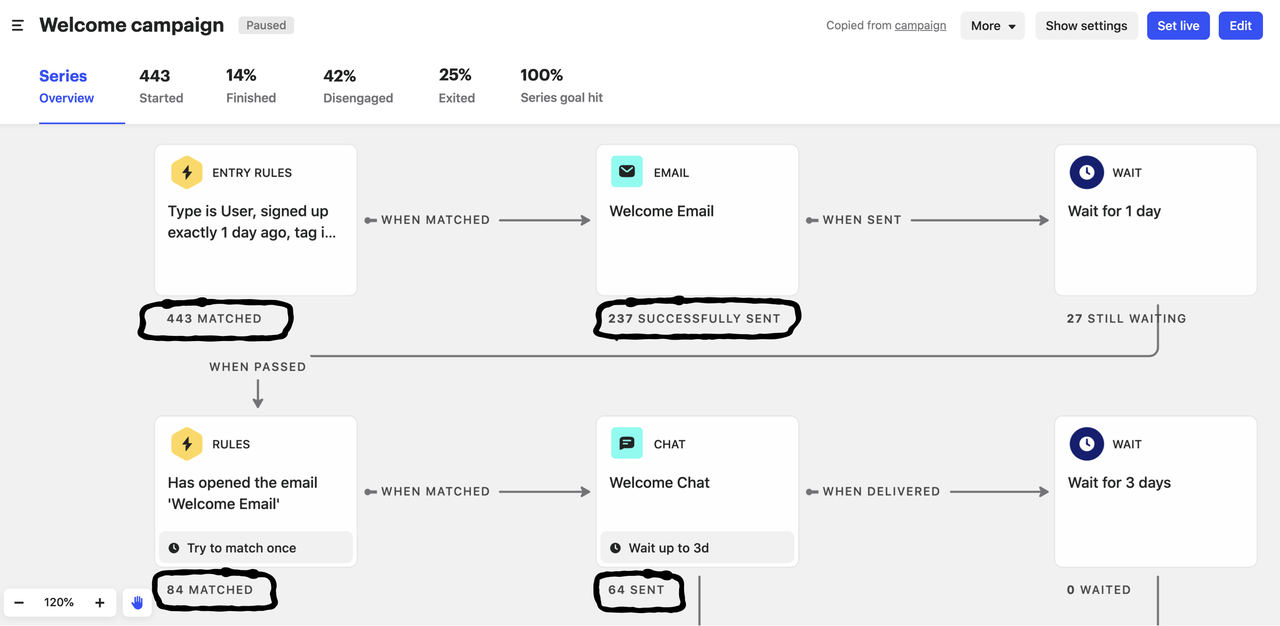
A team installs the Intercom Messenger and sends user data, company data (Company ID and custom company attributes) and product events. In the Series builder they then draw a journey whose entry rules filter on company attributes, for example all users at accounts on a given plan with low seat usage. An event trigger can hold a user at a step for up to 30 days until a product event fires, then send the next message: a product tour, a post, a banner, a checklist, a survey, an email or a push notification. Goals and exit rules stop the Series as soon as the user completes the action you wanted. Replies go to the shared Intercom inbox, where a teammate or the Fin AI agent answers.
- your team already supports customers in Intercom and wants proactive journeys and replies in one place
- you want product tours, checklists, banners and email in a single journey with goals and exit rules
- you plan high proactive volume on a tight budget: the Proactive Support Plus add-on includes 500 messages a month, and every message above that is billed
- you need Salesforce accounts, contacts and their links mirrored automatically: the sync doesn't create records, backfill history or sync person-to-company links
- Users like
- helpful features and ease of use
- Users dislike
- missing features, limits of the AI agent, a learning curve and cost, according to G2's summary of reviews
- Source: G2, 3,930 reviews
Plans, add-ons and integrations
The seat price doesn't include proactive campaigns. Series, product tours, checklists, posts and surveys need the Proactive Support Plus add-on, which costs $99 per month including 500 messages sent, with per-message pricing above that. In-app chats, banners and tooltips are free and unlimited on every plan, and email campaigns, SMS and WhatsApp are pay-as-you-go. Advanced ($85 per seat per month on annual billing) and Expert ($132) add 20 and 50 free Lite seats.
Salesforce business accounts can sync with Intercom companies attribute by attribute, in either direction. Intercom pushes its changes immediately and polls Salesforce about every five minutes. Intercom's App Store lists 450+ apps, and its integrations page names HubSpot, Segment, Snowflake, Pendo, Slack and Jira among them.
Series checks entry rules about once an hour, so a message can arrive later than the event that qualified the user. The G2 listing for Intercom now carries the name Fin, so its 3,930 reviews weigh the AI agent and help desk more than proactive messaging.
- Starting price
- From $29 per seat per month on Essential (billed annually, $39 monthly); proactive campaigns need the Proactive Support Plus add-on at $99 per month; Fin AI Agent $0.99 per outcome
- Plans
- Essential $29, Advanced $85, Expert $132 per seat per month
- Fin
- $0.99 per outcome, $1.99 per voice outcome
- Multilingual
- Advanced or higher, 64 languages
- Proactive Support Plus
- $99 per month add-on, 500 messages included
Customer.io
Lifecycle messaging engine for product-led teams
Customer.io fits a lifecycle or CS ops team with data help on call, because every journey depends on the events and attributes you send it.
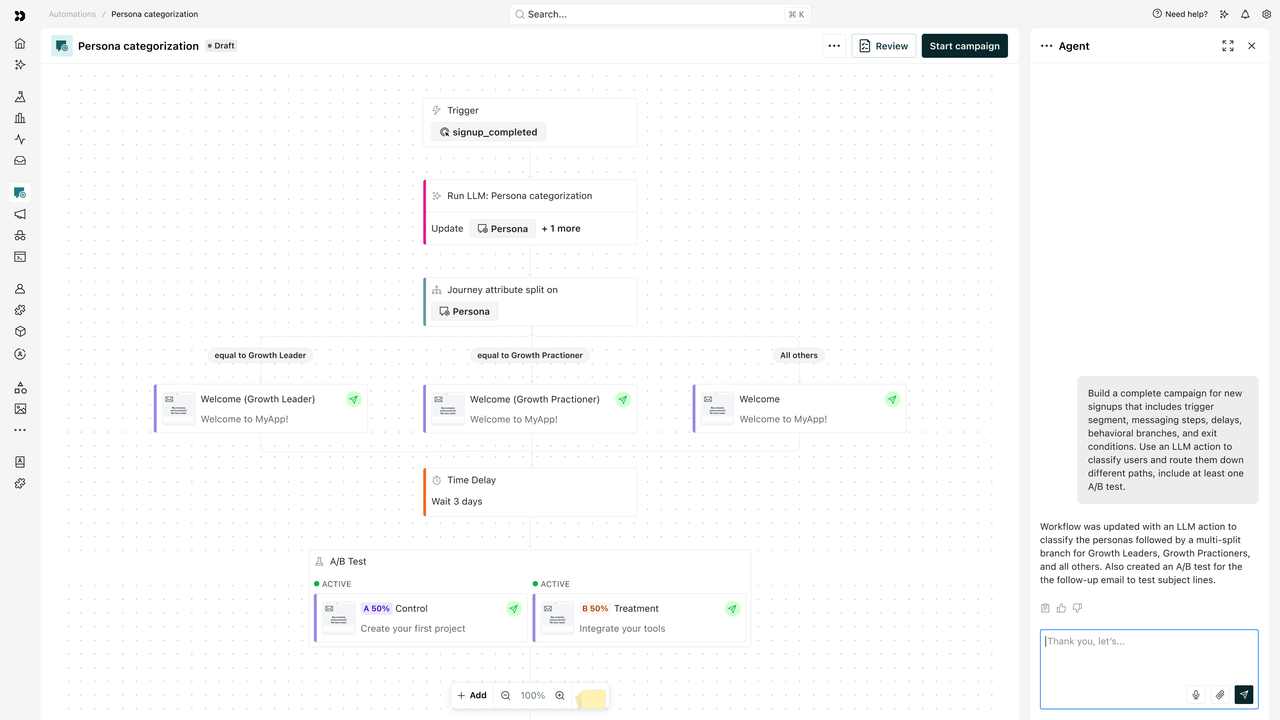
Product events and user attributes arrive through SDKs, the API, Segment or reverse ETL, and each B2B account is modeled as a custom object, for example a Company, related to the people who work there. A journey starts on an event (a feature used for the first time), an attribute or segment change, an important date such as a renewal, or a change to the account object itself. It then sends email, in-app modals, banners and tooltips, push, SMS or a webhook to Slack or your CRM, personalized with both person and account attributes. Because the account holds its data once, a plan change on the company object can notify all of that account's admins. Customer.io sends messages, but replies and human follow-up happen in another tool.
- your team wants event-triggered email and in-app journeys driven by product data, not by a CSM's calendar
- you need to message every admin of an account when something changes on the account itself
- your CS team needs a shared inbox or live chat for replies: Customer.io lists no help desk or shared inbox
- you need Salesforce or HubSpot sync on a small budget: those integrations start on Premium, from $1,000 per month billed yearly
- Users like
- ease of use and flexible event-driven automations
- Users dislike
- a steep learning curve for advanced automations and pricing that grows with every stored profile
- Source: G2, 976 reviews
Plans, limits and data
Essentials starts at $100 per month on monthly billing and includes 5,000 profiles, 1 million emails a month, unlimited push and in-app messages and unlimited user seats. Each extra profile costs $0.009, and account objects count as profiles too, so a B2B model with many companies adds to the bill. Essentials allows 2 object types and Premium allows 10.
Object and relationship triggers reach at most 500 to 5,000 people per event, depending on the plan, and events above that limit start no journey. In-app formats include modals, banners, tooltips, carousels and surveys for NPS and CSAT, but product tours and checklists aren't named as formats. Customer.io reviews each new account manually before it can send outbound messages, so leave a buffer before your first planned send.
- Starting price
- Essentials from $100 per month (5,000 profiles, billed monthly); Premium from $1,000 per month billed yearly; Enterprise custom
- Billing unit
- profiles (people plus account objects), 5,000 on Essentials
- Account objects
- 2 object types on Essentials, 10 on Premium
- CRM sync
- Salesforce and HubSpot on Premium and Enterprise
Pendo
Product analytics with in-app guides and NPS
Pendo fits a product-led company that wants product and CS working from the same numbers, with a free plan to start on.
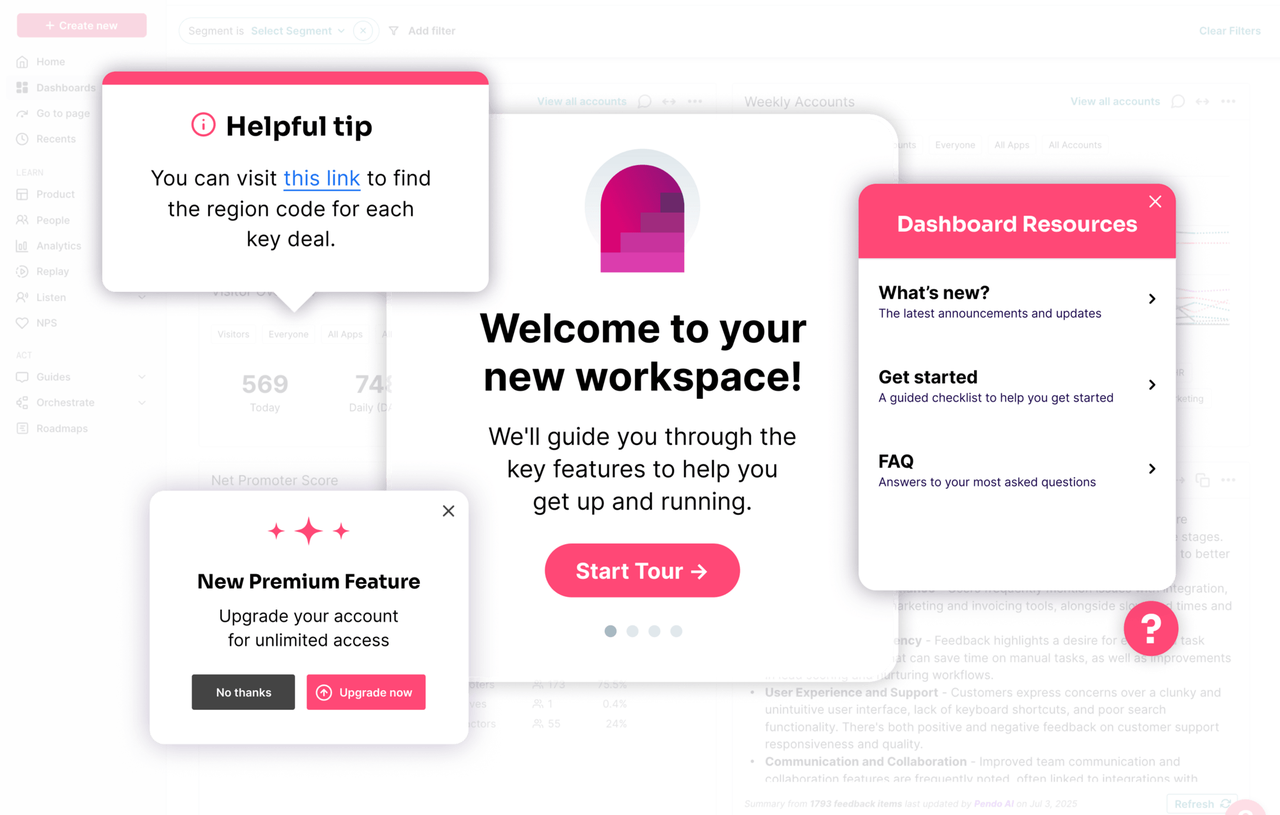
An admin sends account fields such as plan, ARR, renewal date and CSM owner through the install snippet or pulls them from Salesforce as account metadata. The CS team builds a segment from that metadata plus usage rules, for example accounts on a given plan whose users never opened a key feature, and targets a no-code guide, tooltip or walkthrough at it. Guides can also live in the Resource Center, an in-app menu with an onboarding checklist and announcements. Guide interactions and NPS answers become segment rules themselves, so a follow-up guide can target users who dismissed the first one or gave a low score. Account-level usage columns and NPS results are pushed back to the matching Salesforce account once a day, where CSMs and tools such as Gainsight use them in health scores.
- product and CS want usage analytics and the in-app guides that act on them in one tool
- your accounts live in Salesforce and CSMs want usage fields on the account record
- you need a list price before a sales call: Base, Core and Ultimate are all quote only
- you need same-day CRM updates: the Salesforce sync runs once every 24 hours overnight, and you can't change its timing
- Users like
- ease of use, with analytics and in-app guides in one tool
- Users dislike
- data accuracy questions, missing features and an inflexible pricing model
- Source: G2, 1,558 reviews
Plans, sync and targeting limits
Pendo Free covers up to 500 monthly active users with analytics, in-app guides and Pendo-branded NPS. Above 500 you can't create new guides, NPS surveys or segments until you upgrade. Paid plans are priced by monthly active users. NPS, PMF and CSAT surveys are bundled only in Ultimate and are an add-on in Base and Core, and Pendo offers a 30-day trial of the full platform.
Not every rule can target a guide. Account IDs, number of visitors, time on site and number of days active can define a segment for reporting but not for guide targeting. Each application gets one Resource Center. A blank value in a Pendo report clears the matching Salesforce field on the next sync, so check the mapping before you turn it on.
- Starting price
- Free up to 500 monthly active users; Base, Core and Ultimate are quote only (priced by MAU)
- Free plan
- up to 500 MAU
- Salesforce sync
- two-way, once every 24 hours overnight
- Surveys
- NPS, PMF and CSAT bundled in Ultimate, add-on in Base and Core
Userpilot
No-code in-app flows and product analytics
Userpilot fits a SaaS team where CSMs or product marketers build in-app flows themselves, without waiting for engineering.
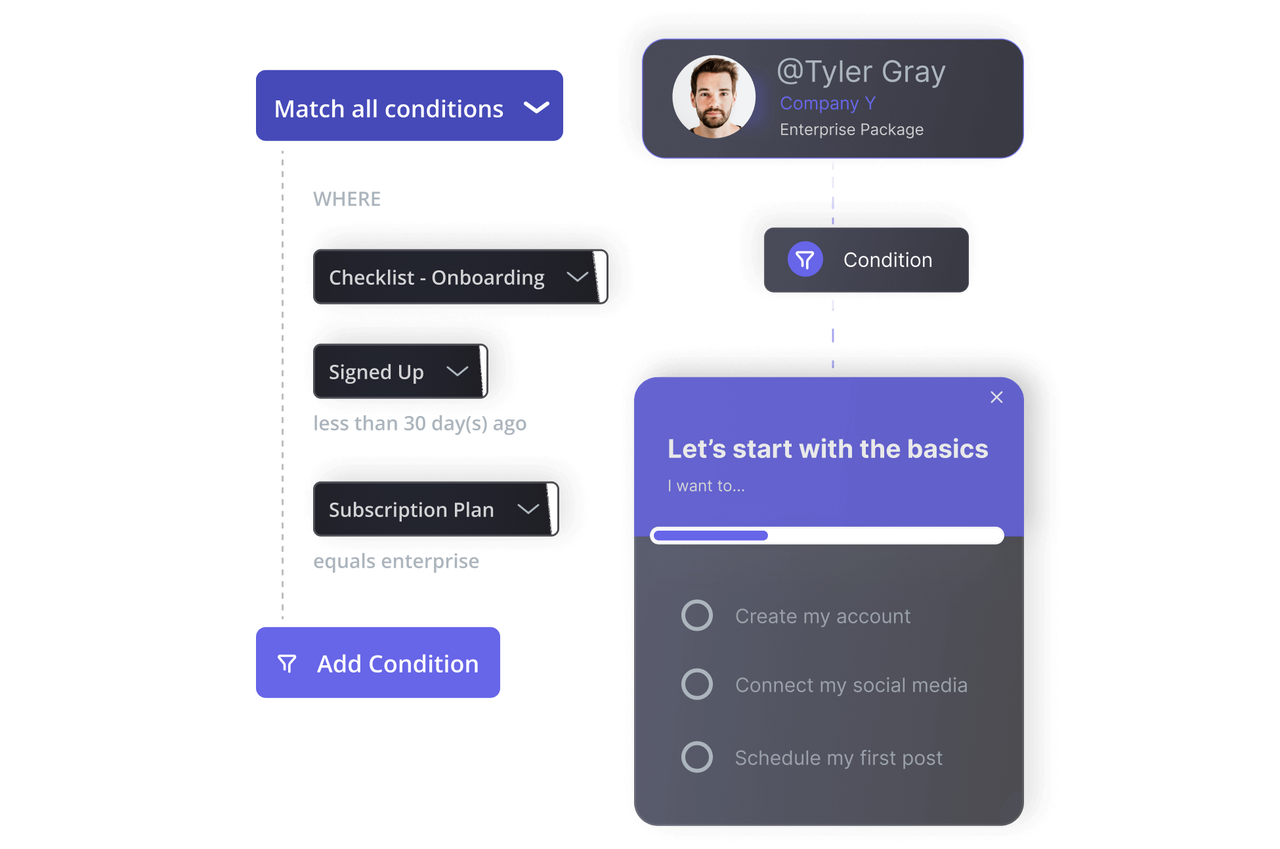
Engineering installs one snippet and passes user and company IDs and attributes. On Growth with the CRM add-on, or on Enterprise, Userpilot also pulls HubSpot or Salesforce company properties such as lifecycle stage, plan or renewal date and refreshes them every five minutes. A CSM builds a segment from company attributes plus in-app behavior and uses the Chrome extension builder to publish a flow, tooltip, banner or checklist to it. NPS is on every plan, and other in-app surveys start on Growth. Flow, checklist, NPS and survey events stream straight to the HubSpot timeline or a Userpilot Events object in Salesforce, where CS can use them for health scoring and outreach.
- CSMs or product marketers should be able to publish in-app flows without engineering
- you want flow and survey events on the CRM record for health scoring
- you need CRM sync on the entry plan: HubSpot and Salesforce aren't on Starter and are a paid add-on on Growth
- you want event-based triggers or a resource center from day one: both start on Growth
- Users like
- self-serve onboarding flows without engineering and strong support
- Users dislike
- a steeper learning curve for new users
- Source: G2, 950 reviews
Plans and CRM sync
Starter covers up to 2,000 monthly active users, 3 seats and 10 segments, with flows, banners, checklists, NPS and user and company profiles. Growth starts at $849 per month and adds 15 seats, unlimited segments, the Resource Center, in-app surveys, email, funnels and retention reports, and event-based triggering. Enterprise is quote only and includes the HubSpot and Salesforce integrations. There is a 14-day trial and no free plan.
The CRM sync doesn't backfill: only events after you switch it on are sent, and Userpilot doesn't create new contacts in HubSpot. Segment, Mixpanel, Amplitude, Heap, Intercom and Slack integrations are on all plans.
- Starting price
- $299 per month (Starter, up to 2,000 MAU), Growth from $849 per month
- Starter limit
- 2,000 MAU, 10 segments
- Retention reports
- Growth plan and above
- CRM sync
- HubSpot and Salesforce are paid add-ons
Gainsight Customer Success
Configurable customer success operating platform with account context, health scorecards, CTAs, playbooks and success plans.
Gainsight fits an enterprise CS organization with a Gainsight admin that wants one-to-many programs driven by health, usage and lifecycle data.
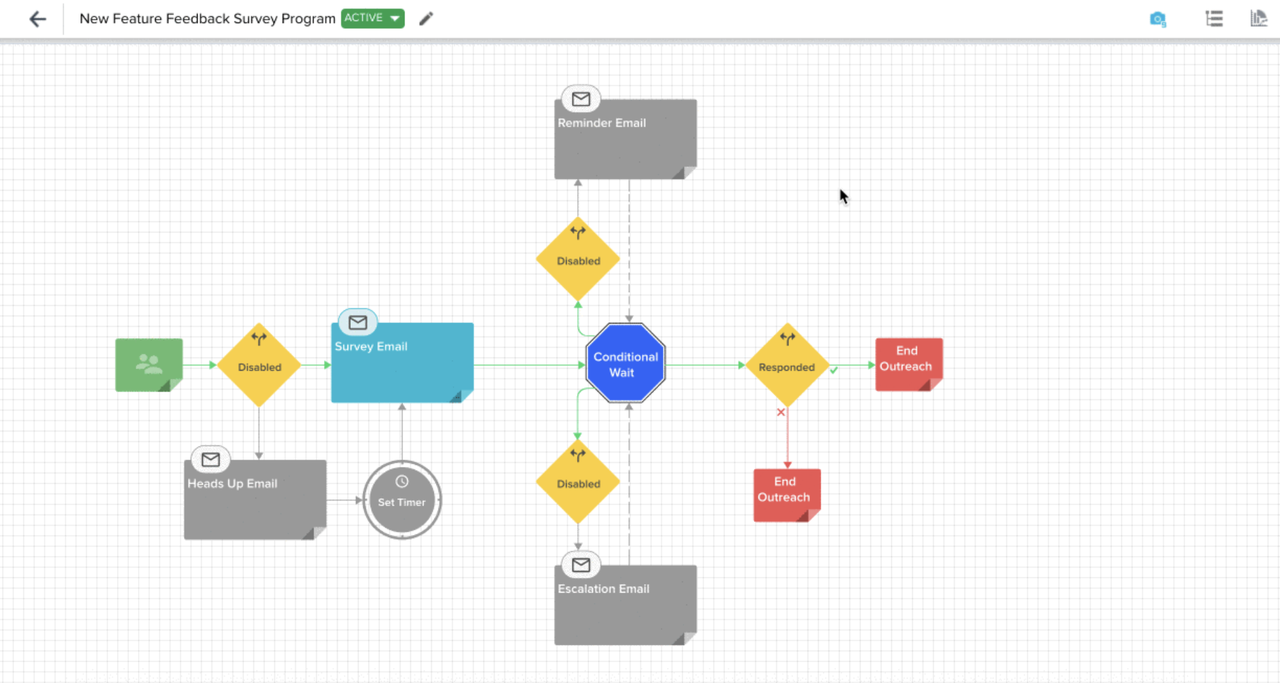
An admin or CS ops user builds a Journey Orchestrator program and picks exactly one audience source: a segment, a Data Designer dataset, a query, a CSV upload or an event such as a customer being onboarded. The program then runs a sequence of steps: an email or survey, a call to action (CTA) for the CSM, an in-app engagement through Gainsight PX, a Slack post, a community or education step, or an API call. Conditional Wait and Evaluate steps change the path depending on how each contact responds. Programs can start from health score, product usage, survey results or lifecycle stage, and they handle renewal and QBR reminders. For one-to-one emails, CSMs send admin-built templates from their Cockpit CTAs with Email Assist.
- you run digital and human touches on the same account data and need one place to coordinate them
- you have an admin or CS ops person who can build and maintain programs
- you want in-app guides in the same license: they live in Gainsight PX, a separately priced product
- you have no admin capacity: reviewers describe a steep learning curve and a long, resource-heavy implementation
- Users like
- Flexible automation and consolidated account visibility
- Users dislike
- Learning curve and configuration complexity
- Source: G2, 1,764 reviews
Packages and program limits
Both Customer Success packages, Essentials and Enterprise, are quote only. Essentials includes 10 full users with 100 customers per user, and Enterprise includes 20 full users with 200 customers per user. Gainsight's pricing page lists digital journeys in both packages, while its support documentation still calls Journey Orchestrator a paid add-on, so confirm in the quote what your package includes. Our Gainsight pricing breakdown covers the packages and add-ons in more detail.
Program surveys go out by email only for now. A delay step can wait up to 365 days and an Evaluate step up to 90 days. Email results are tracked as sent, opened, clicked, bounced, marked as spam and unsubscribed. On Capterra, Gainsight Customer Success holds 4.4 out of 5 from 48 reviews, with praise for flexibility and complaints about the cost per license.
- Starting price
- Request Pricing for Essentials and Enterprise
- Published US price
- Request Pricing
- Packages
- Essentials (10 full users) and Enterprise (20 full users)
- Included full users
- Essentials 10, Enterprise 20
- Renewal Center
- Enterprise included, Essentials add-on
ChurnZero
Customer success platform for mid-market teams
ChurnZero fits a mid-market CS team that wants plays, in-app messages and journeys in one tool, and Capterra reviewers often say they picked it over Gainsight for cost and an easier implementation.
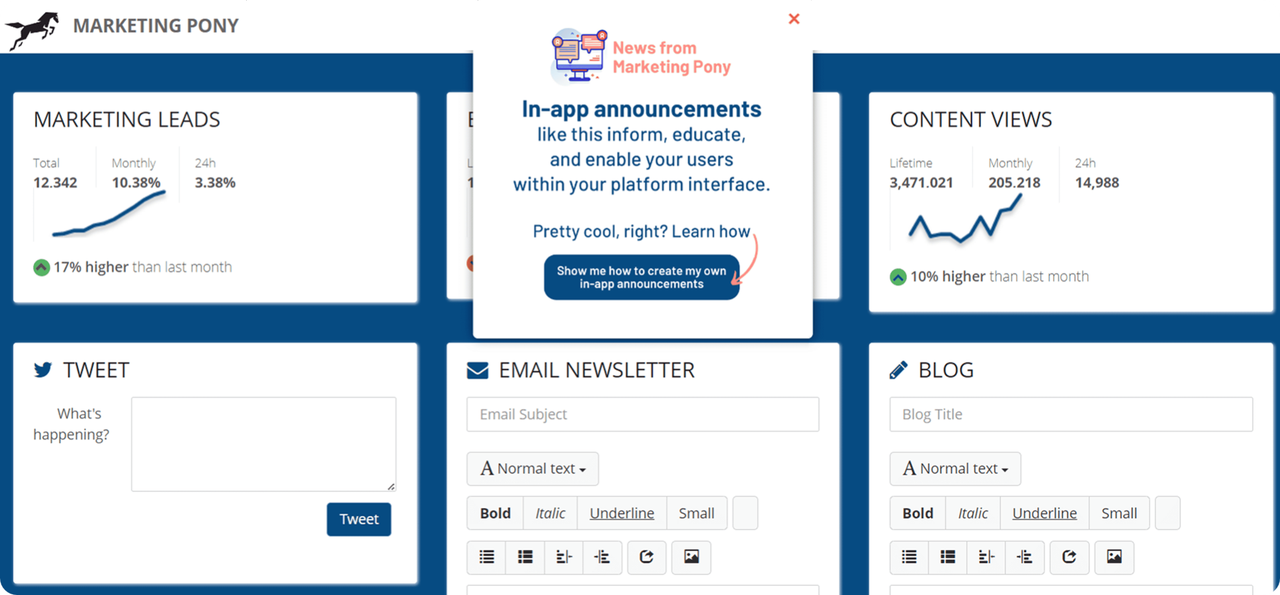
A CSM or CS ops user builds account or contact segments that update from usage, CRM and other connected data, then attaches them to a play. Plays fire on product usage, a point in the customer lifecycle or a change in ChurnScore, ChurnZero's health score. They run once on fixed dates or continuously relative to an event such as onboarding or an upcoming renewal. Each play chains steps with waits between them: a templated or AI-drafted email, an in-app announcement, an internal email, a CSM task, a change of account owner, a tag update or a webhook. Journeys track account milestones as on track, behind or stuck, but they don't send messages themselves, the plays do.
- you want health-triggered plays that mix customer emails, in-app announcements and CSM tasks
- CSMs should send one-to-one email from ChurnZero through their own Gmail or Outlook account
- you plan several in-app pop-ups for the same user at once: ChurnZero queues only one pop-up or slider per contact, and the newest one wins
- you want product tours in the base contract: WalkThroughs are a separately priced add-on
- Users like
- responsive support, and plays that automate onboarding emails and tasks CSMs used to do by hand
- Users dislike
- a clunky interface with some slow pages and reports, and an email tool better suited to one-to-one messages than branded campaigns, according to Capterra reviewers
- Source: G2, 1,600 reviews
Pricing, add-ons and integrations
ChurnZero publishes no price. Capterra lists a starting price of $12,000 per year with no free version or trial, which ChurnZero itself doesn't confirm. WalkThroughs are an add-on that your ChurnZero CSM activates, and they trigger on a page visit, an element click or an anchor icon. Their reports show how many users began, completed or abandoned each walkthrough.
ChurnZero lists more than 70 native integrations and a REST API. Emails can go out through each CSM's own Gmail or Outlook account, but in that mode ChurnZero doesn't track bounces. On Capterra, ChurnZero holds 4.7 out of 5 from 130 reviews.
- Starting price
- Custom, no public price on the vendor site (Capterra lists a $12,000 per year starting price)
- Scoring
- ChurnScores, 100 points, red/yellow/green
- CRM sync for renewals
- every 15 minutes
- Integrations
- 70+ listed on the vendor site
HubSpot Service Hub
HubSpot's customer success workspace builds health scores, alerts and renewal tracking directly on the CRM records your team already uses.
HubSpot Service Hub fits a CS team whose accounts, deals and tickets already live in HubSpot CRM.
CSMs work in the customer success workspace, where the Summary tab shows the average health score and the share of at-risk, neutral and healthy customers they own. Health scores are built from CRM data: meetings, calls and form submissions with score decay, company and contact properties, list membership, support tickets, CSM sentiment and NPS. Product usage comes in through integrations. When an account's health status changes, an alert appears, and the CSM can call, email, create a task or book a meeting from it. For outreach, CSMs enroll contacts in sequences and send NPS, CSAT or CES surveys whose answers flow back into the CRM.
- your customer data already lives in HubSpot CRM, so health scores and alerts need no integration
- CSMs should work health alerts, tasks and email sequences from one workspace
- your accounts live in Salesforce: the workspace and health scores are built on HubSpot records and owners
- you need sequences triggered by workflows or several health score models: both are Enterprise only, from $150 per seat
- Users like
- easy setup, ticketing on the CRM timeline and simple survey building
- Users dislike
- gaps in automation, a busy interface and cost that grows with contacts, according to TrustRadius reviewers
- Source: G2, 3,018 reviews

Plans and limits
The customer success workspace, health scores, feedback surveys, playbooks and sequences need Service Hub Professional or Enterprise, and none of them are on Free or Starter. The workspace also needs an assigned Service Seat, while sequences work with a Sales or Service seat on Professional or Enterprise. Professional comes with a required $1,500 onboarding fee, and Enterprise with $3,500.
Sequences hold up to 10 email templates with step delays of up to 90 business days. Professional allows 500 sequence emails per user per day and Enterprise 1,000. Health status alerts expire after 14 days. Product usage tracking, still in beta, records up to 10 activation or usage events per portal on Professional and Enterprise.
- Starting price
- From $90 per seat per month on Professional billed annually (list price $100), plus a $1,500 one-time onboarding fee
- Needs
- Service Hub Professional or Enterprise
- Playbooks
- up to 5 on Professional, 5,000 on Enterprise
- Enterprise adds
- workflow-triggered sequences and multiple health score models
Front
A shared inbox where account conversations get an owner, internal comments and reply-time goals, with HubSpot or Salesforce account fields next to each thread.
Front fits account managers and CSMs who handle most customer contact by email and need shared ownership of every thread.
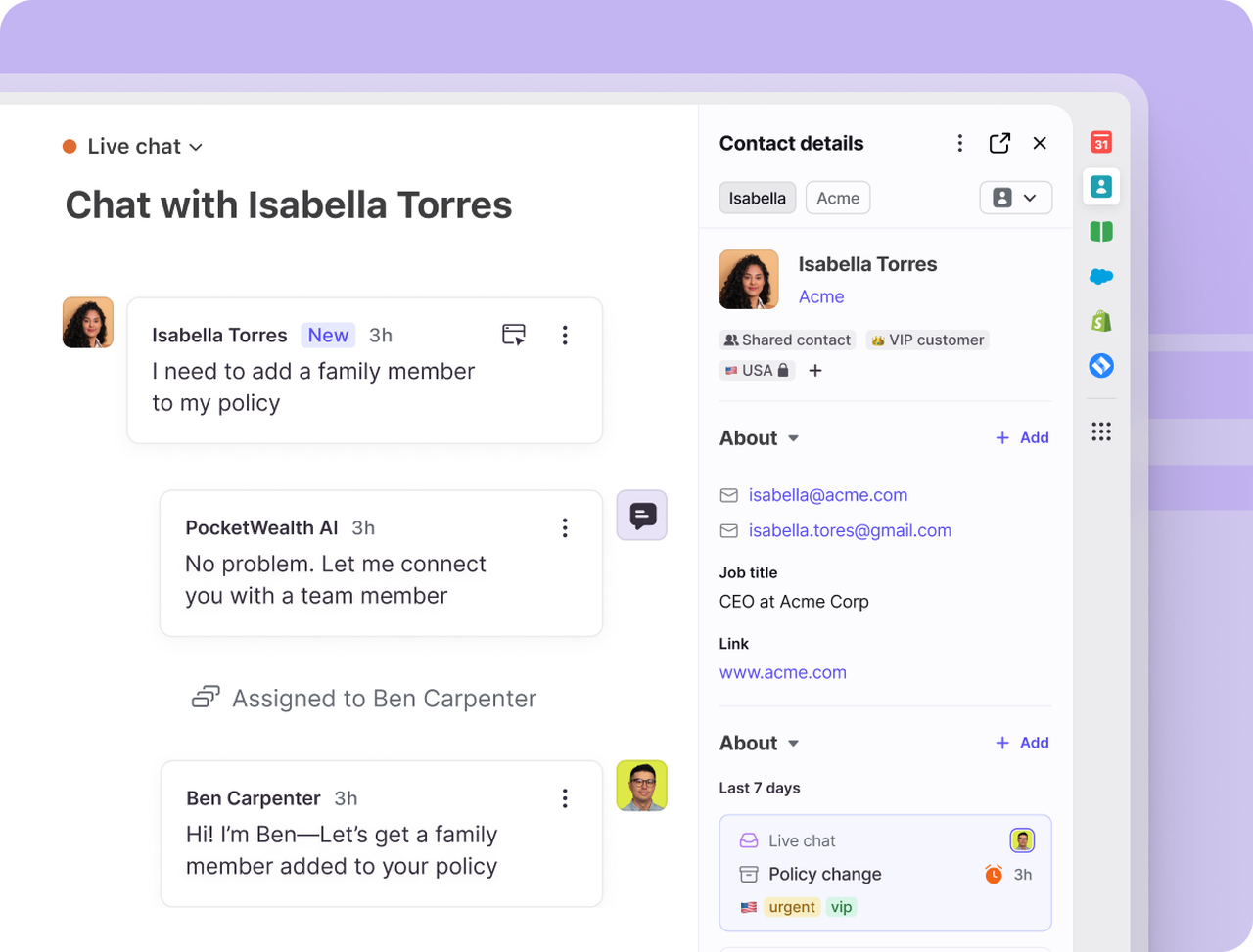
Customer emails and chats for each account land in a shared inbox, so the team sees the whole thread instead of forwarding and copying colleagues. Rules assign conversations round robin on every plan, or by load balancing to the teammate with the fewest open conversations on Professional and above. From Professional, HubSpot companies or Salesforce accounts sync into Front accounts, so CRM fields such as owner or tier show next to the conversation and can drive rules. Time goal rules, formerly called SLA rules, tag a conversation as at risk or breached when a reply or resolution goal passes, and can notify someone or reassign it. The owner replies, pulls in colleagues with internal comments, and managers follow response times per account.
- several people talk to the same accounts by email and replies get lost in personal inboxes
- you want reply-time goals and CRM account context on every customer thread
- you need health scores, renewal tracking or automated multi-step outreach: Front's plans list none of them
- you want reply-time goals and CRM account sync on the cheapest plan: both need Professional
- Users like
- shared client conversations with internal comments, @mentions and clear ownership
- Users dislike
- limited search across older threads, and AI features that cost extra on top of seat pricing
- Source: TrustRadius, 119 ratings
Plans and CRM sync
Starter costs $25 per seat per month on annual billing ($35 monthly), allows up to 10 seats and one channel type, and includes 10 rules. Professional costs $65 per seat ($85 monthly), allows up to 50 seats and 20 rules, and adds load balancing, time goal rules, account-based analytics and the CRM account sync. Enterprise costs $105 per seat, is billed annually only and has unlimited rules. The Copilot AI add-on costs $20 per seat per month and is included in Enterprise, and the Autopilot AI agent starts at $0.05 per conversation.
The HubSpot sync runs one way, from HubSpot companies into Front accounts, links contacts to accounts by email domain and runs a full sync every 24 hours on top of near-instant updates. G2 search listings show about 4.7 out of 5 for Front, but the G2 page didn't load for us, so the card uses TrustRadius.
- Starting price
- Starter $25 per seat per month billed annually ($35 monthly, up to 10 seats); Professional $65 ($85 monthly, up to 50 seats); Enterprise $105, annual only
- Rules
- 10 on Starter, 20 on Professional, unlimited on Enterprise
- SLA rules
- Professional and Enterprise
- CRM account sync
- one-way from HubSpot or Salesforce, Professional and up
- Trial
- 14 days with Professional features
What customer engagement software costs
Customer engagement software is billed in one of four ways: per seat, per monthly active user, per stored contact profile, or by custom quote. The unit matters more than the entry price, because it decides what makes the bill grow as your customer base grows.
| Tool | Pricing unit | What makes the bill grow | Free option |
|---|---|---|---|
| Intercom | Per seat, plus usage | Proactive messages above the 500 included in the add-on, Fin outcomes, email sends | 14-day trial |
| Customer.io | Stored profiles, people and account objects | Every profile above 5,000 and every email above 1 million a month | 14-day trial |
| Pendo | Monthly active users, quote only | More active users, surveys outside Ultimate | Free plan up to 500 monthly active users |
| Userpilot | Monthly active users | Users above your plan's tier, CRM sync add-on on Growth | 14-day trial |
| Gainsight | Quote, with full users per package | Users above 10 or 20, Gainsight PX for in-app guides | None listed |
| ChurnZero | Quote only | WalkThroughs add-on | None listed on Capterra |
| HubSpot Service Hub | Per Service Seat | Seats, onboarding fee, Enterprise for workflow-triggered sequences | Free plan for 2 users, without the CS workspace |
| Front | Per seat | Seats, plan seat caps, Copilot and Autopilot AI | 14-day trial |
Seat-based tools stay predictable as your customer count grows, but every CSM who needs access costs money. User- and profile-based tools let the whole team in, and the cost follows your customer base. For a B2B product with many users per account, check whether inactive users count, and in Customer.io, whether account objects count toward the profile limit. They do.
Engagement cadence by touch model
A touch model splits accounts by how much human attention they get. Use this table as a starting template, then adjust the triggers to your renewal cycle and product.
If you are planning the first weeks after a contract is signed, the customer onboarding software guide covers the project side; the table below covers the ongoing rhythm.
| Touch model | Who owns it | Main channels | What triggers outreach | Tools from this list |
|---|---|---|---|---|
| Tech-touch (many small accounts) | CS ops or lifecycle team | In-app guides, lifecycle email, in-app surveys | Product events, milestones missed, renewal date approaching | Pendo, Userpilot, Customer.io, Intercom |
| Low-touch (mid-sized accounts) | Pooled CSM team | Triggered email plus a CSM task, in-app announcements | Health score drop, usage decline, key user leaving | ChurnZero, Gainsight, HubSpot Service Hub |
| High-touch (strategic accounts) | Named CSM | Meetings, QBRs, shared email threads, success plans | Business review dates, expansion signals, risk alerts | Gainsight, HubSpot Service Hub, Front |
Strategic accounts don't skip automation. In-app guides and lifecycle email still reach the end users a CSM never meets, while the CSM spends time with the champion and the buyer. The mistake to avoid is sending an automated renewal nudge to an account whose CSM is in the middle of a negotiation, so exclude high-touch accounts from automated renewal messages or route those steps to the CSM.
- Each user-facing channel (in-app, email, chat) has exactly one sending tool
- Account fields used for targeting (plan, renewal date, owner, health) sync on a known schedule
- Every automated message has a goal and an exit rule
- Replies to automated messages reach the account owner, not a no-reply address
- High-touch accounts are excluded from automated renewal and pricing messages
- One person owns the program and reviews results each month
- Promises made in replies are written down with an owner and a due date
How do you measure customer engagement in B2B?
Measure engagement per account, not only per user, because one active admin can hide an account where nobody else logs in. Five measures work well for a CS team.
- Count active users per account and compare them with licensed seats, using Pendo account reports, Userpilot company profiles or your own product analytics.
- Track feature adoption with in-app segments built on the features tied to the customer's goals.
- Watch completion of guides and checklists, which Userpilot, Pendo and ChurnZero report per flow, guide or walkthrough.
- Measure response to outreach: Gainsight programs report email opens and clicks, and Front reports reply times per account.
- Read sentiment by account: HubSpot, Pendo and Userpilot write NPS or CSAT results back to the CRM.
Feed these into the health score you already run, and review them by touch model, since a low email open rate means little for an account whose CSM talks to the buyer every week.
How to choose customer engagement software
Start with the channel your customers already use and the system that holds your account data. Those two answers usually cut the list to two or three tools before any demo.
- In-app tours, checklists and email in one journey, answered in a support inboxIntercom with Proactive Support Plus
- Event- and date-triggered lifecycle messages with account objectsCustomer.io
- Usage analytics and in-app guides, with a free startPendo
- In-app flows built by CSMs without engineeringUserpilot
- Enterprise programs that mix email, CTAs and in-app stepsGainsight
- Health-triggered plays for a mid-market teamChurnZero
- Health alerts and sequences on HubSpot CRM recordsHubSpot Service Hub Professional
- Shared ownership of customer email threadsFront
Which integrations does customer engagement software need?
Customer engagement software needs two integrations to work for a B2B team: one that brings account data in from your CRM, and one that brings product usage in. Everything else is optional.
- CRM sync. Salesforce or HubSpot fields such as plan, owner and renewal date drive the targeting. Check the plan: Customer.io puts CRM sync on Premium, Userpilot on Growth as an add-on, and Front on Professional.
- Product data. Events from your app or a source such as Segment tell the tool what users did. Pendo and Userpilot collect them through their own snippet, and Intercom and Customer.io accept them through SDKs, the API or Segment.
- Collaboration. A Slack or webhook step lets a play alert the account owner. Gainsight programs, Customer.io journeys and ChurnZero plays all have one.
How long does setup take?
None of these vendors publishes a typical setup time, so treat any figure in a sales deck as a claim to check with references. The published signals point the same way: the more account data a tool needs, the longer setup takes. HubSpot charges a required $1,500 onboarding fee on Professional, Front requires an onboarding package for contracts above $25,000, Customer.io's Premium plan includes 90 days of onboarding, and Gainsight reviewers on Capterra recommend a dedicated admin. Userpilot and Pendo install with one snippet and can be tested in a 14- or 30-day trial before you sign.
Who should own customer engagement software?
One person should own the tool and every automated message in it, usually someone in CS operations or lifecycle marketing. CSMs should own the content of plays for their accounts and the replies, product managers should approve in-app guides that change the product experience, and RevOps should own the CRM fields the tool reads. When nobody owns the tool, customers get overlapping messages from two systems and nobody notices.
In the demo, ask each vendor these questions. The answers separate tools built for B2B accounts from tools built for single users.
- Can audience rules use account attributes such as plan, renewal date and owner, or only user attributes?
- How often does the CRM sync run, does it create missing records, and does it backfill history?
- Which plan includes the CRM integration and the engagement feature you plan to use?
- What happens when two messages qualify for the same user at the same time?
- Who receives a reply to an automated message, and where is it logged?
- How are account objects, inactive users and test users counted for billing?
- How does the vendor handle GDPR and CCPA deletion requests, and which plan includes SSO?
If two tools pass, run a pilot on one segment with a clear goal, for example feature adoption among accounts renewing in the next quarter, and compare the results after one cycle.
What engagement tools don't record
Every tool above sends messages or tracks health, and some track tasks. None of them keeps a record of what your team promised a customer in a reply, a call or a QBR. Those commitments end up in email threads and call notes, and they get lost when an account changes hands.
The Customer Success Manager is built for that gap. It keeps one evidence-backed ledger of customer commitments: who confirmed each one, what exactly was promised, who owns it and whether delivery was verified. People confirm and verify every entry, and you can ask about open promises in Claude or ChatGPT. It isn't an engagement platform and works next to the tools in this list.
FAQ
What is the best customer engagement software?
The best customer engagement software is the one that reaches users in the channel they already use and reads account data from your CRM. In this comparison, Intercom covers the most channels in one tool, while Gainsight and ChurnZero are strongest when engagement starts from health scores.
What is customer engagement software?
Customer engagement software is the layer that acts on customer data. It decides who gets an in-app guide, an email or a CSM task, and records how they responded. A CRM stores the account, and engagement software reaches the people in it.
What are examples of customer engagement platforms?
Examples of customer engagement platforms include Intercom, Customer.io, Pendo, Userpilot, Gainsight, ChurnZero, HubSpot Service Hub and Front for B2B teams. Braze and MoEngage are common examples on the B2C marketing side.
Is there free customer engagement software?
Pendo has a free plan for up to 500 monthly active users with in-app guides and analytics, and HubSpot's free tools cover 2 users but leave out the customer success workspace. Intercom, Customer.io, Userpilot and Front offer 14-day trials instead of free plans.
What is the difference between a CRM and a customer engagement platform?
A CRM stores who the customer is, what they bought and every past interaction. A customer engagement platform acts on that data, sending triggered messages in the right channel at the right time. Many B2B teams sync account fields from the CRM into the engagement tool.
Do I need customer engagement software if I have a customer success platform?
You don't always need customer engagement software next to a customer success platform. Gainsight and ChurnZero already send emails and in-app messages from health and usage data. Teams add a dedicated tool when they need richer in-app guides (Pendo, Userpilot), high-volume lifecycle messaging (Customer.io) or a shared inbox for replies (Front).