Account management software gives the team that owns a customer after the sale one record per company: contacts, renewal date, open work and activity. The first choice is not a brand. It is who owns the renewal. In HubSpot, Salesforce, Zoho CRM and monday CRM the renewal is a deal, contract or date field on the company record that sales and account managers share. In Gainsight, ChurnZero, Planhat and Vitally it is a record inside a customer success platform, next to health and playbooks, and the CRM usually stays the system for the contract.
This guide is for customer success managers, account managers and CS leaders at B2B software companies. For each tool we read the vendor's pricing page, a feature page and a help-center article on how accounts and renewals work wherever they were public (ChurnZero does not publish pricing, and some help centers are gated), plus the G2 listing. G2 figures for Gainsight, ChurnZero and Vitally review text are from our October 29 read. HubSpot and Salesforce show USD prices. Zoho CRM and monday CRM list euros on their own pages, so we used G2's USD listing, and Gainsight, ChurnZero, Planhat and Vitally publish no price at all. Two things most roundups skip shaped the list: which plan unlocks account hierarchy and renewal features, and what the account view actually shows. If you are comparing customer success platforms on their own, our guide to customer success software goes deeper on health scores.
- tools compared
- 8
- publish no price (Gainsight, ChurnZero, Planhat, Vitally)
- 4 of 8
- have a documented free plan (HubSpot for 2 users, Zoho CRM for 3); Salesforce lists a $0 Free Suite in its comparison table
- 2
- G2 rating range
- 4.1 to 4.7
Best account management software at a glance
 Best when sales and CS share one CRMHubSpot Smart CRM / Sales HubFree for 2 users. Parent and child company labels sit on every plan, and workflows that create renewal deals start on Professional.
 Fits large account hierarchiesSalesforce Sales CloudA Parent Account hierarchy shows up to 2,000 accounts. Automatic renewal opportunities need CPQ.
 Best for a low-cost, configurable Accounts moduleZoho CRMFree for 3 users. The Accounts module is on every edition with parent and member accounts, and Blueprint starts on Professional.
 Best for teams that already work in boardsmonday CRMAn Accounts board linked to contacts and deals, with a renewal date view and reminders per monday's account management page.
 Fits a Salesforce-synced renewal centerGainsight Customer SuccessRenewal Center takes opportunities from Salesforce. Renewal and expansion forecasting is listed for Enterprise only.
 Fits renewal forecasts that use health scoresChurnZeroRenewal Hub forecasts in dollars with GRR and NRR and uses ChurnZero health scores. It syncs with the CRM every 15 minutes.
 Best for a flexible company data modelPlanhatRenewal date, ARR and owner sit on the company record. Workflows can start a renewal project 90 days before contract end.
 Best for renewals owned outside the CSM roleVitallyA custom key role can name renewal owners who are not CSMs. Forecast traits are a build, not built-in fields.
 For promises made inside the accountThe Customer Success ManagerNot account management software. A ledger of customer commitments with owner, due date and verified delivery.
| Tool | Who owns the renewal | Account record | Entry price (USD) | Rating |
|---|---|---|---|---|
| HubSpot Smart CRM / Sales Hub | A renewal deal in the shared CRM | Company record with parent and child labels | Free for 2 users; Sales Hub Starter $20 per seat per month | 4.4 (14,383) |
| Salesforce Sales Cloud | Contract plus opportunity; CPQ for automatic renewals | Account object with a Parent Account hierarchy view | $25 per user per month (Starter Suite) | 4.4 (27,585) |
| Zoho CRM | A deal you build with fields and workflows | Accounts module with parent and member accounts | Free for 3 users; $23 per user per month (Professional, per G2) | 4.1 (2,956) |
| monday CRM | A renewal date view and reminders per monday's page (plan not stated) | Accounts board linked to contacts and deals | $12 per user per month (Basic, per G2, likely billed annually), 3 seats minimum | 4.5 (1,939) |
| Gainsight Customer Success | Renewal Center, synced from Salesforce or kept in Gainsight | Company record with relationships and business units | Quote only | 4.5 (1,772) |
| ChurnZero | Renewal Hub with health-weighted forecasts | Account and contact profile with a ChurnScore | Quote only | 4.7 (1,633) |
| Planhat | Renewal fields on the company, deals with line items | Company model with parent and child tiers | Quote only | 4.5 (964) |
| Vitally | Renewal segment, key roles and playbooks | Organization with child accounts and users | Quote only | 4.5 (713) |
| The Customer Success Manager Our product | Customer commitment tracking | Records what your team promised each customer and whether delivery was verified | From $49/month per workspace | No reviews yet |
Prices as listed on vendor pages or G2 in October 2026. The platforms do not publish USD prices.
What is account management software?
Account management software is the system where the people who own existing customers keep the customer record, the renewal date and the work around both. It differs from a sales pipeline tool because the unit is the customer company over time, not the deal that created it. A good account record answers four questions without a spreadsheet: who owns this customer, who are the people there, when and for how much does the contract renew, and what is open right now.
The category has no single owner. Sales teams use a CRM for key account management. Customer success teams use a customer success platform for the same job after onboarding. Many companies run both and sync them, which is why the renewal ownership question matters more than any feature list.
Two kinds of tools, and who owns the renewal
A CRM stores a renewal as a deal or opportunity on the company record. That works well when account managers also sell expansion, because the renewal and the upsell land in one forecast. The cost is build work: most CRMs in this list give you contracts, date fields and reminder workflows, and you assemble the renewal process from them.
A customer success platform stores the renewal as a record next to health, tasks and playbooks. That gives a CSM a renewal calendar and a forecast without custom fields. The cost is a second system, a CRM sync and, for most of these vendors, a quote instead of a price.
| Question | CRM (HubSpot, Salesforce, Zoho CRM, monday CRM) | Customer success platform (Gainsight, ChurnZero, Planhat, Vitally) |
|---|---|---|
| Where does the renewal live? | A deal or opportunity on the company record | A renewal record or segment beside health and playbooks |
| Who builds the renewal process? | You, with fields, pipelines and workflows | The platform provides a center, hub or template; you configure it |
| What does it cost? | Per seat. HubSpot and Salesforce publish USD; Zoho CRM and monday CRM list euros on their own pages (USD per G2) | Quote only on all four |
| What does it need? | Nothing else, it is the CRM | Usually a CRM sync; Gainsight and Planhat can hold deals themselves |
- Step 1Sale closes
- HubSpot Smart CRM / Sales Hub
- Salesforce Sales Cloud
Check Where the contract end date lives, on the deal or on the account - Step 2Account syncs to CS
- Gainsight Customer Success
- ChurnZero
- Planhat
- Vitally
Lag Sync timing differs: ChurnZero every 15 minutes, Planhat from Salesforce about every 10 minutes, Vitally syncs HubSpot deals hourly and edits made in Vitally can take up to an hour to reach HubSpot - Step 3Work the account
- Zoho CRM
- monday CRM
Limit Reminders and flags run on automations you configure, with monthly caps on monday CRM - Step 4Forecast the renewal
- Gainsight Customer Success
- ChurnZero
Method Gainsight forecasts from CRM probability or Low, Medium and High scenarios; ChurnZero uses health scores - Across allKeep the promises
- The Customer Success Manager
Records What was promised, who owns it and whether delivery was verified
Best CRMs for account management
These four are general CRMs. Each holds the account as a company record, and each treats a renewal as a deal or contract you set up. They fit teams where the same people sell, renew and expand, or where the CRM is already the source of truth for contract data.
HubSpot Smart CRM and Sales Hub
HubSpot Smart CRM / Sales Hub
HubSpot
Free CRM with company records, deal pipelines and workflows, where a separate Service Hub workspace adds a CSM view.
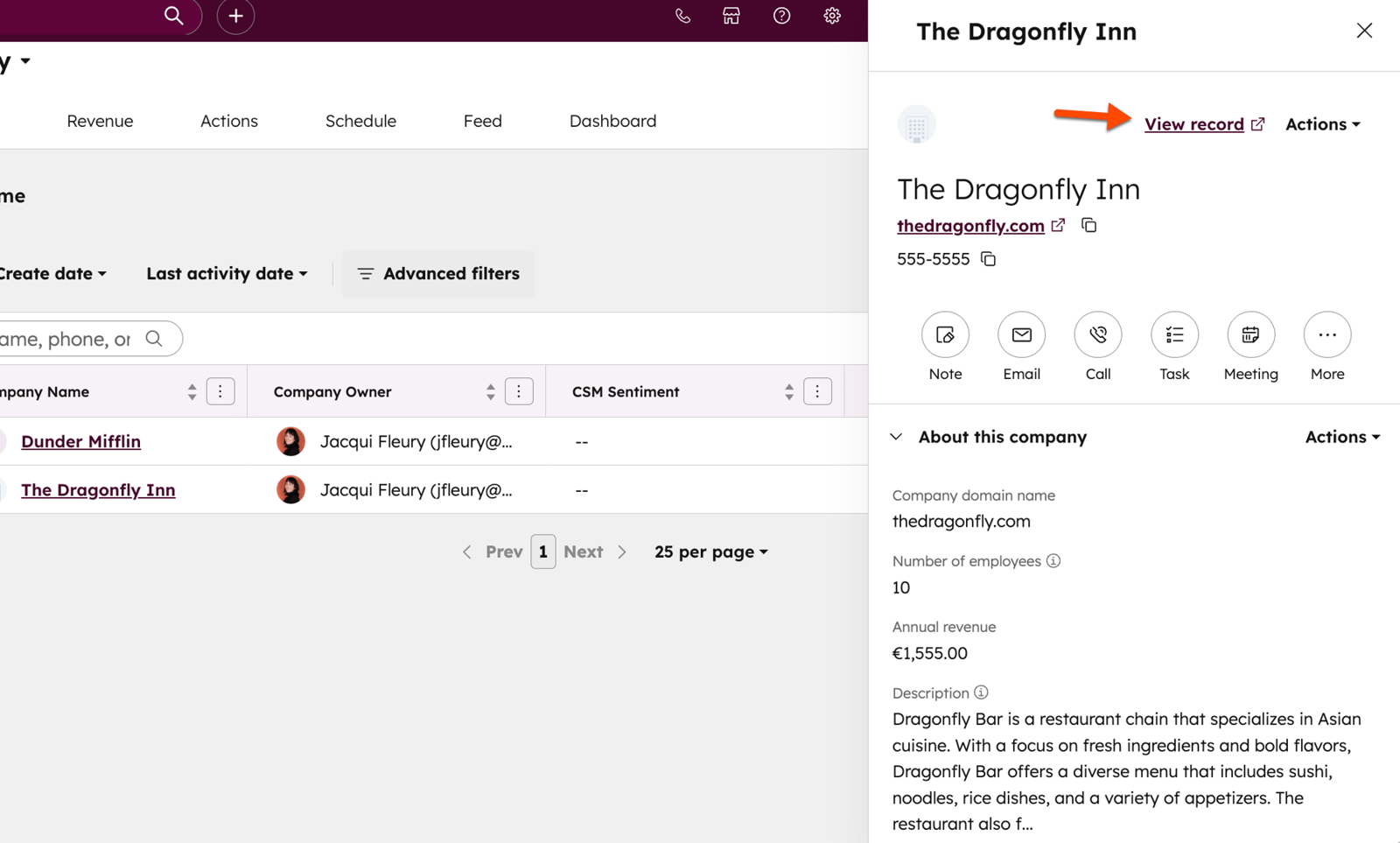
HubSpot keeps each customer as a company record linked to contacts, deals and activity. Sales Hub is free for up to 2 users. Starter is listed at $20 per seat per month, Professional at $90 per seat per month billed annually ($100 paid monthly on an annual commitment) with a one-time $1,500 onboarding fee, and Enterprise at $150 per seat per month with a $3,500 onboarding fee. Parent and child company associations are available on every plan, with a parent holding many children and a child only one parent. HubSpot describes them as labels on the Companies card, not a hierarchy tree.
Renewals are built, not shipped. Contracts show renewal due dates and can drive workflows that create task reminders, renewal deals and renewal quotes, but creating contracts and renewal quotes currently needs a Revenue Hub subscription (a direct-create beta exists), and those workflows need Professional (about 300 workflows) or Enterprise (about 1,000), while Starter has a smaller set with restricted triggers and actions. HubSpot's page for customer success teams, the Customer Success Workspace, belongs to Service Hub Professional or Enterprise and needs a Service Seat. It lets an admin pick a CSM ownership property and an optional renewal date property, and it adds Customers, Projects and Revenue tabs plus up to five dashboards.
- Your sales team already runs on HubSpot and you want renewal deals in the same pipeline reporting.
- You want a free or low-cost start and will add paid hubs as the CS team grows.
- You need a built-in health score and renewal playbooks without buying Service Hub as a second product.
- You want one flat price: onboarding fees and per-hub seats add up at Professional and Enterprise.
- Users like
- Ease of use and clear deal and activity visibility.
- Users dislike
- Missing or limited features and extra setup for reports and automation.
- Source: G2, 14,383 reviews
Plan gating, G2 and who should skip it
G2 lists HubSpot Sales Hub at 4.4 from 14,383 reviews. Reviewers most often praise ease of use and a clear view of deals and activity, and they often cite missing or limited features and extra setup for reports and automation. The listing covers Sales Hub, not the whole platform. Skip it if you need a health score and renewal playbooks without buying Service Hub as a second product, or if you want one flat price, because onboarding fees and per-hub seats add up at Professional and Enterprise.
- Starting price
- Free for up to 2 users; Sales Hub Starter $20 per seat per month list, Professional from $90 per seat per month billed annually plus $1,500 onboarding, Enterprise from $150 per seat per month plus $3,500 onboarding
- Account record
- Company with parent and child labels (all plans)
- Renewals
- Renewal deals via pipelines and workflows; contracts need Revenue Hub
- Automation
- Renewal workflows from Professional; Starter has restricted workflows
- CRM link
- Is the CRM; Salesforce sync available (not verified here)
- Price basis
- Per seat per month, plus onboarding fees from Professional
Salesforce Sales Cloud
Salesforce Sales Cloud
Salesforce
The CRM with a documented Parent Account hierarchy view, where renewal opportunities come from contracts, flows or CPQ.
Sales Cloud treats the account as a core object with contacts, opportunities and contracts attached. Per user per month it costs $25 for Starter Suite (monthly or annual), $100 for Pro Suite (annual), $195 for Core, $395 for Advanced and $550 for Max. The pricing page offers a 30-day trial with no credit card. Starter lists account, contact and opportunity management with built-in sales flows. Pro Suite adds more customization and automation plus quoting and forecasting.
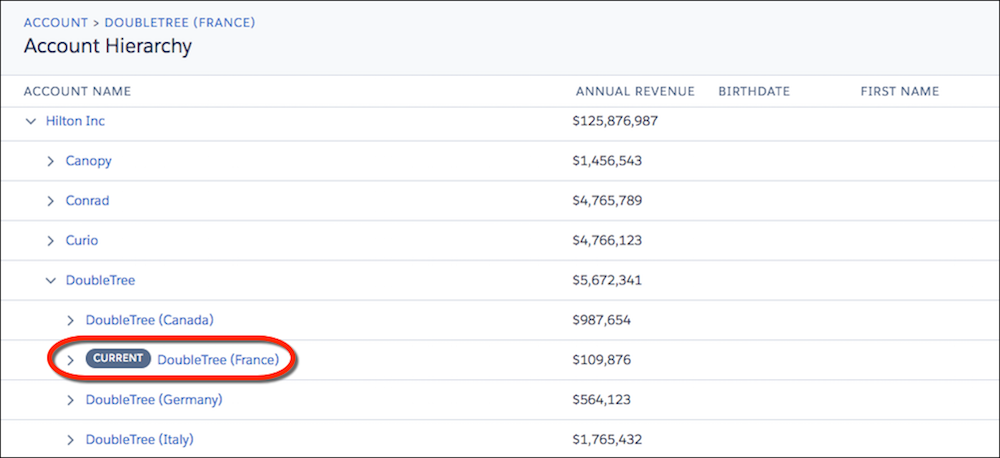
The hierarchy is where Salesforce documents the most detail. Accounts related through the Parent Account field open in a View Account Hierarchy action that shows up to 2,000 accounts from the entry point and up to 15 admin-set columns. For renewals the sources we read show contracts that can carry approval processes and workflow alerts for renewal reminders. Automatic renewal opportunities come from Salesforce CPQ: tick Renewal Forecast on the contract, set a renewal term, and CPQ creates the opportunity on the account's Renewal Opportunities list. Revenue Cloud, the add-on that houses CPQ-based renewal automation, is listed from $200 per user per month; we did not read CPQ's own price.
- Your company already runs Salesforce and CSMs need renewals and expansion in the same forecast as new business.
- You have an admin who can build flows and page layouts for account and renewal views.
- You want ready-made health scores and CS playbooks without custom build work.
- You have no Salesforce admin and need a tool that works after a short setup.
- Users like
- Ease of use, automation and pipeline visibility.
- Users dislike
- Steep learning curve and heavy upkeep of customizations.
- Source: G2, 27,585 reviews
Plan gating, G2 and who should skip it
G2 lists the product (now titled Agentforce Sales, formerly Salesforce Sales Cloud) at 4.4 from 27,585 reviews. Reviewers praise ease of use, automation and pipeline visibility, and they cite a steep learning curve, upkeep of customizations and cost. Salesforce's help article lists contracts for the Professional, Enterprise and Unlimited editions, while the pricing page uses suite names, so confirm which suite includes them before you buy. Skip it if you want ready-made health scores and CS playbooks without custom build work, or if you have no Salesforce admin.
- Starting price
- Starter Suite $25, Pro Suite $100, Core $195, Advanced $395, Max $550 per user per month
- Account record
- Account object with Parent Account hierarchy
- Renewals
- Contracts and reminders; automatic renewal opportunities need CPQ
- Automation
- Built-in sales flows; Pro Suite adds more automation
- CRM link
- Is the CRM
- Price basis
- Per user per month; Pro and above billed annually
Zoho CRM
Zoho CRM
Zoho
Low-priced configurable CRM with an Accounts module, parent and member accounts and workflow rules on every edition.
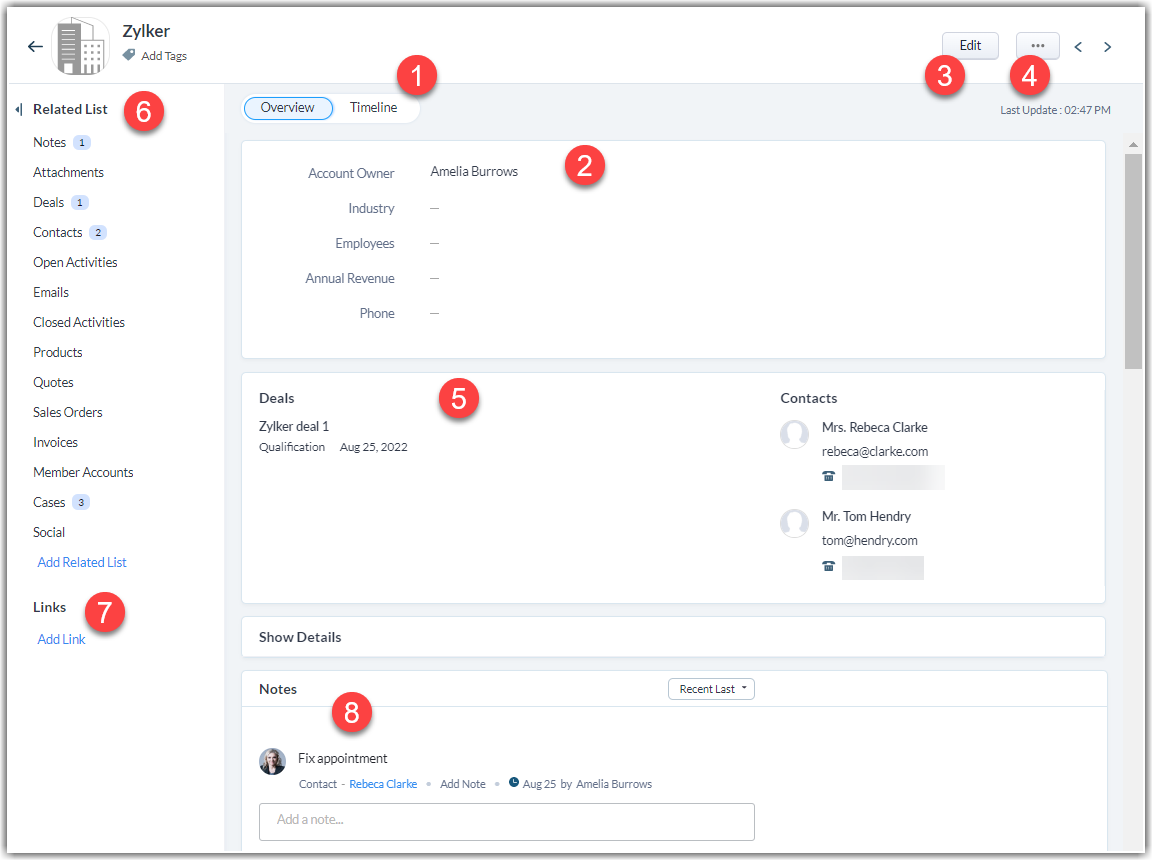
Zoho CRM stores companies in an Accounts module that exists in every edition, and each deal links to an account through a lookup field. A parent account can have member accounts, created from the Member Accounts related list (Zoho's article does not say which editions include it), so you can track the divisions of a customer and view one division or the consolidated total. Zoho's article does not state how many levels deep the hierarchy goes. The free edition covers 3 users. G2 lists Professional at $23 and Enterprise at $40 per user per month, and Zoho's own US page lists euro prices, so confirm the USD figures at checkout.
There is no renewal center in the sources we read. Zoho's own renewal guide builds one: custom date and picklist fields on Deals, a Deals view filtered to contracts ending within 30 days, a scheduled function that sets the renewal status to In Progress, and a workflow that assigns an owner and creates a follow-up task. That guide is marked for Enterprise and above. Workflow rules exist on every edition, from 10 per module on Free to 150 on Ultimate. Blueprint, Zoho's process builder, starts at Professional with 3 blueprints, 50 on Enterprise and 100 on Ultimate.
- You want a low-cost CRM with a free tier for 3 users and room to customize modules and workflows
- Your accounts have parent and division structures you want to roll up
- You want a ready-made renewal pipeline and health scoring without building fields and workflows
- Your team lacks admin time for setup, since reviewers call configuration heavy
- Users like
- Lead handling, customization, automation
- Users dislike
- Complex setup and navigation for new users
- Source: G2, 2,956 reviews
Plan gating, G2 and who should skip it
G2 lists Zoho CRM at 4.1 from 2,956 reviews, the lowest rating in this list. Reviewers like having lead and customer data in one place, broad customization and workflow automation, and they say the many options make setup and navigation hard for new users. Skip it if you want a ready-made renewal pipeline without building fields and workflows, or if nobody on your team has admin time.
- Starting price
- Free for 3 users; Professional $23, Enterprise $40 per user per month (G2 USD)
- Account record
- Accounts module with Parent Account lookup and Member Accounts
- Renewals
- Built on Deals date fields, a view and workflows
- Automation
- Workflow rules on all editions; Blueprint from Professional
- CRM link
- Is the CRM; Zoho apps and API for others
- Price basis
- Per user per month; free for 3 users
monday CRM
monday CRM
monday.com
A board-based CRM where accounts, contacts and deals are linked boards with a renewal date view.
monday CRM keeps its core data on five boards: Leads, Contacts, Deals, Accounts and Activities. The Contacts board has a Connect Boards column to Accounts, and an optional setting assigns the account automatically when a contact's email domain matches an account. The item card overview combines widgets for deal, customer and account data. monday's account management page promises one activity timeline per account, a view of renewal dates by account, region or period, and automatic reminders before renewals. It does not publish thresholds or say which plan includes them.
G2 lists prices of $12 (Basic), $17 (Standard) and $28 (Pro) per user per month, with a three-seat minimum. monday's own pricing page lists euros, and the G2 USD figures match the yearly euro prices, so they most likely refer to annual billing. Custom automations start at Standard with 250 per month and rise to 25,000 on Pro. The emails and activities timeline needs Standard or higher, and quotes, invoices and the Sales Dashboard need Pro. The help article we read describes no parent and child account hierarchy, so treat accounts as flat until the vendor confirms otherwise.
- Your CS team already works in monday boards and wants accounts, renewals and tasks on one canvas
- You want no-code automations for renewal reminders and untouched account flags
- You need documented parent and child account hierarchies
- You expect deep reporting or heavy automation, since reviewers cite limits and a steep board-linking curve
- Users like
- Ease of use and customization
- Users dislike
- Steep learning curve linking boards; limited depth
- Source: G2, 1,939 reviews

Plan gating, G2 and who should skip it
G2 lists monday CRM at 4.5 from 1,939 reviews. The most-cited praise is ease of use, and the most-cited complaints are a learning curve when linking boards and limited depth in automation, columns and reporting. Skip it if you need documented parent and child accounts, or if you expect deep reporting.
- Starting price
- $12 Basic, $17 Standard, $28 Pro per user per month (G2 USD, likely annual); 3 seat minimum
- Account record
- Accounts board linked via Connect Boards
- Renewals
- Renewal date view and reminders (vendor page)
- Automation
- 250 custom automations per month on Standard, 25,000 on Pro
- CRM link
- Is the CRM; 500+ integrations listed
- Price basis
- Per user per month, 3 seats minimum
Best customer success platforms for account management
These four are built for the post-sale job. The account is a customer record with health, tasks and renewals, and the CRM usually remains the system for contracts and opportunities. None publishes a USD price, so budget a sales conversation before you shortlist. The CRM usually stays the system for the contract, although Gainsight and Planhat can also hold opportunities or deals themselves.
Gainsight
Gainsight Customer Success
Gainsight CS
Enterprise customer success platform with a Customer 360 view and a Renewal Center that syncs opportunities from Salesforce.
Gainsight sells Essentials and Enterprise, both marked Request Pricing. Essentials includes 10 full users and 100 customers per user, Enterprise 20 full users and 200 customers per user, and both include unlimited viewer licenses. Customer 360, playbooks, success plans, health scorecards, dashboards, surveys and digital journeys appear in both. Renewal and expansion forecasting, organizational mapping and sponsor tracking are listed for Enterprise only. The pricing page does not say which plan includes the Renewal Center module or CTAs, so ask for that in writing.
Renewal Center has two modes. In Gainsight mode opportunities live only in Gainsight, for teams without Salesforce. In Salesforce mode they come in through the Salesforce connector's Opportunity Sync job, with separate jobs for stages and record types. Switching modes means deleting existing opportunity records. Forecasts use either CRM probability (forecast amount times probability, summed) or Low, Medium and High scenarios based on forecast category, and each opportunity carries a booking type of renewal, upsell or downsell. CTAs, Gainsight's task alerts, can be linked to Salesforce objects through the primary Salesforce connection, and records a CSM creates from the CTA are added to the linked object.
- You want configurable scorecards by segment plus AI that reads customer communications for risk
- You have an admin or CS ops owner who can run a larger platform and route risk into CTAs and journeys
- You need a quick setup; G2 reviewers flag a steep learning curve and 5 months average implementation
- You need published pricing or a churn probability score; neither is published
- Users like
- Ease of use, centralized information, visibility
- Users dislike
- Not intuitive, steep learning curve, limited customization
- Source: G2, 1,772 reviews
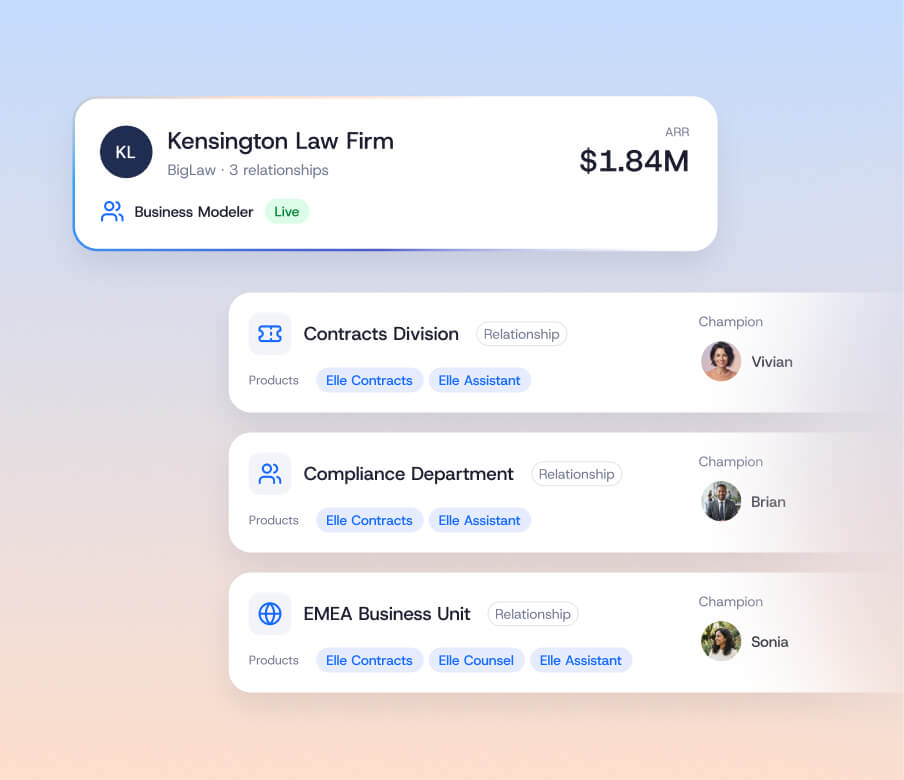
Renewal Center, plan gating and who should skip it
G2 listed Gainsight Customer Success at 4.5 from 1,772 reviews when we last read it on October 29, praising ease of use and centralized information and citing a steep learning curve and a not-intuitive interface. Skip it if you need a quick setup, since G2 showed an average implementation of about 5 months on October 29, or if you need a published price.
- Starting price
- Quote only (Essentials and Enterprise tiers)
- Risk method
- Weighted scorecard (rules) plus Staircase AI communication analysis
- Risk output
- Health score 0-100 and Risk Level 1-5 with risk reasons
- Inputs
- Usage and CRM via scorecards; emails, calls, tickets, meetings via Staircase AI
- Refresh
- Risk summary about every 8 hours while risk is active
- Tiers
- Essentials and Enterprise; Staircase AI gating not published
- Vendor claim
- Up to 95% renewal forecast accuracy (unverified)
- CS packages
- Essentials, Enterprise
- Essentials full users
- 10
- Enterprise full users
- 20
- CRM connectors
- Salesforce, HubSpot
- Published USD price
- Request pricing
- Renewals
- Renewal Center; renewal and expansion forecasting listed for Enterprise only
- Account record
- Company with relationships, products and business units
- Automation
- CTAs, playbooks, success plans, journeys
- CRM link
- Salesforce connector jobs; standalone mode without Salesforce
ChurnZero
ChurnZero
ChurnZero
Customer success platform whose Renewal Hub forecasts in dollars using health scores and syncs with the CRM every 15 minutes.
ChurnZero gives each account and contact a profile that combines usage, engagement, sentiment and outcomes into health and relationship insights. The core software price is not published. The AI agent add-on, Agentic Essentials, is sold for the Professional and Enterprise editions as one annual flat fee, with the amount and credit count not stated.
Renewal Hub is the account management piece. ChurnZero's page says that unlike a CRM, it uses health scores in its forecasts. Forecasts can be filtered in dollars for accounts up for renewal, renewals, expansions, contractions, upsells, downsells, churn, gross revenue retention and net revenue retention. The workbook has tabs for forecasting with custom categories, revenue strategy, updates, opportunity management (create, view and assign open, overdue and high-risk opportunities) and performance reviews. Plays are automated workflows with conditional logic that create tasks and send data to integrated systems, and success plans have no limit per account. The Salesforce sync reads and writes accounts, contacts, tasks and activities every 15 minutes. HubSpot syncs companies, contacts and engagements, with deals through custom tables.
- You want a health score your CSMs can build and check themselves, with no data scientist
- You want AI agents for risk flags sold as one flat-fee subscription on top of Professional or Enterprise
- You need a trained churn model with a probability output; none is documented
- You need public pricing or a published list of what each edition includes
- Users like
- Ease of use, automation, customer support
- Users dislike
- Learning curve, complexity, not intuitive
- Source: G2, 1,633 reviews
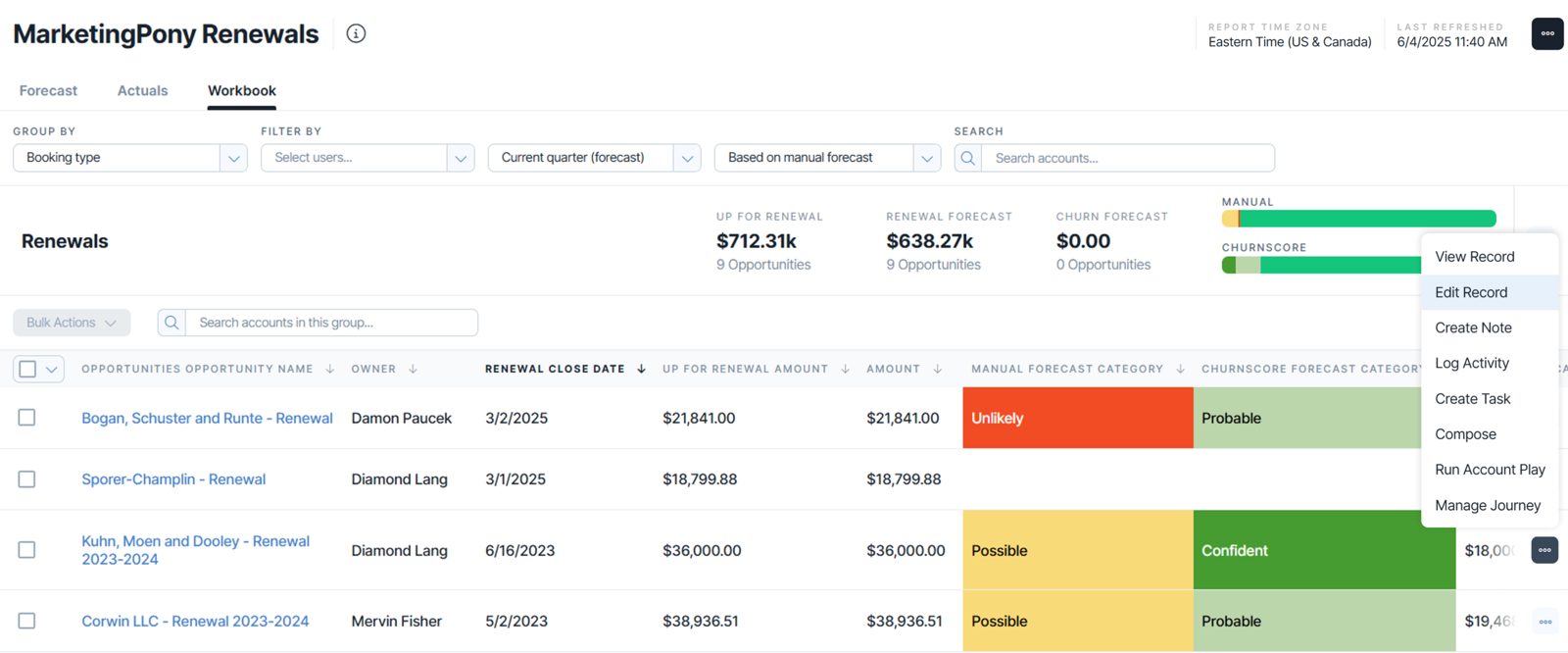
Renewal Hub, CRM sync and who should skip it
G2 listed ChurnZero at 4.7 from 1,633 reviews when we last read it on October 29, the highest rating here, with praise for ease of use, automation and support and complaints about a learning curve and complexity. Skip it if you need public pricing or a published list of what each edition includes.
- Starting price
- Quote only (not published; no pricing page)
- Risk method
- Hand-built weighted ChurnScore (rules) plus Harbinger AI agent
- Risk output
- Score with red/yellow/green; agent flags with type, urgency, impact
- Inputs
- Usage, engagement, support, surveys, journeys; Harbinger reads engagements
- Editions
- Professional and Enterprise; Agentic Essentials add-on, price not published
- Tuning
- CSM-built factors, Calculate ChurnScore check on 150 accounts
- Vendor claim
- 60% churn decrease (no methodology)
- Account record
- Account and contact profile with a ChurnScore
- Renewals
- Renewal Hub with dollar forecasts, GRR and NRR
- Automation
- Plays with conditional logic; success plans
- CRM link
- Salesforce and HubSpot sync every 15 minutes
Planhat
Planhat
Planhat
Flexible customer platform where the company record carries renewal date, renewal ARR and owner, and workflows start the renewal project.
Planhat's company model is the central object, and companies can be arranged in parent and child tiers. A company record carries renewal date, days until renewal, renewal ARR or MRR, health, an AI health score from 1 to 100 and an owner field that can be a CSM, account manager or sales rep. Group totals show one company's share of ARR and the whole group's. Seeing child company activity and usage on a parent profile needs the group structures feature, which Planhat's help article says is part of the Enterprise plan. Pricing is quote based with add-ons for AI, advanced service, email marketing and portals, and no free plan or trial is published.
Revenue is modeled as deals, line items and products, with system reports for renewal rate, renewals and bookings, and forecasts built from open deals, closed deals or both. Workflows can start a renewal process 90 days before contract end, an onboarding project when a deal closes, or a churn-risk project when health drops. Planhat's renewals page describes three ownership models (customer success owns it end to end, customer success prepares and account management closes, or a dedicated renewals team) and three forecast methods. Salesforce sync direction is set per object and per field, with Planhat to Salesforce near instant and Salesforce to Planhat roughly every 10 minutes.
- You want per-segment health profiles that a CS ops person can tune without a data scientist.
- You want email, chat and call sentiment to feed health scores and automations.
- You need a documented trained churn probability or revenue-at-risk model out of the box.
- You want published pricing or a team with no technical resources for configuration.
- Users like
- Reviewers praise flexibility of the data model and workflows, plus onboarding and support quality.
- Users dislike
- Reviewers cite a steep learning curve and the need for technical skills for automations and customization.
- Source: G2, 964 reviews
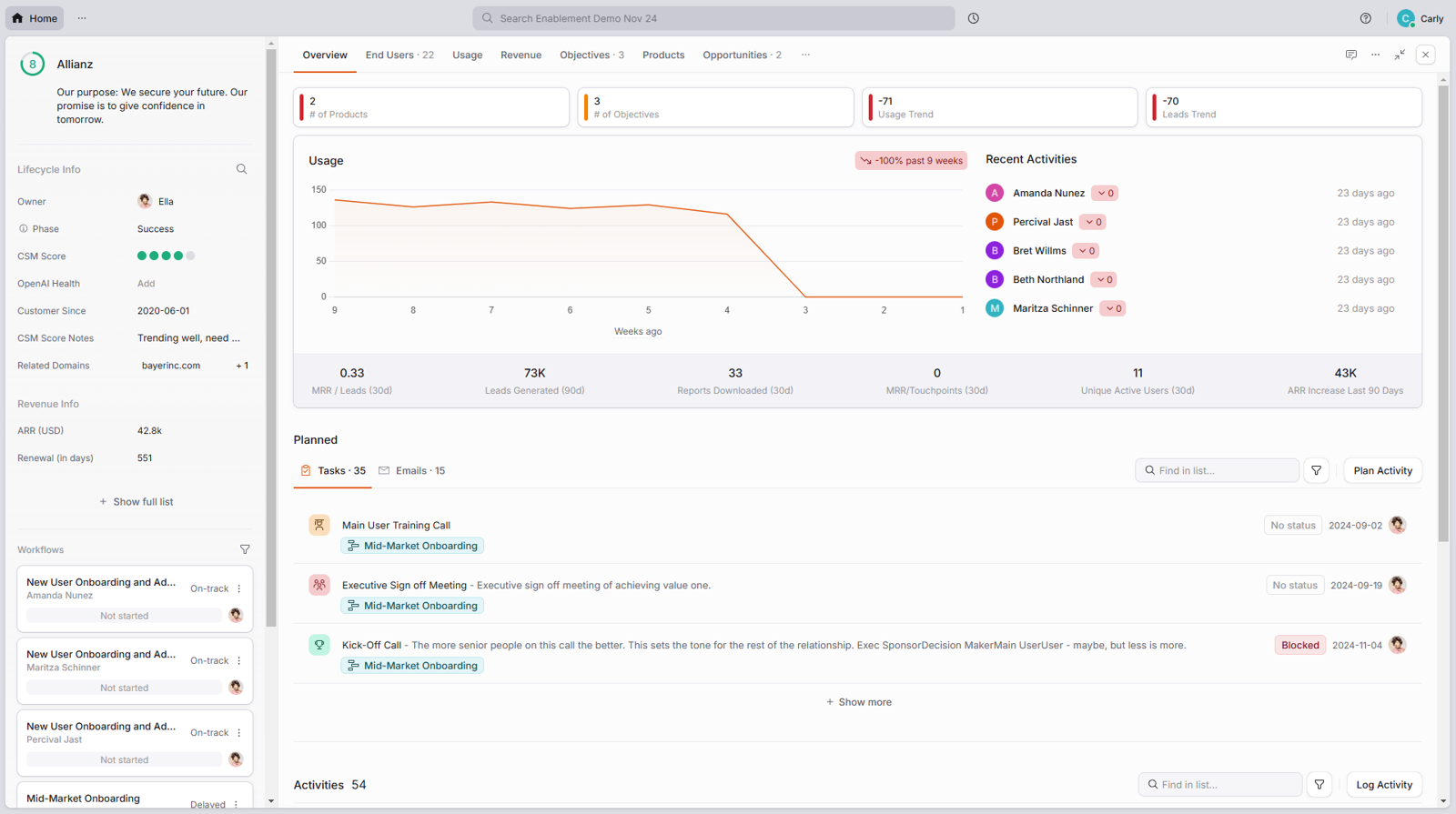
Plan gating, sync and who should skip it
G2 lists Planhat at 4.5 from 964 reviews, with an average implementation time of 3 months reported by users. Reviewers praise the flexible data model, workflow builder, onboarding and support, and they cite a steep learning curve and the technical skills needed for automations and customization. Skip it if you have no one who can configure workflows, or if you need published pricing.
- Starting price
- Quote only, no public USD price
- Scoring type
- Rules-based, 0 to 10, baseline 5
- Inputs
- Fields, metrics, NPS, usage, AI sentiment
- AI
- Sentiment and summaries, credit based
- Plan gating
- Not published; AI add-on listed
- Refresh
- Not published
- Account record
- Company with parent and child tiers; group view on Enterprise
- Renewals
- Renewal date and ARR on the company; deals with line items
- Automation
- Workflows start a renewal project 90 days before contract end
- CRM link
- Salesforce sync set per object and field; HubSpot revenue sync
Vitally
Vitally
Vitally
Customer success platform with an Organization, Account and User hierarchy and a documented way to build renewal tracking.
Vitally models the customer as an Organization (the whole company) with child Accounts (a business unit, subscription or division) and Users. Many objects roll up from Account to Organization but not down, and when an Organization churns all its child Accounts churn. Playbooks and project templates can target Organizations or Accounts, but not both. The pricing page lists three packages, Tech-Touch, Hybrid-Touch and High-Touch, all marked Request Pricing. Vitally says every plan includes unlimited observer seats, unlimited automations and the same feature set, and offers a trial sandbox with your own data.
Vitally's own account management guide shows how much of renewals is a build. Lifecycle tracking gives ARR, next renewal date and churn, and a Renewal segment groups accounts inside their renewal window. A custom key role can name renewal owners who are not CSMs. The forecast and renewal stage traits are suggestions you create, not built-in fields. A renewal playbook can add accounts to the segment, create a renewal project, start a renewal conversation and update the stage. HubSpot deals sync as custom objects, limited to deals created or updated in the last 12 months, and edits can take up to an hour to reach HubSpot. According to Vitally's docs summary, Salesforce opportunities are handled as custom objects too.
- You want per-segment health score profiles a CSM can change without code.
- You want AI summaries of calls and emails to surface risk next to the score.
- You need a predicted churn probability from a trained model, which is not described.
- You need a published price or self-serve trial.
- Users like
- Flexible, segmentable health scores and a useful AI assistant.
- Users dislike
- A few early reviewers say the interface feels overwhelming at first
- Source: G2, 713 reviews
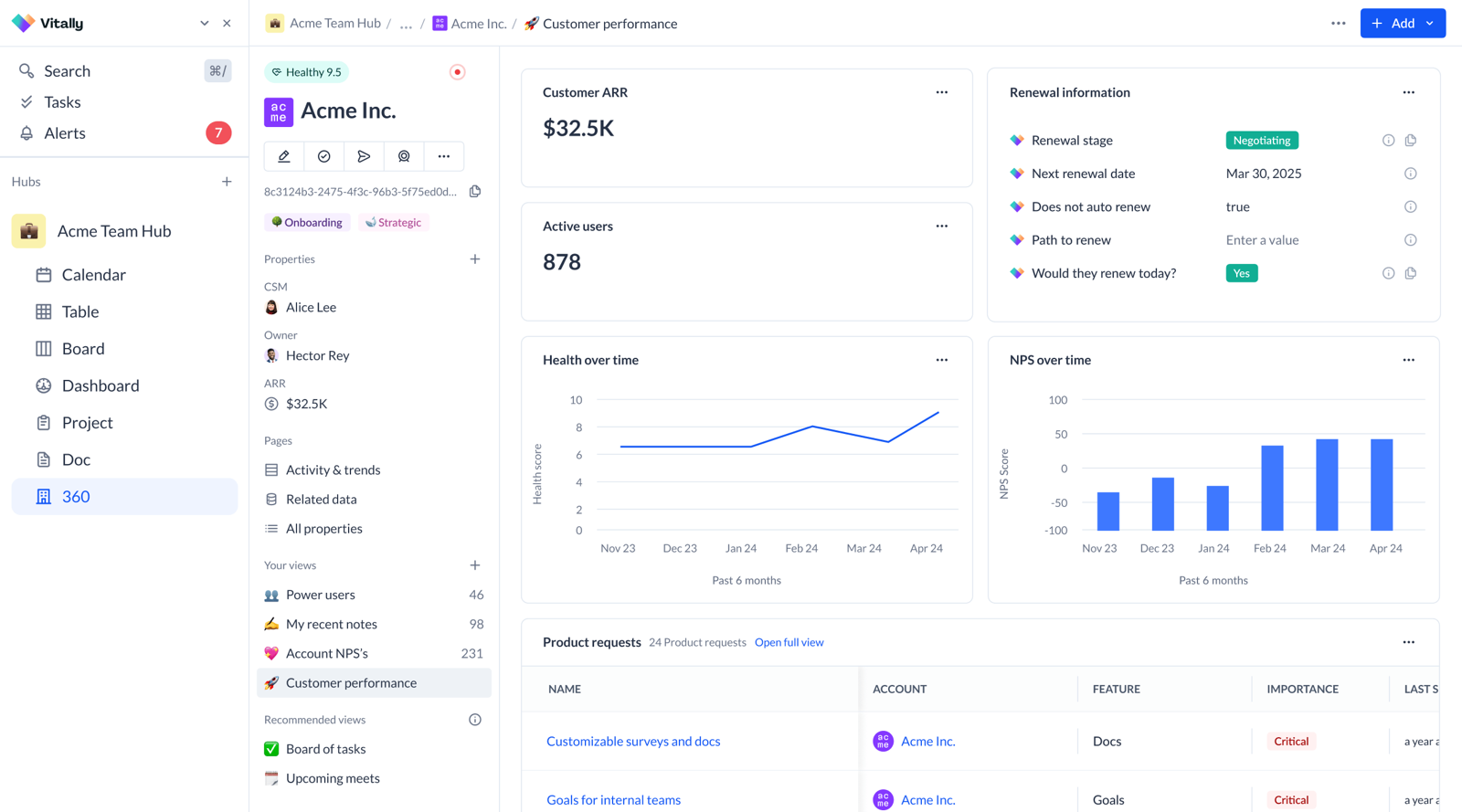
Hierarchy, CRM sync and who should skip it
G2 lists Vitally at 4.5 from 713 reviews, with an average implementation time of 2 months reported by users. When we last read the review text on October 29, reviewers praised flexible, segmentable health scores, and a few early reviewers said the interface felt overwhelming at first. Skip it if you want a built-in renewal forecast instead of building one, or if you need a published price.
- Starting price
- Quote only
- Scoring
- Rules-based, weighted 0 to 10
- Refresh
- Hourly per docs
- Limits
- 10 scores, 50 properties
- AI
- Copilot reads calls, emails, tickets
- Pricing
- Not published
- CS packages
- Tech-Touch, Hybrid-Touch, High-Touch
- Unlimited automations
- Advertised across plans
- Observer seats
- Unlimited advertised
- SSO
- Advertised across plans
- CRM connectors
- Salesforce, HubSpot
- Published USD price
- Request pricing
- Account record
- Organization with child accounts and users
- Renewals
- Renewal segment and playbook; forecast traits you build
- Automation
- Playbooks create tasks, projects and conversations
- CRM link
- Salesforce and HubSpot custom objects; up to an hour of lag
What an account view should show
Every tool above has an account view, and they differ most in what sits next to the company name. Use this list when you watch a demo. Ask the vendor to open one of your accounts, not a sample, and check each line.
- The account owner, and the renewal owner if it is a different person
- Contacts with their roles, including who signs the renewal
- Renewal date and amount, from the contract and not typed in by hand
- Open tasks with an assignee and a due date
- Recent activity from email, calls and meetings
- A health or risk signal, with the inputs behind it
- Parent and child accounts, so a subsidiary rolls up to its group
- What was promised to the customer and whether it was delivered
| Tool | Hierarchy | Renewal fields | Where the owner is set |
|---|---|---|---|
| HubSpot | Parent and child labels on every plan | Renewal date property in the Customer Success Workspace; contracts need Revenue Hub | CSM ownership property chosen by an admin |
| Salesforce | Parent Account hierarchy, up to 2,000 accounts shown | Contract and opportunity; automatic renewals via CPQ | Not documented in the sources we read |
| Zoho CRM | Parent and member accounts | Custom fields you add to Deals | Deal owner, assigned by workflow |
| monday CRM | None documented | Renewal date view per vendor page | Not documented in the sources we read |
| Gainsight | Relationships and business units; org mapping on Enterprise | Opportunity with booking type and amounts | Not documented in the sources we read |
| ChurnZero | Not confirmed in the published vendor pages | Renewal Hub opportunities | Not documented in the sources we read |
| Planhat | Parent and child tiers; group view on Enterprise | Renewal date, renewal ARR, days until renewal | Owner field (CSM, account manager or sales rep) |
| Vitally | Organization, Account, User | ARR and next renewal date from lifecycle tracking | Custom key roles |
What account management software costs
Two of the eight tools publish a USD seat price (HubSpot and Salesforce), two more show euros on their own pages with USD on G2 (Zoho CRM and monday CRM), and the other four need a quote. For the CRMs, the entry price is not the price of the features this article is about. HubSpot's contract-based renewal workflows start at Professional, Zoho's Blueprint at Professional, monday's automations at Standard, and Salesforce adds more automation at Pro Suite. The calculator uses those plans so the numbers compare like with like.
Monthly cost for the plan where automation starts, before add-ons and one-time fees. Zoho and monday USD prices come from G2, and the billing basis is not labeled for either.
| Tool | Price shown | Not included in that price |
|---|---|---|
| HubSpot | Free for 2 users; $20, $90 and $150 per seat | $1,500 and $3,500 onboarding fees on Professional and Enterprise; Service Hub for the CS workspace; Revenue Hub for contracts |
| Salesforce | $25 to $550 per user | Revenue Cloud (CPQ renewals), from $200 per user; CPQ's own price not read |
| Zoho CRM | Free for 3 users; $23 and $40 per user (G2) | Standard and Ultimate USD prices were not read |
| monday CRM | $12, $17, $28 per user (G2) | Quotes, invoices and the Sales Dashboard need Pro |
| Gainsight | Quote only | Plan entitlement for the Renewal Center is not published |
| ChurnZero | Quote only | AI agents are a separate flat-fee add-on |
| Planhat | Quote only | AI, advanced service, email and portals are add-ons |
| Vitally | Quote only | Pricing is not published for any of the three packages |
How to choose account management software
Start with the renewal owner, then the stack, then the money. As a rule of thumb, a small team of account managers who also sell expansion can stay in the CRM, while a CS team with a long renewal calendar gets more from a platform, because building the same thing in a CRM costs admin time.
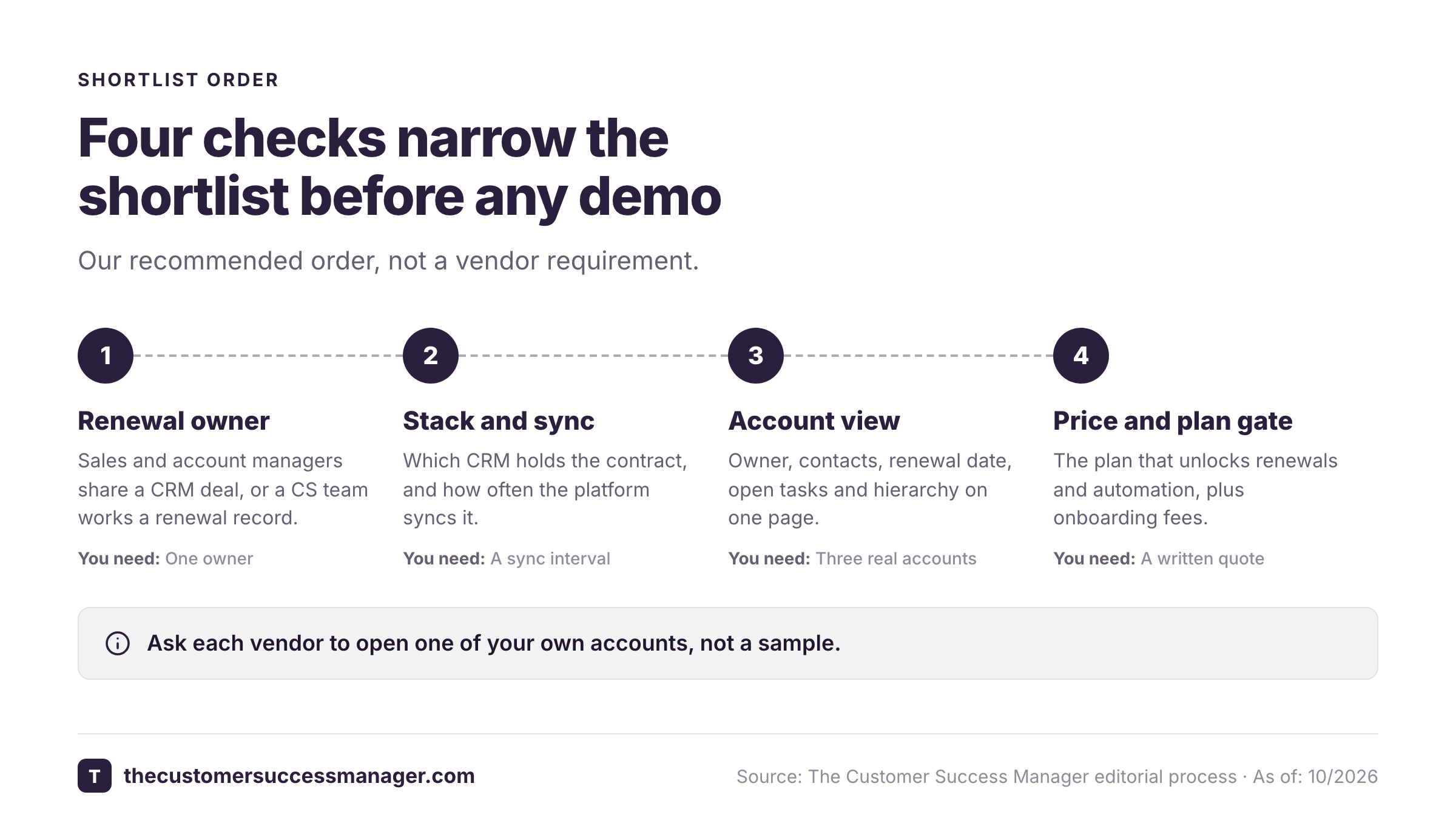
- Sales and account managers share one forecastHubSpot or Salesforce
- A free start for a small teamHubSpot (2 users) or Zoho CRM (3 users)
- Large customers with parent and child accountsSalesforce, or Planhat on Enterprise
- A CRM your team already uses as boardsmonday CRM
- A renewal center fed by Salesforce opportunitiesGainsight
- Renewal forecasts that use health scoresChurnZero (Planhat also lists a health-weighted method)
- Renewal owners who are not CSMsVitally (custom key roles)
- A flexible data model with renewals on the companyPlanhat
- Customer promises tracked to verified deliveryThe Customer Success Manager, beside your CRM
What these tools don't record
Most account management software tracks tasks, health, contacts and renewals. The sources we read did not document a field for the specific promises your team made to a customer in calls, QBRs and email: the integration review before the audit, the fix date for a bug, the discount that was agreed verbally. Those live in meeting notes and memory, and they disappear when the CSM changes. The Customer Success Manager is a small ledger for exactly that gap, with an owner, a due date, source evidence and a reviewer who verifies delivery. It sits beside your CRM or customer success platform and does not replace either.
FAQ
What is account management software?
Account management software is the system where the team that owns existing customers keeps one record per customer company, with contacts, renewal date and amount, open tasks and activity. CRMs such as HubSpot, Salesforce, Zoho CRM and monday CRM do this, as do customer success platforms such as Gainsight, ChurnZero, Planhat and Vitally.
What is the difference between account management software and a CRM?
A CRM is one kind of account management software. It tracks companies, contacts and deals, and you build renewal tracking from deals, fields and workflows. A customer success platform adds health, playbooks and a renewal view, and usually syncs with the CRM.
Do I need a customer success platform, or is a CRM enough?
A CRM is enough when account managers also sell expansion and the renewal calendar is short. A platform fits when a CS team runs many renewals and wants health-based forecasts without building them, and it adds a second system and a quote-only price.
Is there free account management software?
HubSpot's CRM is free for up to 2 users and Zoho CRM is free for up to 3 users. Salesforce shows a Free Suite at $0 in its comparison table and offers a 30-day trial. We found no free plan for the four customer success platforms on the published vendor pages (ChurnZero does not publish pricing).
Which tool handles renewals best?
Gainsight and ChurnZero have a dedicated renewal center and hub with forecasting, though Gainsight lists renewal and expansion forecasting for Enterprise only and does not publish which plan includes the Renewal Center. Planhat and Vitally hold renewal data on the account and use workflows; Planhat also builds forecasts from deals, while in Vitally forecast fields are a build. The CRMs need a renewal process built from contracts, fields and workflows.
How much does account management software cost?
Published CRM prices run from free to $550 per user per month. Zoho CRM Professional is listed at $23 per user per month on G2 (Zoho's own page shows euros), and HubSpot Sales Hub Professional is $90 per seat per month billed annually, plus a $1,500 onboarding fee. Gainsight, ChurnZero, Planhat and Vitally quote prices on request.
Related reading
Related: best customer segmentation software compares eight tools by how they build and use segments.