The best customer segmentation software for a customer success team depends on what each segment has to trigger.  Vitally and
 Gainsight Customer Success turn segments into coverage decisions,
 Amplitude and
 Mixpanel find accounts by what their users do, and
 Customer.io and
 HubSpot Marketing Hub turn a segment into outreach. Four of the eight tools publish no price at all.
- tools compared
- 8
- jobs a segment can do
- 3
- publish no price
- 4
- G2 reviews behind the ratings
- 26,519
Best customer segmentation software at a glance
Every tool below groups customers by rules, but they differ in who owns the rules, whether the segment works per account or per user, and where the segment can go next. The picks are by job.
- Best for coverage tiersVitallyPlaybook rules put accounts into segments such as coverage tiers, and dashboards group by segment.
- Best if accounts live in SalesforceGainsight Customer SuccessCompany segments built from Salesforce or Matrix Data objects become the audience of programs.
- Best for behavior segmentsMixpanelEvent and property conditions recompute whenever you query the cohort.
- Best for lifecycle messagingCustomer.ioData-driven segments update themselves and can start automations.
- Best if you run HubSpot CRMHubSpot Marketing HubActive contact and company segments feed email, workflows and reports.
 For what segments leave outThe Customer Success ManagerRecords what you promised the customers inside a segment. It does not segment anything.
All eight tools compared
| Tool | Type of tool | What a segment drives | Starting price | G2 rating |
|---|---|---|---|---|
| Vitally | Customer success platform | Account lists, dashboards and playbooks | Quote only | 4.5 (713) |
| Gainsight Customer Success | Customer success platform | Audiences for programs | Quote only (Essentials and Enterprise tiers) | 4.5 (1,772) |
 Planhat | Customer success platform | Journeys, tasks and CSM assignment by tier | Quote only, no public USD price | 4.5 (964) |
 ChurnZero | Customer success platform | Scheduled reports | Quote only (not published by the vendor) | 4.7 (1,633) |
| Amplitude | Product analytics | Chart filters and cohort syncs | Free to 2M events/month; Plus from $0; Growth and Enterprise by quote | 4.5 (3,045) |
| Mixpanel | Product analytics | Report filters and cohort syncs | Free to 1M events/month; Growth from $100/mo billed yearly ($140 billed monthly) at 1.5M events | 4.5 (1,380) |
| Customer.io | Lifecycle messaging platform | Campaigns and broadcasts | Essentials from $100 per month (5,000 profiles, billed monthly); Premium from $1,000 per month billed yearly; Enterprise custom | 4.4 (976) |
| HubSpot Marketing Hub | CRM and marketing automation | Email, workflows, ad audiences and reports | Free tools for up to 2 users; Starter $20 per seat per month list ($7 for new customers in a limited promotion); Professional from $800 per month ($890 struck through on the page) plus required $3,000 onboarding; Enterprise from $3,600 per month plus required $7,000 onboarding | 4.4 (16,036) |
| The Customer Success Manager Our product | Customer commitment tracking | Records what your team promised each customer and whether delivery was verified | From $49 per month per workspace; card required at checkout (vendor homepage, as of 2026-11-05) | No reviews yet |
Prices and plan details as of November 2026. G2 figures were read between October 20 and 30, 2026.
What customer segmentation software does
Customer segmentation software groups customers or accounts into segments by shared traits, such as plan, ARR, lifecycle stage or product usage, and keeps those groups current so a team can treat each one differently. A customer success team uses a segment to decide who gets a named CSM, who gets an email sequence, which accounts need a renewal call and which usage drops need a look.
Three properties separate the tools in this list. The first is level: a segment can contain people, accounts or both, and customer success work is mostly account level because the renewal and the contract belong to the account, while product usage is recorded per user.
The second is freshness. A dynamic segment updates its members as the data changes, and a static segment holds whoever matched when it was saved.
The third is destination. A segment only matters if it can start something, such as a task, an email, a report or a separate health score per segment.
How a segment goes from data to action
A segment is the middle step of four. Data has to arrive in the tool, a rule turns it into a group, the group refreshes, and something acts on it. Each step is where a tool can fall short, and the next sections point out which.
- Step 1Data arrives
- Gainsight Customer Success
- Amplitude
- Mixpanel
Limit a segment can only use fields the tool already holds, so Gainsight segments start from Salesforce or Matrix Data objects - Step 2A rule builds the group
- Vitally
- ChurnZero
- Customer.io
Limit Vitally needs one playbook per automated segment and Customer.io needs accounts modeled as objects - Step 3The group refreshes
- Mixpanel
- HubSpot Marketing Hub
- Gainsight Customer Success
Limit Gainsight refreshes on a schedule you set, while Mixpanel computes a cohort when you query it - Step 4Something acts on it
- Customer.io
- HubSpot Marketing Hub
- Vitally
- Planhat
Limit HubSpot sends marketing email to contact segments only, not to company segments
Customer success segments worth building
Start from the decision, not the tool. These six segments cover most coverage, renewal and risk work. The thresholds are examples to replace with your own.
| Segment | Example rule | Data you need | What the team does |
|---|---|---|---|
| Coverage tier | ARR above $50,000, or below $10,000 | ARR or MRR from the CRM or billing | Assigns a named CSM, a shared pool or a tech-touch program |
| Lifecycle stage | Onboarding, adopting, renewing | Contract start date and an onboarding milestone | Switches the playbook and the health model |
| Renewal window | Renewal date inside 90 days | Renewal date on the account | Opens a renewal task and a stakeholder check |
| Adoption drop | Key event count down more than half in 30 days | Per-user or per-account product events | Sends a check-in or schedules a call |
| Expansion signal | License utilization at 100% | Seats bought and seats used | Flags the account for the upsell conversation |
| Sustained risk | Health below a set score for 30 days | A health score and its history | Escalates to a high-touch plan |
Each tool card below builds one recipe: paying accounts with low usage and a renewal inside 90 days. That recipe needs all three kinds of data, which is why it shows where each tool is strong and where it needs a second system.
Customer success platforms: segments that set coverage
Vitally, Gainsight, Planhat and ChurnZero sit closest to the CSM's daily work. A segment here usually decides ownership, tasks and which health model applies, but the builders differ a lot in how much of them is public.
Vitally
Vitally
Fills account, organization or user segments with Playbook rules, then filters lists, views and dashboards by segment.
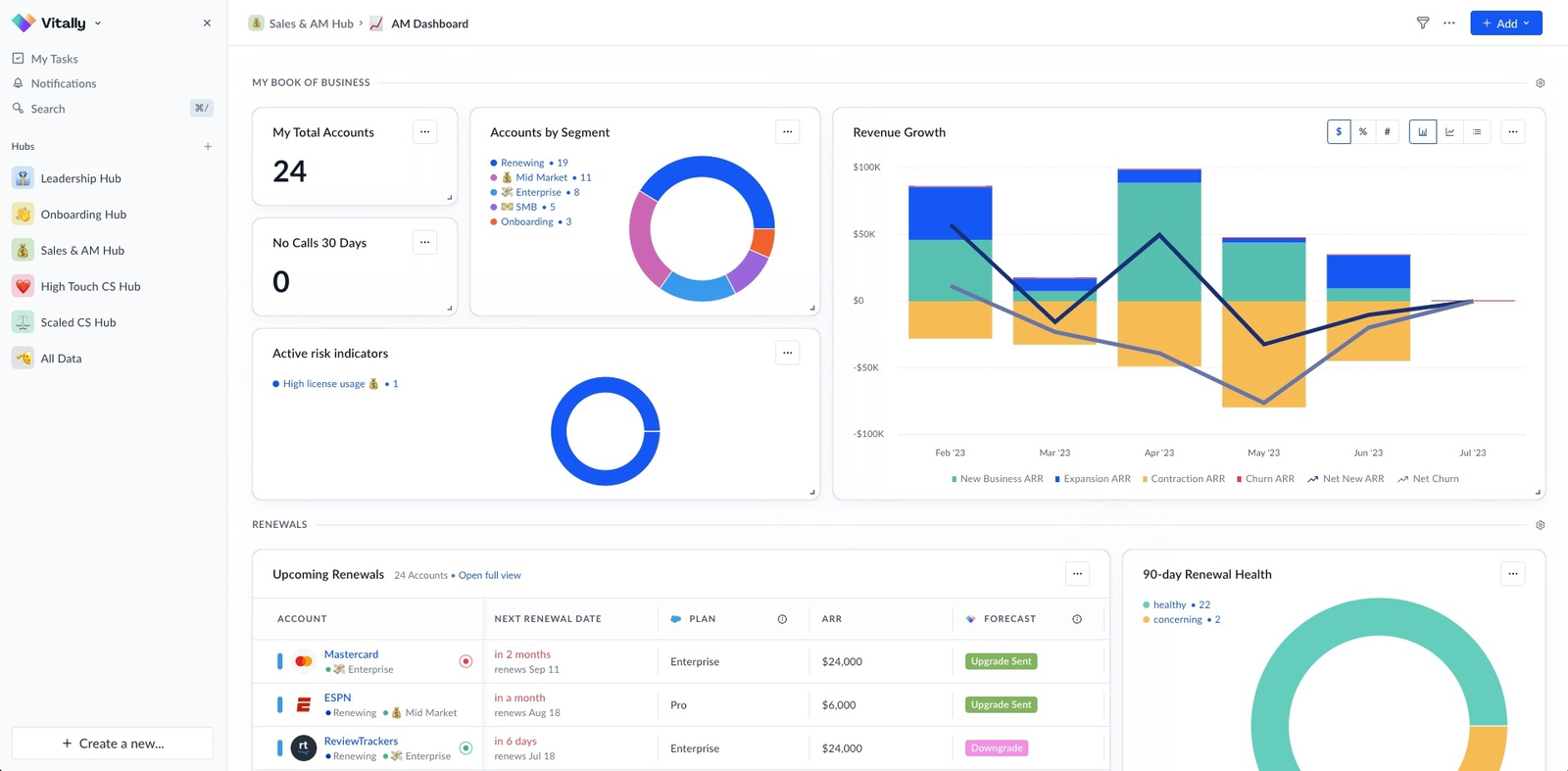
Vitally builds the recipe in two steps. You create a segment under Settings, then an account-level Playbook with trigger rules and the Add to a Segment action. Rules combine with AND, OR and filter groups, and they can use traits, success metrics, product usage, MRR and renewal data, Clearbit market data or any data you send. Vitally's documentation recommends one playbook per segment, and an account matches if any of its users matches the user rules. Membership added by a playbook is dynamic: when an account stops matching, the link goes away. A segment applied by hand overrides the playbook and is not removed by it.
Once accounts are in a segment, it works as a filter on account lists and table views and as a grouping in dashboard widgets, for example NRR by segment. Further playbooks can start from the segment to create tasks with round-robin assignment, send email conversations, set traits or ping a webhook. The documentation says playbooks run on about an hourly window and that there is no built-in history of when an account entered or left a segment. It suggests writing a datetime trait to track that.
- You want rules to sort accounts into segments such as coverage tier, lifecycle stage or persona
- You want dashboard metrics such as NRR grouped by segment
- You want a standalone filter builder: automated membership needs one playbook per segment
- You need a history of when accounts entered or left a segment: it is not built in
- Users like
- Flexible, segmentable health scores and a useful AI assistant.
- Users dislike
- A few early reviewers say the interface feels overwhelming at first
- Source: G2, 713 reviews
Reviews, packages and price
G2 lists Vitally at 4.5 from 713 reviews (as of October 29). Reviewers praise flexible, segmentable health scores and a useful AI assistant, and a few early reviewers say the interface feels overwhelming at first. Vitally sells Tech-Touch, Hybrid-Touch and High-Touch packages, and all three show Request Pricing.
- Starting price
- Quote only
- Scoring
- Rules-based, weighted 0 to 10
- Refresh
- Hourly per docs
- Limits
- 10 scores, 50 properties
- AI
- Copilot reads calls, emails, tickets
- Pricing
- Not published
- CS packages
- Tech-Touch, Hybrid-Touch, High-Touch
- Unlimited automations
- Advertised across plans
- Observer seats
- Unlimited advertised
- SSO
- Advertised across plans
- CRM connectors
- Salesforce, HubSpot
- Published USD price
- Request pricing
- Packages
- Tech-Touch, Hybrid-Touch, High-Touch; unlimited full seats on High-Touch
- Trial
- Dedicated sandbox after contacting sales
- Segment builder
- Account, Organization or User segments filled by hand or by one Playbook per segment (AND/OR rules on traits, usage and MRR)
- Segment refresh
- Playbook-driven membership; docs describe an hourly run window and no entry/exit history
- Segment level
- Account, organization or user
- Updates itself
- Yes, when a Playbook assigns the segment
- Gate or limit
- Segment limits and plan gates not published
Gainsight Customer Success
Gainsight
Builds a company segment from a Salesforce or Matrix Data object, refreshes it on a schedule and uses it as the audience for a program.
Gainsight asks for the data source first. Segments in Journey Orchestrator come from Salesforce objects or Matrix Data objects, so the usage field and the renewal date have to exist on one of them already. You pick the object, set a company identifier and add filters on its fields. Gainsight's documentation caps a segment at 26 filters and 100,000 fetched records, and a tenant at 500 segments. Person-level types (company person, relationship person) exist too, and a CSV upload works for person segments.
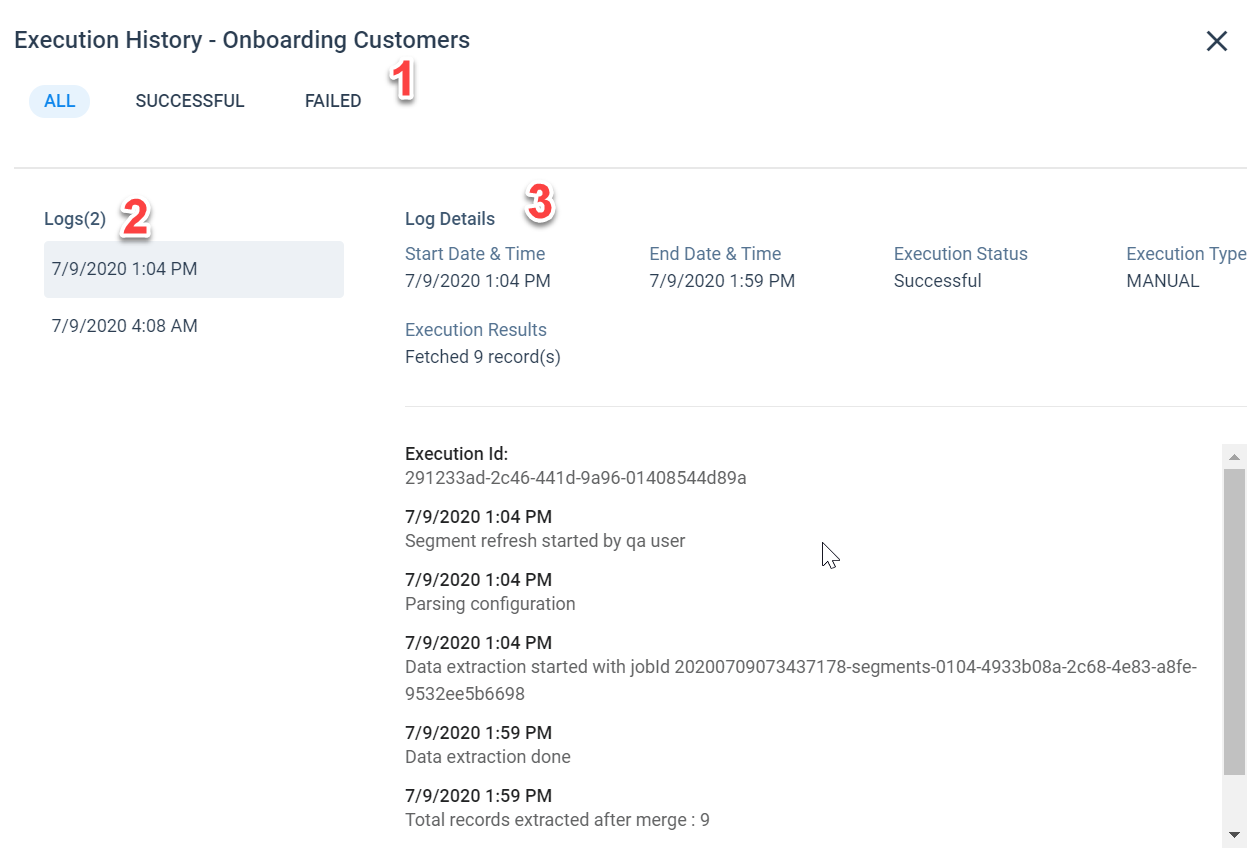
A segment refreshes only when you switch on a scheduled refresh on its Schedule tab. Otherwise it runs once. Deletes and company merges in the source are not reflected. The documented use is as the audience of a program, for example an email to every contact at enterprise customers. The documentation lists reports and rules support as planned, so confirm the current state before you rely on a segment inside a rule. For coverage tiers, the scorecard FAQ suggests segmenting first and then building one scorecard per lifecycle stage, segment or industry, with shared measures and different weights.
- Your accounts, ARR and renewal dates already live in Salesforce
- You want one scorecard per segment or lifecycle stage
- You have no admin to model Matrix Data objects: segments start from those objects
- You need segments that update the moment data changes: refresh runs on a schedule
- Users like
- Ease of use, centralized information, visibility
- Users dislike
- Not intuitive, steep learning curve, limited customization
- Source: G2, 1,772 reviews
Reviews, editions and price
G2 lists Gainsight Customer Success at 4.5 from 1,772 reviews (as of October 29). Reviewers praise ease of use and centralized information, and they cite a steep learning curve, a not-intuitive interface and limited customization. Gainsight sells Essentials with 10 full users and Enterprise with 20, both on request. The segment documentation does not say which edition includes which segment features.
- Starting price
- Quote only (Essentials and Enterprise tiers)
- Risk method
- Weighted scorecard (rules) plus Staircase AI communication analysis
- Risk output
- Health score 0-100 and Risk Level 1-5 with risk reasons
- Inputs
- Usage and CRM via scorecards; emails, calls, tickets, meetings via Staircase AI
- Refresh
- Risk summary about every 8 hours while risk is active
- Tiers
- Essentials and Enterprise; Staircase AI gating not published
- Vendor claim
- Up to 95% renewal forecast accuracy (unverified)
- CS packages
- Essentials, Enterprise
- Essentials full users
- 10
- Enterprise full users
- 20
- CRM connectors
- Salesforce, HubSpot
- Published USD price
- Request pricing
- Renewals
- Confirm add-on entitlement
- Segment builder
- Journey Orchestrator segments from Salesforce or Matrix Data objects; 26 filters, 100,000 records per segment, 500 segments per tenant
- Segment refresh
- Only on a schedule you set; deletes and company merges are not reflected
- Segment level
- Company and person types
- Updates itself
- Only on a scheduled refresh
- Gate or limit
- 26 filters, 100,000 records, 500 segments per tenant
Planhat
Planhat
Describes tiers by ARR band that re-segment accounts as usage, health and revenue change, with a separate health model per tier.
Planhat's public pages do not show the segment builder, its limits or its plan gates, What Planhat publishes is a framework. Its guide to scaled customer success sets tiers by ARR band (high-touch above $50,000, mid-touch $10,000 to $50,000, tech-touch under $10,000) and re-segments continuously instead of fixing a tier at contract close. A tier change starts journeys, CSM assignment and tasks. In Planhat's own example, a mid-touch account with health below 60 for more than 30 days moves to high-touch and creates a priority task.
The guide is written by the vendor and presents the framework as an implementation in Planhat, so ask for the builder in a demo before you assume it matches.
- You want to adopt Planhat's ARR-band tier framework and confirm in a demo that the builder does it
- You want to try a separate health model per tier
- You need to see the segment builder, limits and plan gates before a demo: the public pages do not show them
- You need a published price: Planhat quotes a platform fee plus a minimum number of core users
- Users like
- Reviewers praise flexibility of the data model and workflows, plus onboarding and support quality.
- Users dislike
- Reviewers cite a steep learning curve and the need for technical skills for automations and customization.
- Source: G2, 964 reviews
Reviews and price
G2 lists Planhat at 4.5 from 964 reviews (as of October 29). Reviewers praise the flexibility of the data model and workflows, plus onboarding and support quality, and they cite a steep learning curve and the technical skills needed for automations and customization. Pricing is a platform fee plus a minimum number of core users, billed annually upfront and in USD by default. No USD amounts are published.
- Starting price
- Quote only, no public USD price
- Scoring type
- Rules-based, 0 to 10, baseline 5
- Inputs
- Fields, metrics, NPS, usage, AI sentiment
- AI
- Sentiment and summaries, credit based
- Plan gating
- Not published; AI add-on listed
- Refresh
- Not published
- Pricing model
- Platform fee plus minimum core users; extra core users and add-ons
- Billing
- Annual upfront, USD by default
- View users
- Unlimited on all plans
- Segment builder
- Public help pages did not load; the vendor's own guide describes ARR-band tiers with a health model per tier
- Segment gating
- Not published
- Segment level
- Not shown in public pages
- Updates itself
- Re-segments continuously (vendor description)
- Gate or limit
- Not published
ChurnZero
ChurnZero
Builds account and contact segments from metrics such as license utilization and login counts, then feeds them into scheduled reports.
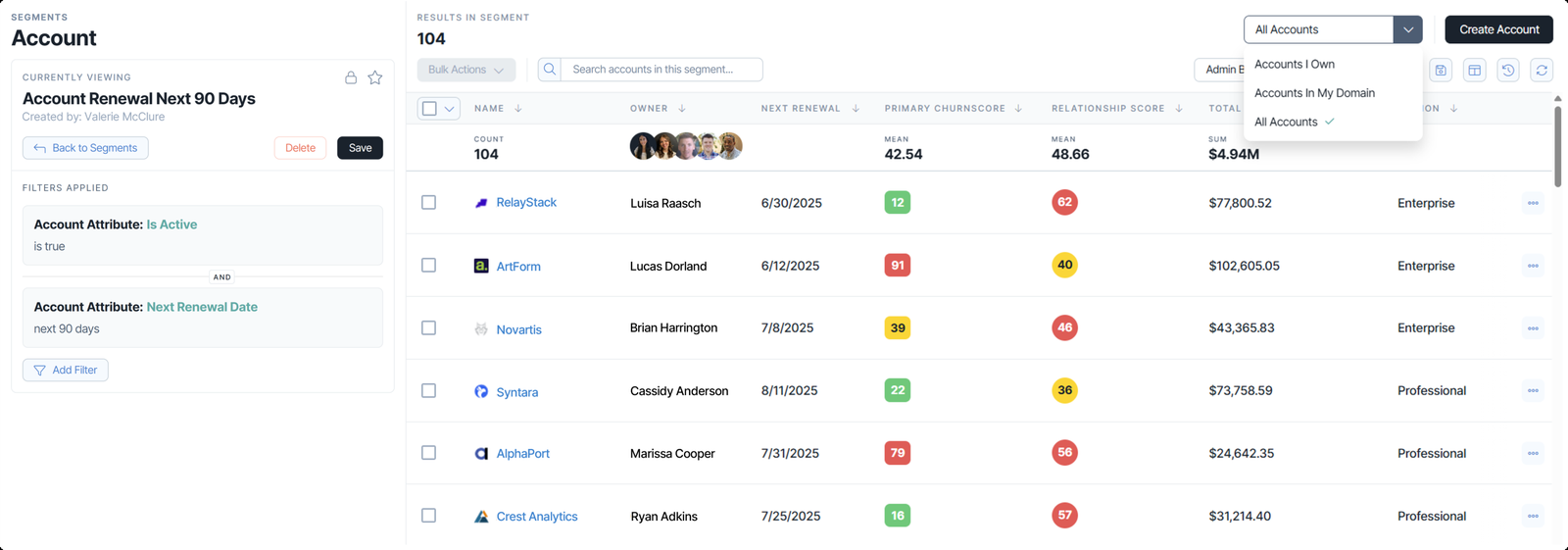
ChurnZero splits segments by what they return. An account segment returns accounts that match filters on account metrics, for example license utilization at 100% for the current year. A contact segment returns people, for example active contacts with more than 30 logins in the last month. Its help article lists further segment types for events, messages, tasks, notes, survey responses, meetings, success plans, signals and custom tables, so a CSM has to pick the right type before filtering. The marketing page lists size, product type, industry, feature use, sentiment, NPS, decision makers and upsell potential as example segments.
Segments drive reports: they filter a report, and ChurnZero's reporting page says they can trigger report creation and sharing on a schedule, delivered by email, Salesforce, Slack or Teams. A vendor customer story also shows a segment attached to a Play that fires when an account enters it. ChurnZero lists a 15-minute default sync of accounts and contacts for Salesforce and HubSpot. ChurnZero's public pages do not say whether segments update themselves, how filters nest or what limits apply.
- You want scheduled, segment-based reports sent to Slack, Teams or email
- You want separate account and contact segments for different questions
- You want a price before a sales call: ChurnZero publishes none
- You want a quick builder: G2 reviewers cite a learning curve and complexity
- Users like
- Ease of use, automation, customer support
- Users dislike
- Learning curve, complexity, not intuitive
- Source: G2, 1,633 reviews
Reviews and price
G2 lists ChurnZero at 4.7 from 1,633 reviews (as of October 29), the highest rating in this list. Reviewers praise ease of use, automation and customer support, and they cite a learning curve, complexity and a not-intuitive interface. No vendor prices are listed, and which edition includes which segment features is not published.
- Starting price
- Quote only (not published by the vendor)
- Risk method
- Hand-built weighted ChurnScore (rules) plus Harbinger AI agent
- Risk output
- Score with red/yellow/green; agent flags with type, urgency, impact
- Inputs
- Usage, engagement, support, surveys, journeys; Harbinger reads engagements
- Editions
- Professional and Enterprise; Agentic Essentials add-on, price not published
- Tuning
- CSM-built factors, Calculate ChurnScore check on 150 accounts
- Vendor claim
- 60% churn decrease (no methodology)
- Integrations
- 11 CRMs, 12 support tools, S3, Snowflake, BigQuery; Intercom, Mixpanel, Pendo, Segment under usage (vendor integrations page, 2026-11-06)
- Segment builder
- Segments by object: accounts, contacts, events, messages, tasks and more, filtered on account and contact metrics
- Segment output
- Scheduled and shared reports; vendor story shows a Play fired on segment entry
- Segment level
- Account and contact segments, plus other object types
- Updates itself
- Not published
- Gate or limit
- Not published
Product analytics: behavioral cohorts
Amplitude and Mixpanel answer the adoption question that platforms often cannot: which accounts stopped using the feature that justifies the renewal. Both call a segment a cohort, and both are strong per user and need an add-on and engineering help to work per company.
Amplitude
Amplitude
Builds cohorts from event rules in a time window and syncs them to messaging and CRM tools, with account-level cohorts behind an add-on.
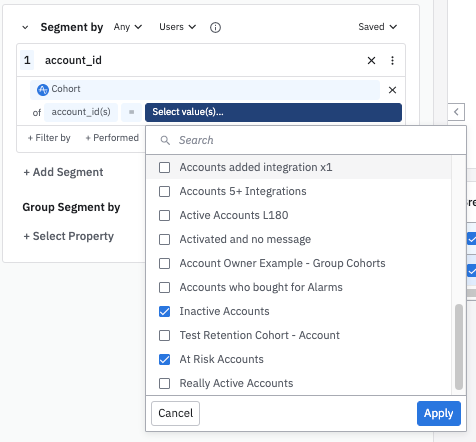
In Amplitude the recipe becomes a behavioral cohort: users that did, or stopped doing, a key event inside a time window. A cohort used to segment a chart recomputes each time the chart runs, and a refresh icon recomputes it on demand. Predictive cohorts use machine learning. To work on companies instead of users, you switch the cohort to a group type, which needs the Accounts add-on (listed on Growth and Enterprise) and group data instrumented by engineering. Amplitude allows up to five group types per project. Custom behavioral cohorts are not on the Free plan.
Cohorts can be synced to destinations such as Braze and HubSpot one time or on a schedule (hourly or daily). Real-time sync exists for some destinations only, and HubSpot is not one of them. The plan decides how: Free allows one-time syncs, Plus does not include scheduled syncs, Growth and Enterprise include scheduled syncs with limits, and real-time sync is an add-on on Growth and Enterprise. Amplitude's sync documentation does not say whether group-level cohorts can be synced.
- You want to find accounts by what their users do in the product
- You have a data or product team that can instrument groups
- You need account-level cohorts without engineering help: the Accounts add-on and group data come first
- You need company cohorts in your CRM: syncing group-level cohorts is not documented
- Users like
- Clear behavior insights and an intuitive interface
- Users dislike
- Steep learning curve, missing features, event cost and management
- Source: G2, 3,045 reviews
Reviews and price
G2 lists Amplitude at 4.5 from 3,045 reviews (as of October 28). Reviewers praise clear behavior insights and an intuitive interface, and they cite a steep learning curve, missing features and the cost and management of events. Billing is by events: Free covers 2 million events a month, Plus starts at $0 for the first 2 million events, and Growth and Enterprise are by quote.
- Starting price
- Free to 2M events/month; Plus from $0; Growth and Enterprise by quote
- Billing unit
- Events (Plus tier shows up to 700K MTU / 70M events)
- Free plan
- 2M events/month, unlimited seats, 1 year data access
- Account analysis
- Groups, 5 group types per project, Accounts add-on
- Cohort sync
- One-time, scheduled (hourly or daily) or real-time; real-time is an add-on on Growth and Enterprise
- Data retention
- 1 year Free, 2 years Plus, unlimited Growth and up
- Session replay
- 10,000 sessions/month on Free and Plus
- Cohort builder
- Behavioral cohorts from event rules in a time window; account-level cohorts need the Accounts add-on
- Segment level
- User; company with the Accounts add-on
- Updates itself
- Recomputed each time a chart runs
- Gate or limit
- Custom cohorts not on Free; sync mode depends on plan
Mixpanel
Mixpanel
Builds cohorts from event thresholds and profile properties, recomputed whenever you query them, with a paid add-on for company-level analysis.
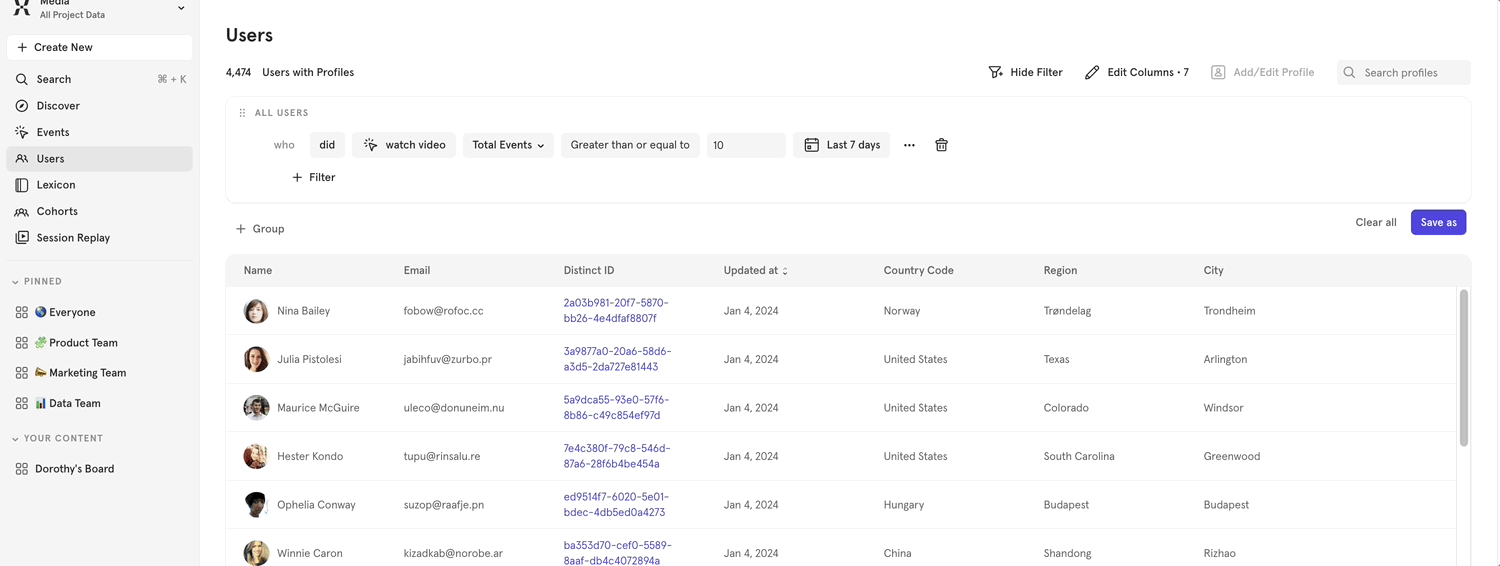
A Mixpanel cohort combines behavioral conditions (did an event more or less than a threshold) and property conditions (a profile property equals, exceeds or falls below a value) with AND and OR. Cohorts are computed dynamically when you use them in a query, so membership always reflects current data, while a cohort made from a CSV upload is static. Events timestamped more than 30 days ago can take up to 12 hours to appear in cohort analysis after an import or change.
For companies, Group Analytics is a paid add-on on Growth and Enterprise that links user profiles to a group key and adds company profiles. Cohort Sync pushes cohorts to destinations such as Segment and Braze and to custom webhooks, and a cohort's users can be downloaded as a CSV. Mixpanel's documentation does not say which plan includes Cohort Sync.
- You can describe a behavior segment as an event threshold plus a property
- You want to hand a cohort to Braze or Segment
- You need company-level lists you can sync into a CRM: Group Analytics is an add-on and syncing company cohorts is not documented
- You are on the Free plan and want saved cohorts: Free cannot save them
- Users like
- Easy to use interface and real time insights
- Users dislike
- Steep learning curve (37 mentions); single reviews also mention complex setup and pricing for small teams
- Source: G2, 1,380 reviews
Reviews and price
G2 lists Mixpanel at 4.5 from 1,380 reviews (as of October 28). Reviewers praise an easy interface and real-time insights, and the most frequent complaint is a steep learning curve (37 mentions). Billing is by events: Free covers 1 million events a month, and Growth starts at $100 a month billed yearly ($140 billed monthly) for 1.5 million events.
- Starting price
- Free to 1M events/month; Growth from $100/mo billed yearly ($140 billed monthly) at 1.5M events
- Billing unit
- Tracked events per month
- Free plan
- 1M events, unlimited seats, 10K session replays
- Group Analytics
- Paid add-on on Growth and Enterprise, price not published
- Warehouse
- Import from Snowflake, BigQuery, Databricks, Redshift, Postgres
- Data retention
- 2 years default, custom on Enterprise only
- Cohort builder
- Event and profile-property conditions with AND/OR; computed at query time; CSV uploads are static
- Cohort gating
- Free cannot save cohorts; Growth and Enterprise save them; Group Analytics is a paid add-on
- Segment level
- User; company with Group Analytics
- Updates itself
- Yes, computed at query time (CSV cohorts are static)
- Gate or limit
- Free cannot save cohorts; Group Analytics is an add-on
Messaging and CRM: segments that trigger outreach
Customer.io and HubSpot are built to send. A segment is the audience of a campaign or workflow, which suits tech-touch programs and renewal reminders but gives a CSM no task list on its own.
Customer.io
Customer.io
Builds data-driven segments from attributes, events and relationships and uses them as the audience or trigger of campaigns.
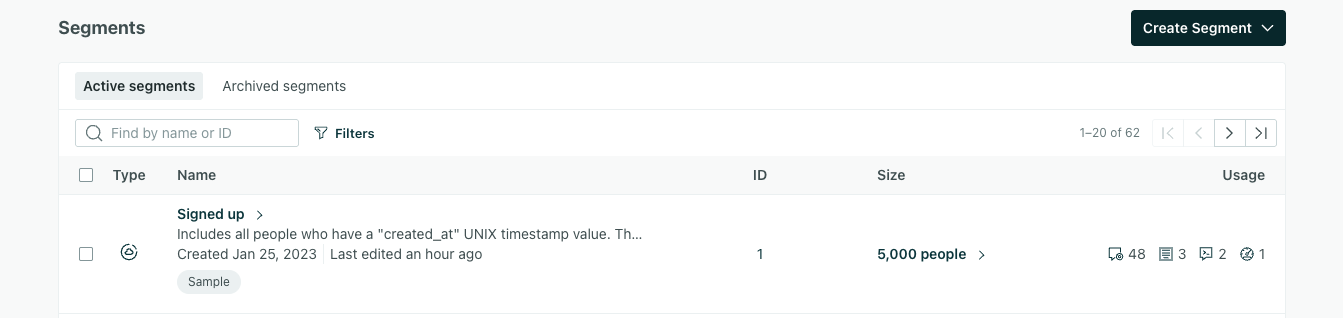
Customer.io has three segment types. A data-driven segment updates itself as people's data changes. A snapshot segment uses the same conditions but stays frozen until someone clicks Refresh. A manual segment is a CSV upload, an automation action or an API call. Conditions can use attributes, events, relationships to objects, forms, page events, devices, consent records, other segments and message activity, joined with All, At least one or nested groups. An is-one-of condition accepts up to 50 values.
Accounts are not a native level: you model them as custom objects (2 object types on Essentials, 10 on Premium) and select people through a relationship condition. Objects count toward billable profiles. A segment can be an automation trigger, a broadcast audience or a filter, and it can be exported as a CSV. One trap in the documentation: a relationship-based segment starts an automation for the first matching relationship only, not for each match.
- You want a segment to start a message when someone joins it
- You can keep attributes, events and accounts as objects in Customer.io
- You need account-level segments without modeling accounts as objects
- You watch cost closely: billing counts people plus objects
- Users like
- ease of use and flexible event-driven automations
- Users dislike
- a steep learning curve for advanced automations and pricing that grows with every stored profile
- Source: G2, 976 reviews
Reviews and price
G2 lists Customer.io at 4.4 from 976 reviews (as of October 20). Reviewers praise ease of use and flexible event-driven automations, and they cite a steep learning curve for advanced automations and pricing that grows with every stored profile. Essentials starts at $100 a month for 5,000 profiles billed monthly, Premium at $1,000 a month billed yearly, and Enterprise is custom. Segments, AI segment building and suggested segments are on all three plans.
- Starting price
- Essentials from $100 per month (5,000 profiles, billed monthly); Premium from $1,000 per month billed yearly; Enterprise custom
- Billing unit
- profiles (people plus account objects), 5,000 on Essentials
- Account objects
- 2 object types on Essentials, 10 on Premium
- CRM sync
- Salesforce and HubSpot on Premium and Enterprise
- Segment types
- Data-driven (updates itself), snapshot (frozen until refreshed) and manual (CSV, automation action or API)
- Segment logic
- All, At least one and nested groups; accounts must be modeled as custom objects
- Segment level
- People; accounts through custom objects
- Updates itself
- Data-driven yes; snapshot and manual no
- Gate or limit
- 2 object types on Essentials, 10 on Premium
HubSpot Marketing Hub
HubSpot
Keeps contact and company segments in the CRM, active or static, and feeds them to email, workflows and reports.
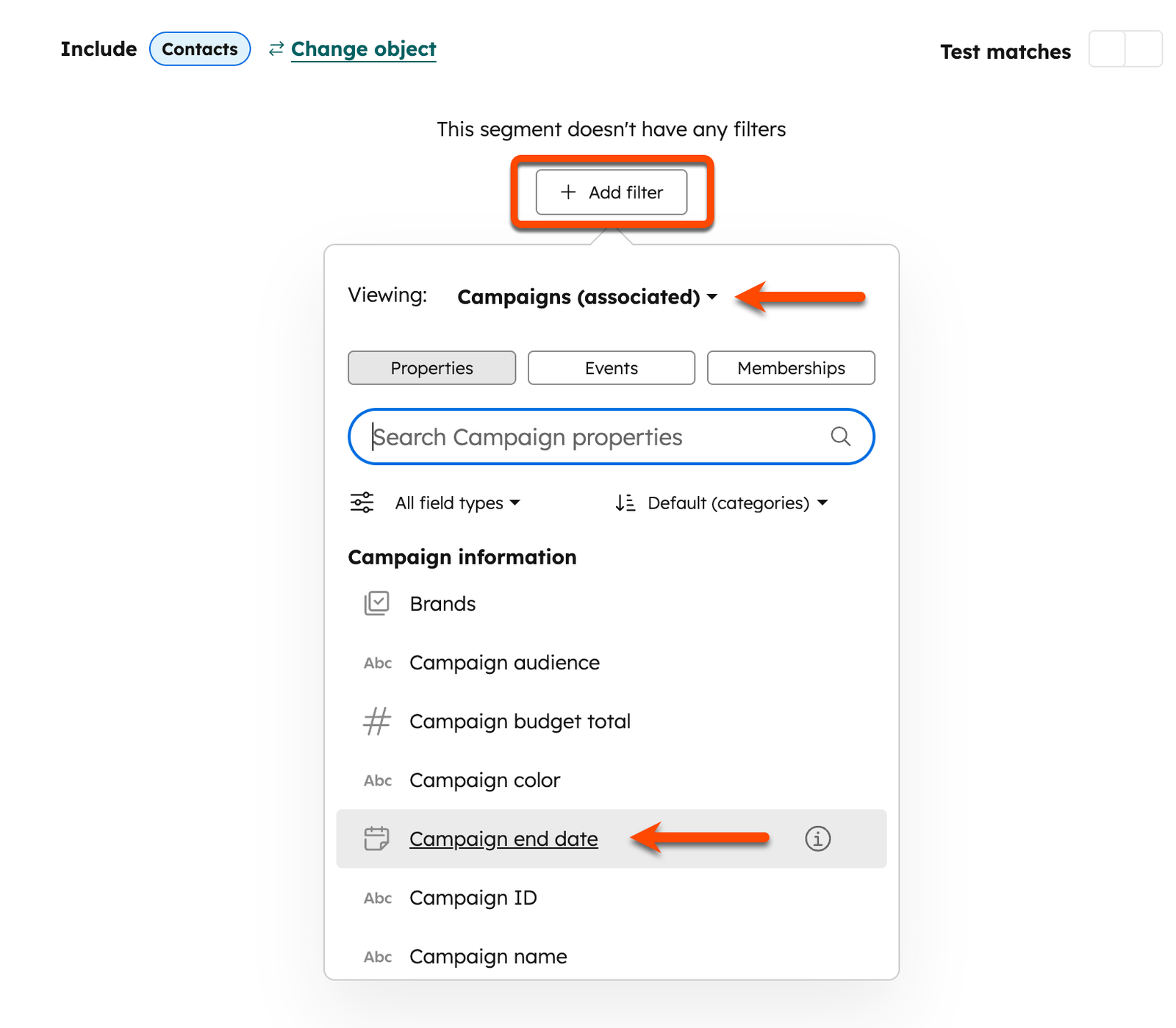
HubSpot's knowledge base now calls its lists segments. You pick an object first, contacts or companies, then add filters on properties, events and memberships, including associated records such as a company's deals or contacts. Filters combine with AND and OR, with up to 250 per segment and up to 60 of them on associated objects. An active segment updates itself as records start and stop matching. A static segment holds whoever matched when it was processed. For the recipe you would build an active company segment on a plan property and a renewal date property, and an active contact segment for the people to message.
Segments drive marketing email (contact segments only), workflow enrollment, ad audiences and filters in custom reports. HubSpot says segments are available with all products and plans. Filtering on association labels needs Professional or Enterprise.
- You already run HubSpot CRM and want account and contact lists that update themselves
- You want one segment to feed email, workflows and reports
- You need to email a company segment: marketing email works on contact segments only
- You need health scores or coverage playbooks: segments only group records
- Users like
- Ease of use with built-in integration and automation (2,525 mentions)
- Users dislike
- Steep learning curve (808 mentions), missing features for smaller teams (786) and cost as the contact list grows (667)
- Source: G2, 16,036 reviews
Reviews and price
G2 lists HubSpot Marketing Hub at 4.4 from 16,036 reviews (as of October 30). Reviewers praise ease of use with built-in integration and automation, and they cite a steep learning curve, missing features for smaller teams and cost as the contact list grows. The reviews cover Marketing Hub, not the free CRM. Professional costs from $800 a month with 3 seats and 2,000 marketing contacts plus a required $3,000 onboarding fee, and Enterprise from $3,600 a month plus $7,000.
- Starting price
- Free tools for up to 2 users; Starter $20 per seat per month list ($7 for new customers in a limited promotion); Professional from $800 per month ($890 struck through on the page) plus required $3,000 onboarding; Enterprise from $3,600 per month plus required $7,000 onboarding
- Segment builder
- Contact or company segments; active (updates itself) or static; up to 250 filters on properties, events and memberships
- Segment output
- Marketing email (contact segments only), workflows, ad audiences, reports
- Segment gating
- Segments exist in every plan; association-label filters need Professional or Enterprise
- Segment level
- Contacts and companies
- Updates itself
- Active yes; static no
- Gate or limit
- 250 filters per segment; label filters need Professional
What to check before you buy
Before you buy, ask these questions in a demo and build the same recipe segment in each trial so you can compare the counts.
- Write the segment as one sentence first, for example paying accounts, usage under a set threshold, renewal inside 90 days
- Ask whether the segment works per account or only per user
- Ask whether the segment updates itself or needs a schedule or a click
- Ask where the segment can go: tasks, email, CRM, reports
- Ask which plan or add-on holds account-level segments and syncs
- Ask how many segments and filters the plan allows
- Build the recipe on real data and compare the count with a hand-made list
| Tool | Segment level | Updates itself | What it drives | Gate or limit |
|---|---|---|---|---|
| Vitally | Account, organization, user | Yes, when a Playbook assigns it | Lists, views, dashboards, playbooks | Not published |
| Gainsight | Company and person | On a set schedule | Program audiences | 26 filters, 100,000 records |
| Planhat | Not shown in public pages | Re-segments continuously (vendor) | Journeys, tasks, CSM assignment | Not published |
| ChurnZero | Account and contact | Not published | Reports | Not published |
| Amplitude | User; company with add-on | Recomputed per chart run | Chart filters, syncs | Custom cohorts not on Free |
| Mixpanel | User; company with add-on | Computed at query time | Report filters, syncs | Free cannot save cohorts |
| Customer.io | People; accounts as objects | Data-driven yes | Campaigns, broadcasts | 2 object types on Essentials |
| HubSpot | Contacts and companies | Active yes | Email, workflows, ad audiences | 250 filters per segment |
Which tool fits which team
- Your accounts and renewal dates live in Salesforce and you have an adminGainsight
- You want rules that sort accounts into coverage tiers, lifecycle stages or personasVitally
- You want ARR-band tiers with a health model per tierPlanhat, once a demo confirms the builder
- You want segment-based reports sent to Slack, Teams or emailChurnZero
- You need to find accounts by what their users do in the productAmplitude or Mixpanel, plus the account-level add-on
- You need a segment to start a messageCustomer.io or HubSpot
- You already run HubSpot CRMHubSpot
What segments don't record
A segment tells you which accounts are in which group. It does not tell you what your team promised the customers in that group. Commitments made on calls and in QBRs sit in notes and in people's heads, and a coverage segment cannot show which of them are still open. The Customer Success Manager keeps that ledger and is not a segmentation tool.
FAQ
What is customer segmentation software?
Customer segmentation software groups customers or accounts into segments by shared traits such as plan, ARR, lifecycle stage or product usage, and keeps the groups current so each one can get a different treatment.
How much does customer segmentation software cost?
Four of the eight tools here publish no price: Vitally, Gainsight, Planhat and ChurnZero. Mixpanel Growth starts at $100 a month billed yearly, Customer.io Essentials at $100 a month, HubSpot Marketing Hub Professional at $800 a month, and Amplitude and Mixpanel both have free plans.
How do I choose customer segmentation software?
Write the segment you need as one sentence, then check whether the tool works per account or per user, updates itself, and can start the action you want, such as a task, an email or a report. A CRM segment or an analytics cohort can do the grouping alone, and a customer success platform adds tasks, playbooks and a health model per segment. Start with coverage tier, lifecycle stage and renewal window.
How often do customer segments update?
Segment refresh depends on the tool. Customer.io data-driven segments and HubSpot active segments update as data changes, Mixpanel computes a cohort when you query it, Vitally playbooks run on about an hourly window, and Gainsight segments refresh only on a schedule you set.
What is the difference between a static and a dynamic segment?
A dynamic segment updates its members as the data changes, such as a HubSpot active segment or a Customer.io data-driven segment. A static segment holds the records that matched when it was saved, such as a HubSpot static segment or a Customer.io snapshot.
Can a free plan do customer segmentation?
Partly. HubSpot says segments are available with all its products and plans. Amplitude's custom behavioral cohorts are not on its Free plan, and Mixpanel's Free plan cannot save cohorts.
Related reading
Related: best customer intelligence software compares eight tools by the customer signals they read and where the insight goes.