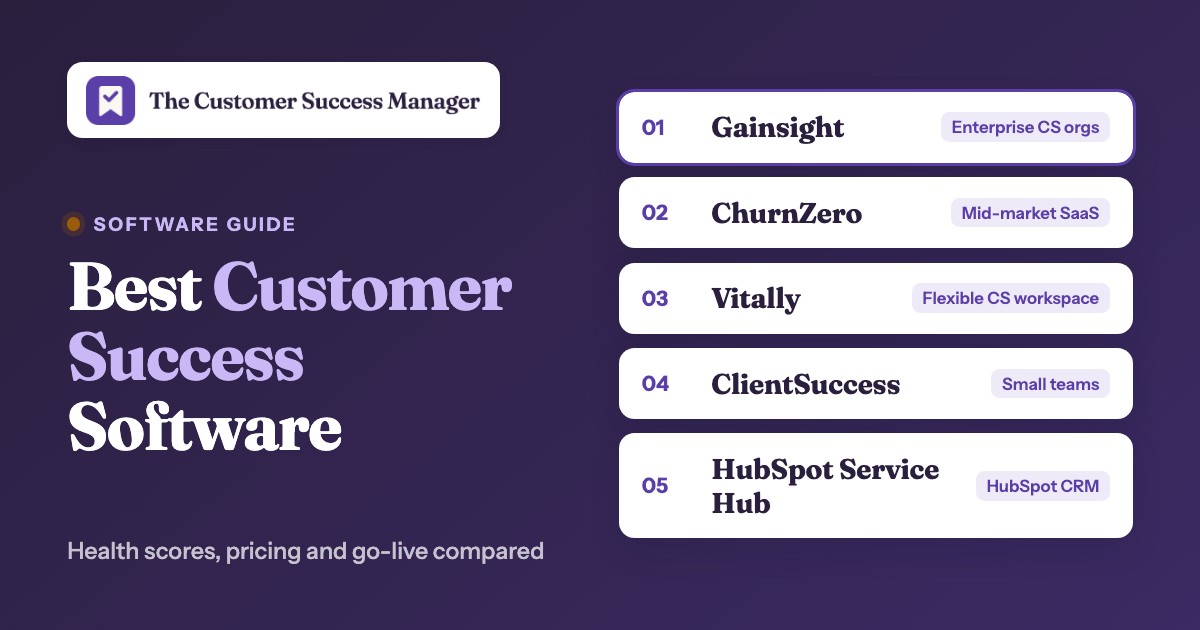
The best customer success software for most B2B teams is one of nine platforms: Gainsight for enterprise CS organizations with an admin, Planhat and Totango (now Odie) for data-heavy enterprise setups, ChurnZero, Vitally and Velaris for mid-market teams, and ClientSuccess, Custify or HubSpot Service Hub for smaller teams. What separates them is less the feature list, which looks alike on every vendor site, and more how each one turns account data into a health score, what that score can trigger, how the vendor prices it and how long it takes to go live.
This guide compares the nine on exactly those points, using each vendor's pricing page, product pages and help-center documentation, plus G2 and Capterra for what users report. Help desks, survey suites, call recorders and in-app guide tools also show up in "customer success software" lists. They support a CS team, but they don't manage accounts after the sale, so they're left out here. Survey and feedback platforms are compared in our guide to customer experience management software.
Best customer success software at a glance
Nine platforms made this list, and six of them are the picks below, one per type of team. The table after the picks adds Totango (now Odie), Velaris and Custify and shows each tool's health score model, starting price and G2 rating side by side.
 Best for enterprise CS orgs on SalesforceGainsight Customer SuccessScorecards, a Rules Engine and success plans customers can edit, with forecasting on the Enterprise package.
 Best all-in-one for mid-market SaaSChurnZeroChurnScores, plays, in-app WalkThroughs and a renewal hub that syncs with the CRM every 15 minutes.
 Best for a flexible CS workspaceVitallySeveral weighted 0 to 10 health scores per account, plus projects and docs you can share with customers.
 Best for revenue and data-heavy teamsPlanhatHealth profiles per segment, renewal deals with line items and customer portals on one data model.
 Best for small teams that need to go live fastClientSuccessA weighted SuccessScore you set up yourself and a vendor-stated go-live of four to six weeks.
 Best if your CRM is HubSpotHubSpot Service HubHealth scores and renewals sit on the same records as deals and tickets, so there is no sync to maintain.
| Tool | Type | Health score model | Starting price (USD) | G2 rating |
|---|---|---|---|---|
| Gainsight Customer Success | Customer success platform | Scorecard of measures, scored by rules or CSMs | Request Pricing for Essentials and Enterprise | 4.5 (1,764) |
 Totango (now Odie) | Enterprise customer success platform | Good, Average or Poor rank (legacy); daily AI re-analysis (Odie) | Odie: from $500 per month (Knowledge Engine) or $1,500 per month (Customer Operating System), annual terms; legacy Totango and Catalyst contracts continue unchanged | 4.3 (1,150) |
| Planhat | Enterprise customer success platform | Health profile per segment, first match wins | Custom, no public price (quote only, add-ons quoted separately) | 4.5 (950) |
| ChurnZero | Mid-market customer success platform | ChurnScore factors that add up to 100 points | Custom, no public price on the vendor site (Capterra lists a $12,000 per year starting price) | 4.7 (1,600) |
| Vitally | Mid-market customer success platform | Several 0 to 10 scores, weighted average | Custom, no public price (three plans, quote only) | 4.5 (700) |
 Velaris | AI-native customer success platform | Indicators in categories, 0.0 to 10.0 | Custom, no public price (one license with 5 users and unlimited viewers, add-ons quoted) | 4.5 (125) |
| ClientSuccess | Customer success platform for B2B SaaS | Metric groups weighted to 100 percent | Custom, no public price (Startup, Growth and Enterprise packages, quoted by number of CSMs and modules) | 4.4 (423) |
 Custify | Customer success platform for SaaS | Score with bands you define | Custom, no public price | 4.7 (500) |
| HubSpot Service Hub | CRM-native service and customer success suite | Event and property groups that add or subtract points | From $90 per seat per month on Professional billed annually (list price $100), plus a $1,500 one-time onboarding fee | 4.4 (3,018) |
 The Customer Success Manager Our product | Customer commitment tracking | Records what your team promised each customer and whether delivery was verified | From $49/month per workspace | No reviews yet |
Checked between October 17 and 21, 2026. Quote only means the vendor publishes no figure; the cost section below explains what each quote is based on. Several G2 ratings and counts are listing figures and can differ slightly from the live page.
What is customer success software?
Customer success software is a platform that subscription and SaaS companies use after the sale to track each customer's health, drive product adoption, prevent churn and manage renewals and expansion. It pulls account data from the CRM, product usage, support tickets, billing and surveys into one record per customer, scores that record and tells a customer success manager (CSM) which accounts need attention and what to do next. Survey scores often come from a separate tool, and our guide to the best customer feedback software compares the options.
Not sure which kind of tool your team needs yet? Our guide to customer success management software maps the seven jobs, the price basis of each kind and a two-week pilot plan.
The category also goes by customer success platform, CS platform, CSM software or, mostly at agencies and services firms, client success software. Client success means the same discipline with "client" in place of "customer". Gartner and G2 list it as its own market, separate from CRM and help desk software.
What a customer success platform does
Every tool in this guide covers six jobs. They differ in how deep each one goes and in which plan unlocks it.
- Customer 360. One account page with contacts, revenue, product usage, tickets, survey answers and CSM notes.
- Health scores. A weighted score per account that turns many signals into a status a manager can sort by.
- Playbooks and automation. Rules that create tasks, send emails or start a sequence when a score, usage trend or lifecycle stage changes.
- Success plans. Goals and milestones agreed with the customer, often shared with them through a link or portal.
- Renewals and expansion. Renewal dates, forecast categories and expansion signals, usually synced with CRM opportunities.
- Digital or scaled CS. One-to-many emails, in-app messages or customer hubs for accounts no CSM can cover one by one.
If your team mostly needs one of these jobs, a narrower tool can be enough. Our guides to customer retention software, customer onboarding software, client onboarding software and customer engagement software cover those cases.
Customer success software vs CRM vs help desk
A CRM such as Salesforce or HubSpot tracks the path to a closed deal. A help desk answers questions customers send in. Customer success software works on the accounts in between: customers who have bought and need to stay, grow and renew.
| Tool type | Main question it answers | Core data | Who works in it | Typical trigger |
|---|---|---|---|---|
| CRM | Will this deal close? | Leads, opportunities, pipeline stages | Sales and account executives | A deal moves stage |
| Help desk | Is this ticket solved? | Tickets, SLAs, conversations | Support agents | A customer writes in |
| Customer success software | Will this account renew and grow? | Health, usage, renewals, goals, NPS | CSMs and CS leaders | A health score or usage trend changes |
Common CRM examples are Salesforce, HubSpot, Microsoft Dynamics 365, Zoho CRM and Pipedrive, and ClientSuccess, for one, lists integrations with all five. Customer engagement software is a fourth neighbor: tools such as Intercom or Pendo send in-app and email messages to users. If your team only needs to message users, an engagement tool is enough; if it needs to know which accounts are at risk and why, it needs a CS platform (see our customer engagement software comparison).
Most CS platforms read from the CRM rather than replace it. The sync direction matters more than it looks, because renewal forecasts usually have to land back in the CRM where finance and sales read them. Each card below says which way the sync runs. Our guide to account management software compares the same platforms with four CRMs by who owns the renewal.
How each platform builds a health score
A health score is only as useful as the action it starts. All nine platforms weight several inputs into one score, but they don't agree on the scale, on whether an onboarding account and a mature account can be scored by different formulas, or on what happens automatically when the score drops. That last column decides how much manual triage your CSMs still do every morning. Our guide to churn prediction software shows which of these scores are rules you set and which come from AI or a trained model.
| Platform | Score model | Scale | Segment-specific formulas | What a score change can trigger |
|---|---|---|---|---|
| Gainsight | Scorecard of measures | Numbers, letters or colors | Yes, per scorecard | Rules Engine creates a Risk CTA in the CSM's Cockpit |
| Totango (legacy) | Health rank | Good, Average, Poor, calculated daily | Yes, by segment | Event-based SuccessPlays |
| Planhat | Health profiles | Set per profile | Yes, first matching profile wins | Automations and workflows |
| ChurnZero | ChurnScore factors | Points that total 100, red, yellow, green | Yes, standard and composite scores | Plays with emails, in-app messages and tasks |
| Vitally | Several scores per account | 0 to 10, weighted average | Yes, equation per segment | Playbooks, evaluated hourly |
| Velaris | Indicators in categories | 0.0 to 10.0, red, amber, green | Yes, by entity and lifecycle stage | Playbooks, tasks or new pipeline deals |
| ClientSuccess | SuccessScore metric groups | Groups weighted to 100 percent | One profile per client type | Automation rules |
| Custify | Score with custom bands | Bands you define | Via segments | Alerts, tasks and playbooks |
| HubSpot Service Hub | Event and property groups | Points with labels and thresholds | Multiple scores on Enterprise only | Health status alerts and workflows |
Best customer success platforms for enterprise CS teams
Enterprise CS orgs usually run Salesforce, sell several products and have a CS operations person who can own scorecards, rules and data mappings. Gainsight, Totango (now Odie) and Planhat are built for that setup, and they're also the three where configuration takes the most time.
Gainsight Customer Success
Configurable customer success operating platform with account context, health scorecards, CTAs, playbooks and success plans.
Gainsight CS fits enterprise customer success organizations that run Salesforce, manage several segments and can give the platform a dedicated admin.
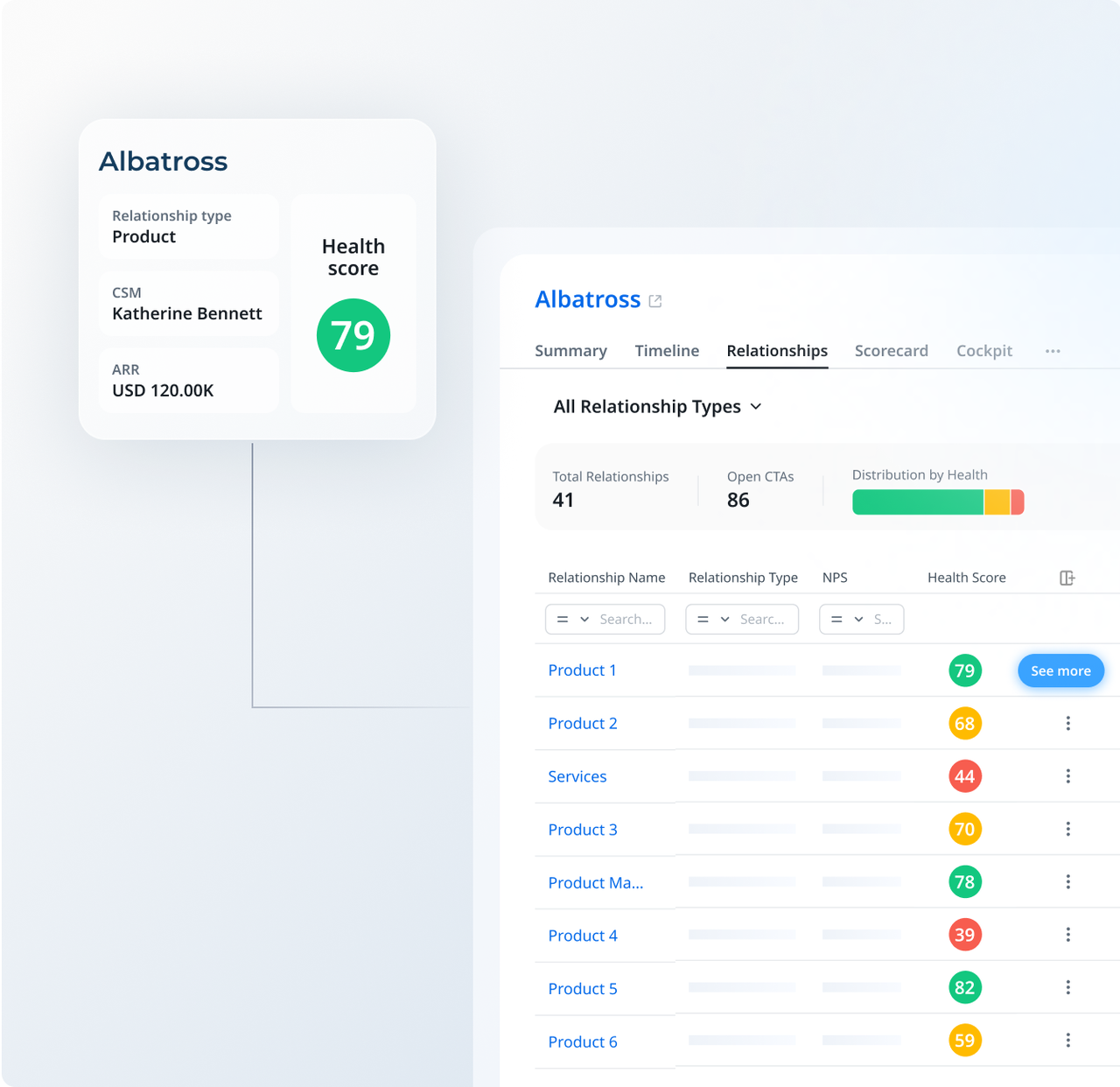
Health in Gainsight lives in Scorecards. A scorecard is a set of measures, for example product usage, support load, NPS and executive sponsor, and each measure is scored either by a CSM or automatically by the Rules Engine. The result shows as a number, a letter or a color, and you can run different scorecards for different segments.
The Rules Engine is what turns a score into work. Gainsight's own tutorial shows a rule that creates a Risk Call to Action with high priority when a measure turns red. That CTA lands in the account owner's Cockpit, the task list a Gainsight CSM starts the day in. On the renewal side, Renewal Center adds a data-science renewal likelihood score that flags the renewals most likely to churn, based on health and engagement.
Success plans are the third piece. Each plan has four tabs (Plan Info, a Cockpit with all its CTAs and tasks, a Gantt chart and a timeline). CSMs create plans by hand, or admins create them from templates through the Rules Engine. A CSM can share a plan by email with customer contacts. If the admin switches on two settings, customers can edit the shared plan and own objectives themselves.
- you run Salesforce and want account, contact, case and opportunity data mapped into one customer record
- you need scorecards, rules and success plans that differ by segment, and someone on the team will own the configuration
- nobody can own the setup: G2 reviewers name the learning curve and configuration complexity as the main drawback
- you want a published price: both Essentials and Enterprise are quote only
- Users like
- Flexible automation and consolidated account visibility
- Users dislike
- Learning curve and configuration complexity
- Source: G2, 1,764 reviews
Plans, renewals, integrations and AI
Plans and limits. Gainsight sells two CS packages. Essentials includes 10 full users and up to 100 customers per user, Enterprise 20 full users and 200 customers per user. Renewal and Expansion Forecasting, Company News and Organizational Mapping with sponsor tracking are listed for Enterprise only. Gainsight's support documentation also calls Renewal Center an add-on licensed through the account manager, so ask which applies to your quote. Our Gainsight pricing breakdown covers the packages in detail.
Renewals. Forecasting works at the opportunity level, not per product line, and GRR and NRR are calculated from opportunity records. Multi-year contracts therefore need an opportunity for each year in between.
Integrations. The Salesforce connector maps Account to Company, Contact to Person, Cases and Opportunities, and any object to a custom object. The docs call the integration bidirectional but note that real-time sync only runs from Salesforce to Gainsight. A Zendesk connector pulls tickets in, and a Gainsight app inside Zendesk shows account data next to live tickets. Journey Orchestrator sends automated emails based on health score, usage, survey results and lifecycle stage. If you are also choosing the help desk itself, our guide to customer service software compares eight options by unit of work and AI pricing.
AI and go-live. Gainsight's 2026 product pages describe prebuilt risk, handoff and expansion agents, a Gainsight MCP server for outside AI assistants and an Agent Studio for custom workflows, without public add-on prices. Atlas, its AI renewal service with Gainsight specialists behind it, is sold separately. The Essentials product page says it can launch in as little as four weeks; the site navigation says two. For a fuller verdict, see our Gainsight review.
- Starting price
- Request Pricing for Essentials and Enterprise
- Published US price
- Request Pricing
- Packages
- Essentials and Enterprise
- Included full users
- Essentials 10, Enterprise 20
- Renewal forecasting
- Listed for Enterprise only; docs call Renewal Center an add-on
Totango (now Odie)
A long-running customer success platform that rebranded to Odie in September 2026 and now sells an AI customer knowledge engine next to the legacy product.
Totango became Odie in September 2026. Existing Totango and Catalyst customers keep the same contract and product for now, while new buyers are offered Odie, a customer knowledge engine with an optional CS workspace on top.
In the legacy Totango platform, health is a rank of Good, Average or Poor, calculated once a day, so a change can show up the next day. Health feeds SuccessPlays, which run when an account enters or leaves trigger criteria such as "health rank changed to Poor in the last X days". The Detect Risk SuccessBLOC ships ready-made plays for champion or leadership loss, a large drop in license use, past-due payments of 45 to 90 days, high support ticket volume and low NPS or CSAT.
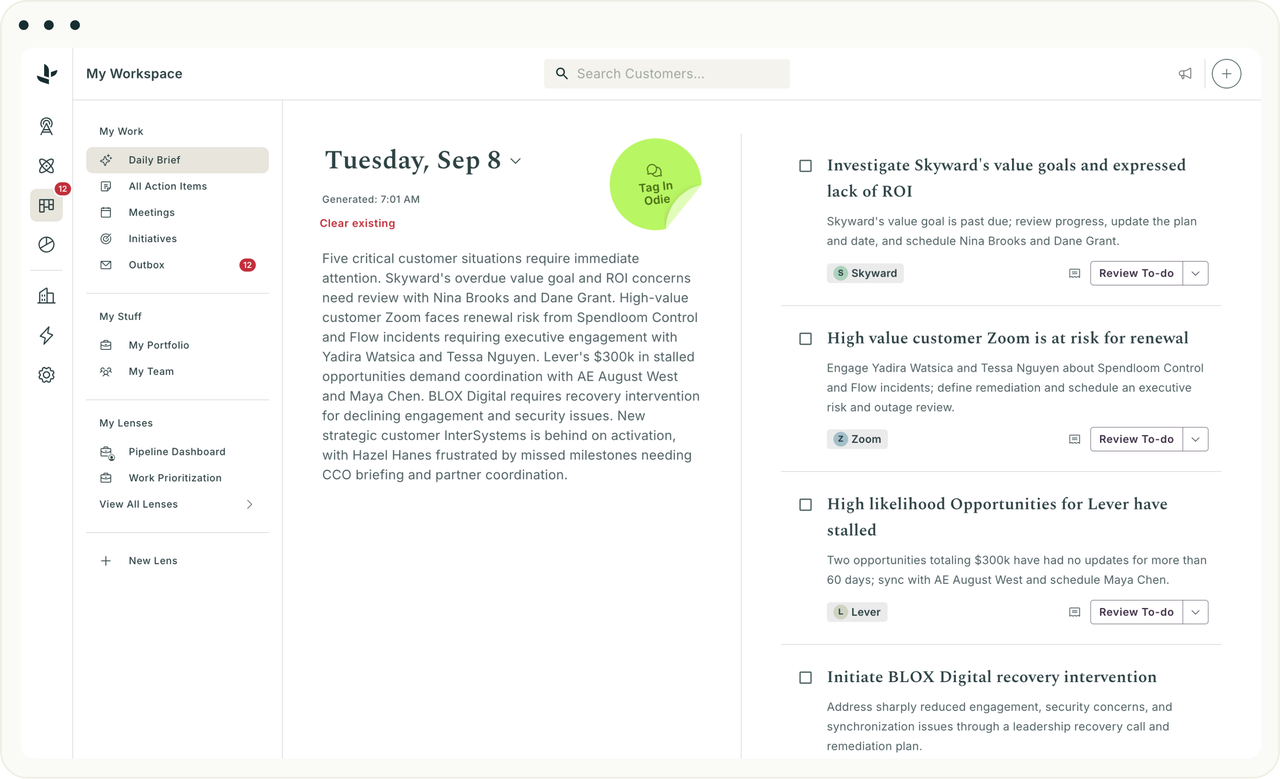
Odie replaces rule building with analysis. Its Customer Operating System re-analyzes every account daily, captures activity from email, calls and meetings automatically, and includes renewal forecasting with predictive models trained on your own data. Playbooks, campaigns and journeys can carry embedded agents. Underneath sits the Customer Knowledge Engine, a set of knowledge graphs about your customers, products and team that your own AI agents can query through an MCP server.
- you already run Totango or Catalyst and want to stay on a known platform while Odie matures
- you want daily AI analysis of every account and a knowledge layer your own agents can query, with a published starting price
- you need customer-facing success plans or a portal now: the Odie pages don't describe either
- you want month-to-month billing: Odie terms start at one year
- Users like
- ease of use, support and a Salesforce sync reviewers call a standout
- Users dislike
- a steep learning curve and limited customization beyond Salesforce
- Source: G2, 1,150 reviews
Odie pricing, go-live and integrations
Pricing. Odie is one of only two tools in this list with a published starting price. The Knowledge Engine starts at $500 per month and the Customer Operating System at $1,500 per month, with no seat pricing and terms of at least one year (most customers sign two). The Customer Operating System price scales with portfolio size and analysis depth and includes a pool of AI tokens and applied-AI service hours. Scheduled daily analyses use no tokens; manual analyses, generated briefs and emails and the chat copilot do.
Go-live. Odie states about eight weeks. Before kickoff you agree one to three measurable outcomes, then two tracks run in parallel: short interview sessions that capture your team's knowledge, and connecting CRM, call, email and support data.
Integrations. The integrations index lists Salesforce (with real-time write-back), HubSpot, Zendesk, Intercom, Jira Service Management, Gong, Chorus, Slack, Gmail and Outlook, Mixpanel and Pendo for usage, and Snowflake, BigQuery and Redshift. Some listings were still marked as coming soon in October 2026, so confirm the connectors you depend on.
Reviews. G2's rating still belongs to the legacy Totango listing and mostly reflects the classic platform.
- Starting price
- Odie: from $500 per month (Knowledge Engine) or $1,500 per month (Customer Operating System), annual terms; legacy Totango and Catalyst contracts continue unchanged
- Odie Knowledge Engine
- from $500 per month
- Odie Customer Operating System
- from $1,500 per month, annual terms
- Legacy Totango and Catalyst
- same contract and product for now
- Go-live (Odie)
- about eight weeks
- Customer Operating System
- from $1,500 per month
Planhat
A flexible customer platform that holds companies, contacts and usage metrics in one data model and fires automations when health changes.
Planhat fits CS teams that treat customer data as their main asset: several products, revenue that changes often and a need to share workspaces with customers.
Health in Planhat is organized as health profiles. Each profile applies to a segment defined by a global filter, for example "Enterprise tier" or "Onboarding phase". A company has one profile at a time, and the first matching profile from the top of the list wins, so the order of profiles is part of the design. Factors can use any field, time-series metrics and filters on end users, which lets an onboarding account be scored on activation while a mature account is scored on breadth of use.
Scores feed two separate engines. Automations run in a sentence-style template editor or a flowchart editor with branching, wait steps, webhooks and AI steps, and can start from a change to any record, an incoming webhook, a schedule or a manual run. Workflows (formerly playbooks) are projects with task tables and sequences of emails to end users. A step can be a task the customer completes inside a Planhat portal.
- you need one data model for health, revenue, usage and support across several products
- you want customers to complete onboarding or renewal tasks in a shared portal
- you don't have a CS operations person: G2 reviewers mention a learning curve and long setup
- you need a fixed price before talking to sales: Planhat quotes, and add-ons are priced separately
- Users like
- an intuitive interface and flexible data modeling that lets small teams manage large books
- Users dislike
- a learning curve and long setup, with occasional integration challenges
- Source: G2, 950 reviews
Revenue, integrations and add-ons
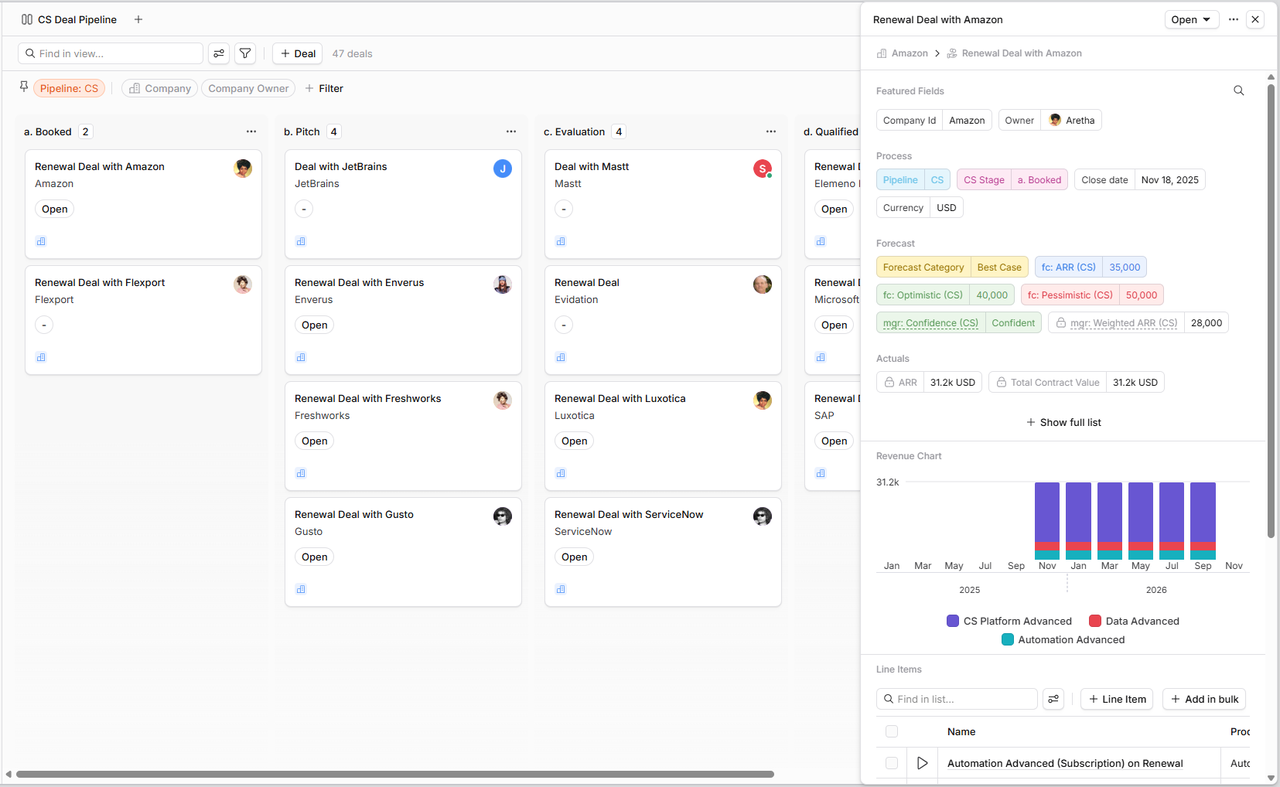
Revenue and renewals. Since early 2026 Planhat records revenue as deals with line items (subscriptions or fees) per company. A renewal is a new deal created from an existing one, optionally in a separate renewals pipeline, and Planhat recommends forecasting on that open renewal deal in its system reports. The help center says the rollout of this model can depend on the customer, so confirm you have it.
Integrations. Deal, line item and product records can sync with Salesforce or HubSpot, with the direction set per model and per field. The standard Salesforce-to-Planhat job runs every 10 minutes, while changes in Planhat reach Salesforce in near real time. Segment sends Identify, Track and Group calls, and events with unmatched company or user IDs are dropped. Snowflake syncs hourly, and Zendesk tickets arrive almost instantly on create and update.
AI and add-ons. Every instance gets 10,000 AI credits per rolling 30 days, shared across users, for AI steps, conversation classification and summaries. Planhat OS adds Pi, an agent that can read and update records and build automations under role permissions, and an MCP server connects Claude or ChatGPT to live data. The pricing page lists an upgraded AI platform, advanced service, email marketing and advanced portals as add-ons, and the number of external portal roles depends on the portals package.
- Starting price
- Custom, no public price (quote only, add-ons quoted separately)
- Health scoring
- profiles per segment, first match wins
- Automations
- templated or flowchart editor
- Notifications
- in-app, email, Slack, Teams, desktop
- AI credits
- 10,000 per instance every 30 days
Best customer success platforms for mid-market teams
A mid-market team often mixes high-touch and tech-touch accounts and has no full-time platform admin. ChurnZero, Vitally and Velaris let a CS manager change scores and playbooks without a consultant, though each one draws the line between base plan and add-on differently.
ChurnZero
A customer success platform built around ChurnScores that alert the CSM when an account's score changes and start automated plays.
ChurnZero fits mid-market SaaS teams that want health scoring, automated plays, in-app messages and renewal forecasting in one platform.
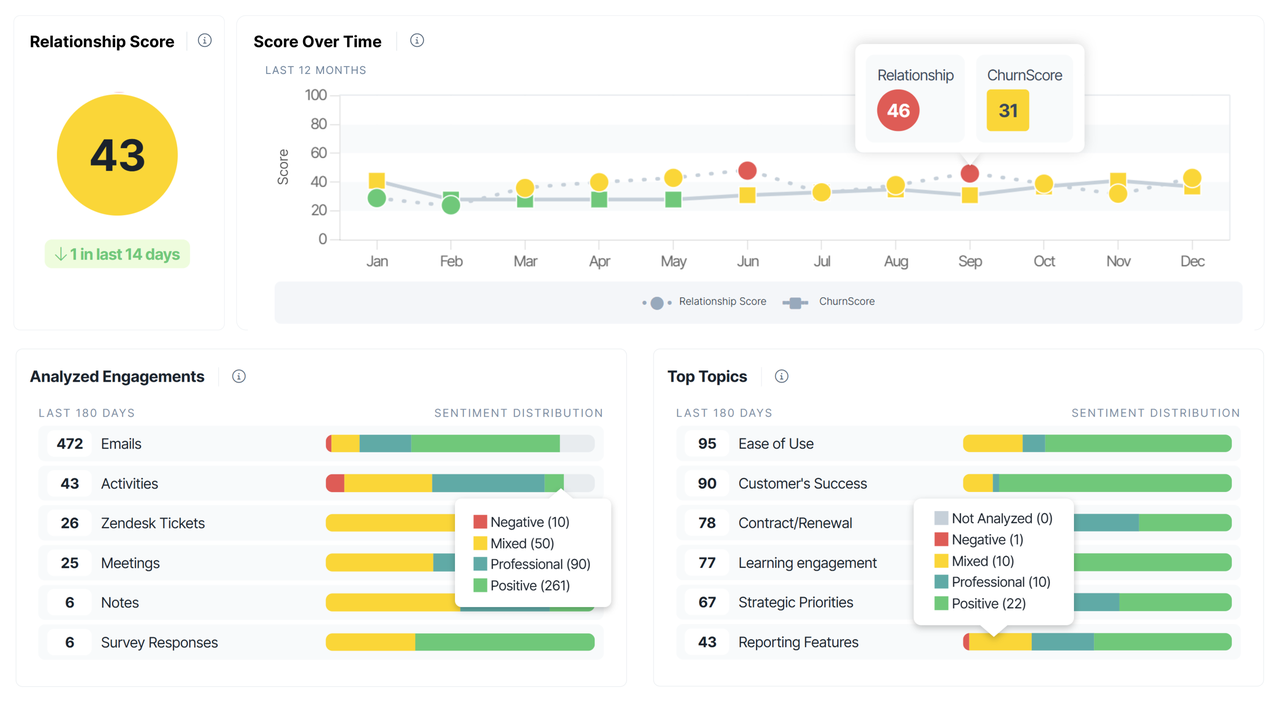
ChurnZero's health score is the ChurnScore. Each factor gets a share of points and the total must add up to 100. Inputs named on the feature page include license use, active contacts, time in the app, support ticket volume and SLA issues, and NPS, CSAT or CES results. A score can be standard or composite, meaning it uses other scores as inputs, and you can segment scores by company size or lifecycle stage. The red, yellow and green bands split the range into thirds by default and can be moved with sliders. Success plan completion can also be weighted into the ChurnScore, so an account that hits its agreed goals scores higher.
Plays turn score changes into action. A play uses conditional logic and triggers to send emails, show in-app messages, launch WalkThroughs (multi-step in-app guides) and create CSM tasks, and CSMs can approve or remove accounts before it runs. Launchpad offers prebuilt plays per lifecycle stage. Because in-app messaging is built in, a mid-market team can run tech-touch programs without buying a separate in-app tool.
- you want ChurnScores, plays, in-app WalkThroughs and success plans in one tool
- you need renewal and expansion forecasts in dollars, with GRR and NRR, that sync with your CRM
- you need a published price: ChurnZero shows none on its site
- you want broad Salesforce write-back by default: it's off and set field by field
- Users like
- ease of use and helpful customer support
- Users dislike
- a learning curve, plus limited dashboard and reporting flexibility
- Source: G2, 1,600 reviews
Renewals, integrations, AI and setup
Renewals. The Renewal and Forecast Hub shows renewals, expansions, contractions and churn in dollars, calculates GRR and NRR, lets leaders add ChurnScores to the forecast and syncs with the CRM every 15 minutes.
Integrations. Salesforce accounts map to ChurnZero accounts. Write-back to Salesforce is off by default and enabled field by field, and it isn't possible when the next renewal date in ChurnZero is driven by opportunities. Product usage arrives through a JavaScript library, an HTTP API or Segment, and the integrations page lists HubSpot, Dynamics 365, Pendo, Mixpanel, Intercom, Snowflake, BigQuery, Zendesk and ServiceNow among others.
Digital CS. Success Centers are in-app hubs with journey checklists, account metrics, announcements and resources. Showing one requires token authentication in your app. WalkThroughs are unlimited.
AI. About 20 named agents (for success plans, email replies, handoffs and churn notes) are sold through an AI Marketplace as one annual subscription with flat-rate tiers and prepaid credits; no prices are public. Kit is the in-app assistant, and ChurnZero Connect brings live account data into Claude and ChatGPT through MCP.
Price and setup. ChurnZero publishes no price. Capterra lists a starting price of $12,000 per year, a third-party figure. Implementation is sold as Standard (up to three use cases and eight data sources) or Premium (five use cases and 16 sources); no go-live time is published.
- Starting price
- Custom, no public price on the vendor site (Capterra lists a $12,000 per year starting price)
- Scoring
- ChurnScores, 100 points, red/yellow/green
- CRM sync for renewals
- every 15 minutes
- Integrations
- 70+ listed on the vendor site
Vitally
A customer success platform where health scores and playbooks run on the same hourly clock, with every plan including unlimited automations.
Vitally fits mid-market CS teams that want a flexible workspace (projects, docs, dashboards) built around health scores, with plans named after the touch model you run.
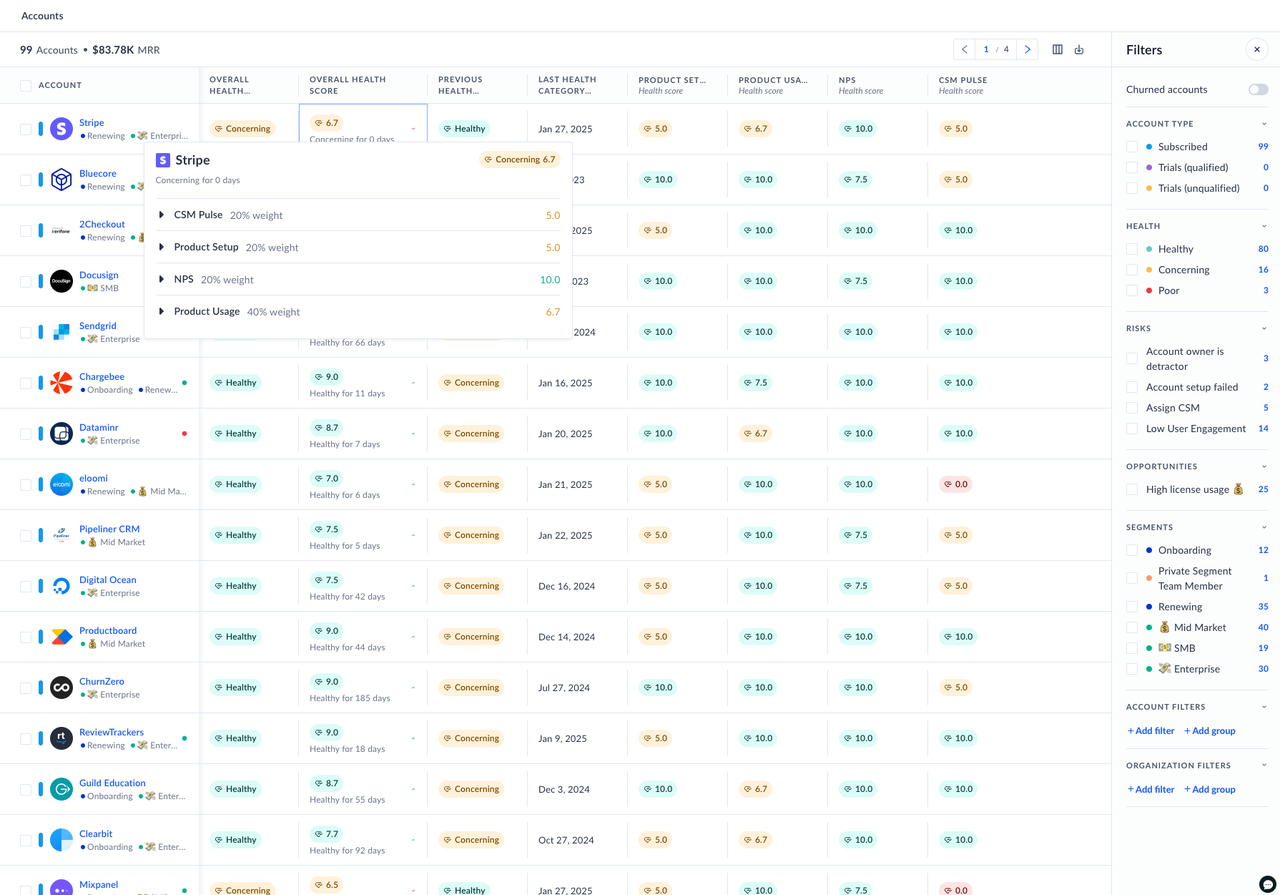
Vitally lets you run several health scores per account or organization, for example product adoption, relationship and support. Each score is graded 0 to 10 against healthy, concerning and poor conditions you define, and the overall health score is a weighted average of them. Different segments can use different equations and weights. If an account belongs to several segments, the one it joined most recently decides which formula applies, which is worth knowing before you build overlapping segments.
Playbooks act on those scores. Triggers include a score moving from healthy to concerning, a trait change, an NPS response or a segment entry. Playbooks evaluate hourly, so an action can lag a match by up to an hour, and run limits stop the same account from being hit repeatedly. A playbook can create a project (milestones and tasks with a completion percentage) from a template. Shared with the customer through a branded Doc, that project becomes the success plan.
- you want several health scores per account and a different formula per segment
- you want projects, docs and dashboards for the whole CS team in the same tool as health
- you want renewal forecasting out of the box: Vitally documents it as something you build from traits, playbooks and dashboards
- you need goal-triggered playbooks or customer-facing goals in the base price: those are in the Goals+ add-on
- Users like
- ease of use, a customizable interface and playbook automation
- Users dislike
- complex, time-consuming setup and integrations that need workarounds
- Source: G2, 700 reviews
Plans, renewals and integrations
Plans and add-ons. Vitally sells three plans named Tech-Touch, Hybrid-Touch and High-Touch, all quote only. All include unlimited automations, unlimited observer seats, SSO, the full integration library and unlimited docs; only High-Touch is labeled with unlimited full seats. Add-ons include Goals+, AI+ (a meeting recorder, custom AI summaries and full history for the included Quin assistant, which otherwise looks back 90 days) and the Email Service for sending at scale from your own domain.
Renewals. Vitally's docs describe a renewal setup built from a renewal segment, custom traits such as forecast and renewal stage, a renewal project template and playbook, and a dashboard of upcoming renewals by forecast.
Integrations. Salesforce syncs accounts, contacts, opportunities, notes and tasks in both directions, with opportunities handled as custom objects, and Vitally can push health scores back to Salesforce fields. HubSpot deals sync for the last 12 months. Segment maps Group calls to accounts and drops track calls from users without a parent account. Snowflake, BigQuery and PostgreSQL can feed events and traits.
- Starting price
- Custom, no public price (three plans, quote only)
- Plans
- Tech-Touch, Hybrid-Touch, High-Touch
- Health score refresh
- hourly
- Automations
- unlimited on all plans
Velaris
An AI-native customer success platform for mid-market and enterprise B2B SaaS teams with a configurable 0 to 10 health score, a visual automation canvas, success plans and named AI agents.
Velaris fits mid-market and enterprise B2B SaaS teams that want health scores, playbooks, success plans, surveys, email campaigns and AI agents in a single license.
Velaris builds health from indicators grouped into categories. For each indicator you define what counts as good, average and poor and how many points it is worth, and Velaris rolls them up into a score from 0.0 to 10.0 that maps to red, amber and green with thresholds you set. Scores can be configured separately for organizations, accounts and contacts and per lifecycle stage. Inputs include user activity, product usage, ticket volume and NPS, plus two optional indicators: an AI Pulse that scores sentiment from emails and calls, and a CSM Pulse where the CSM rates the account by hand.
When a score crosses an upper or lower limit, an alert can start a playbook, create a task or open a new pipeline deal. The automation canvas is drag and drop, with triggers on health changes, lifecycle moves and other signals, and actions across Salesforce, Slack and other connected tools.
- you want one license that already includes health, surveys, playbooks, success plans and email campaigns
- you want AI agents for risk, onboarding and expansion that act with an audit trail and human approval
- you need a documented renewal forecasting module: the Velaris product pages don't describe one
- you need deep customization of the interface and reports: G2 reviewers name it as a limit
- Users like
- easy automation and an approachable interface
- Users dislike
- limited customization of interface and reports, plus a learning curve
- Source: G2, 125 reviews

License, AI and integrations
What the license includes. Velaris sells one license with five users and unlimited viewers, quoted per customer. It covers accounts and contacts with three custom objects, Customer 360, health scores, surveys, dashboards, AI conversation analysis, automations, email campaigns, playbooks, success plans, QBR templates and a task manager. The customer portal and Velaris Support are separate products.
AI. Named agents cover data analysis (Copilot), onboarding (Nexus), scaled CS (Sentinel), risk detection (WatchDog), expansion (Growth Scout) and account planning (Artemis). You can add custom agents with time or event triggers, memory, an audit trail and human approval. In July 2026 Velaris added an MCP connector that brings conversations, usage, health and commercial data into AI assistants.
Integrations and setup. The integration directory lists more than 70 tools, including Salesforce, HubSpot, Zendesk, Intercom, Pendo, Amplitude, Mixpanel, Jira and Slack. Implementation is done with the Velaris team, and the vendor describes time to value as weeks rather than quarters without a fixed number.
- Starting price
- Custom, no public price (one license with 5 users and unlimited viewers, add-ons quoted)
- License
- 5 users, unlimited viewers
- Health score
- 0.0 to 10.0, red/amber/green
- Integrations
- 70+ listed by the vendor
Best customer success software for small teams and HubSpot users
Teams with one to ten CSMs need a tool they can set up themselves in weeks, not a quarter-long project. ClientSuccess and Custify both state a go-live of about a month, and HubSpot Service Hub skips the integration work entirely if your CRM is already HubSpot.
ClientSuccess
A customer success platform for small and mid-size B2B SaaS teams with weighted SuccessScore health profiles, lifecycle playbooks, goal tracking and an AI layer called SmartCS.
ClientSuccess fits small and mid-size B2B SaaS teams that want a health score they can configure themselves and a platform live within weeks.
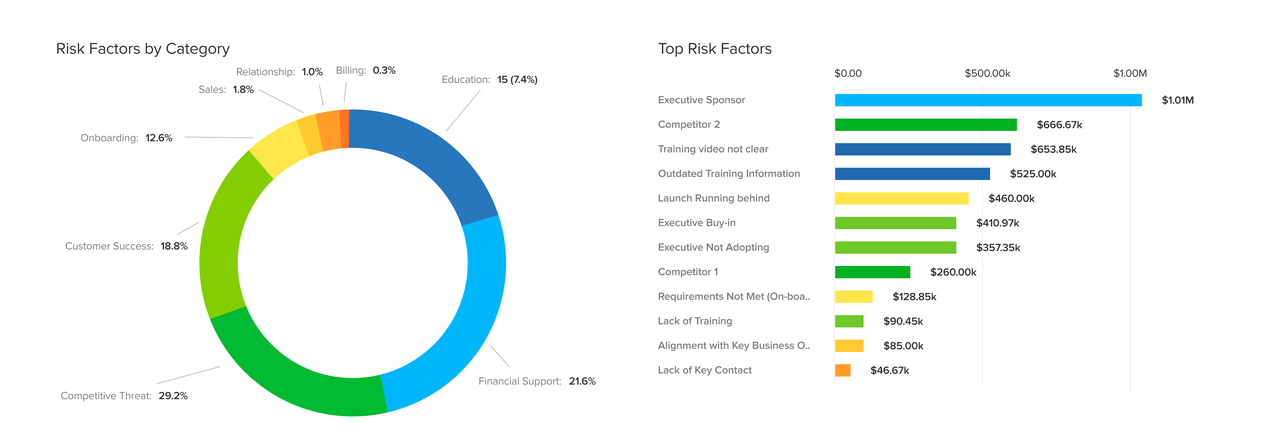
ClientSuccess calls its health score the SuccessScore. An admin builds a profile from named metric groups whose weights must add up to 100 percent, with up to four metrics per group. Each metric gets a range: for days since last touch, for example, 30 days can be worth 0 points and one day 100. Available data points include NPS, a CSM scorecard, days since the last touch, the latest Pulse level a CSM sets, days to renewal, usage totals or percentage change over 7, 30, 60 or 90 days, and custom fields. Each client type gets one profile, so a self-serve account and an enterprise account can be scored differently.
Automation rules built on the SuccessScore work as if-this-then-that workflows and are included in every package. Playbooks, which ClientSuccess calls SuccessCycles, cover onboarding, adoption and renewal stages, and renewal alerts fire ahead of the renewal date.
- you want a weighted health score you can set up without a dedicated admin
- you want a vendor-stated go-live of four to six weeks and no setup fee
- you need customer portals or custom dashboards in the base price: on Growth they are add-ons
- you need enterprise-scale playbook depth: G2 reviewers rate its playbooks below Gainsight's
- Users like
- ease of use, quick implementation and responsive support
- Users dislike
- no public pricing, and playbooks rated below some rivals
- Source: G2, 423 reviews
Packages, AI and setup
Packages. ClientSuccess quotes by number of CSMs and modules. Startup covers up to 500 customers and 10 full licenses, Growth 5,000 customers and 50 licenses, and Enterprise is unlimited. The goals tracker allows one goal per customer on Startup and three on Growth. Meeting Intelligence, Automation and AI, and customer onboarding portals are listed as add-ons, and the vendor's FAQ says there is no setup or implementation fee.
AI. SmartCS drafts customer emails (including one-to-many sends), summarizes what is going well and what to improve in an account's health, analyzes NPS campaigns and summarizes meeting notes. A read-only MCP server with per-user permissions lets Claude and other assistants query account data.
Integrations and setup. The vendor cites 25 to 28 native integrations, among them Salesforce, HubSpot, Zoho, Pipedrive and Dynamics, Zendesk, Intercom, Freshdesk, Jira, Pendo, Mixpanel, Segment, Stripe, Slack and Teams. Its FAQ puts most implementations at four to six weeks and larger enterprise deployments at eight to 12. In January 2025 ClientSuccess announced the acquisition of Product Signals, a product feedback tool it also sells on its own.
- Starting price
- Custom, no public price (Startup, Growth and Enterprise packages, quoted by number of CSMs and modules)
- Packages
- Startup 500 customers, Growth 5,000, Enterprise unlimited
- Go-live (vendor)
- 4 to 6 weeks, 8 to 12 for enterprise
- AI
- SmartCS drafts and summaries, read-only MCP server
Custify
A customer success platform for small and mid-size SaaS teams that combines health scores, lifecycles and playbooks with a customer portal and credit-based AI agents.
Custify fits small and mid-size SaaS teams that want health scores, lifecycle tracking and playbooks running quickly, with a customer portal and AI agents billed by usage.
Custify lets you define your own health score and the bands that label it. Its own guide gives example bands such as 90 to 100 for excellent and 30 to 49 for high risk, and says plainly that no standard exists. The more distinctive piece is Lifecycles: you define a start and end condition, an expected duration and the goals a customer should reach in that stage, optionally with CSM tasks created for every account that enters. Companies enter by hand or through segments, and the team is notified when a goal is missed.
Signals alert CSMs when a tracked event rises or falls by a percentage over a period you choose, and alerts can go to Slack, email or in-app notifications. Bulk emails go out from the customer list or from playbooks to everyone, a segment or a tag, with an approval step you can require always, on errors or never.
- you want lifecycle stages with goals and missed-goal alerts on top of a health score
- you want a customer portal and usage-billed AI agents without enterprise pricing
- you need playbook-written values to flow back to your CRM: only manual edits are exported
- you need a deep enterprise data model: G2 summaries cite missing basic features
- Users like
- ease of use and responsive support
- Users dislike
- missing basic features and limited email customization
- Source: G2, 500 reviews
Portal, AI and integrations
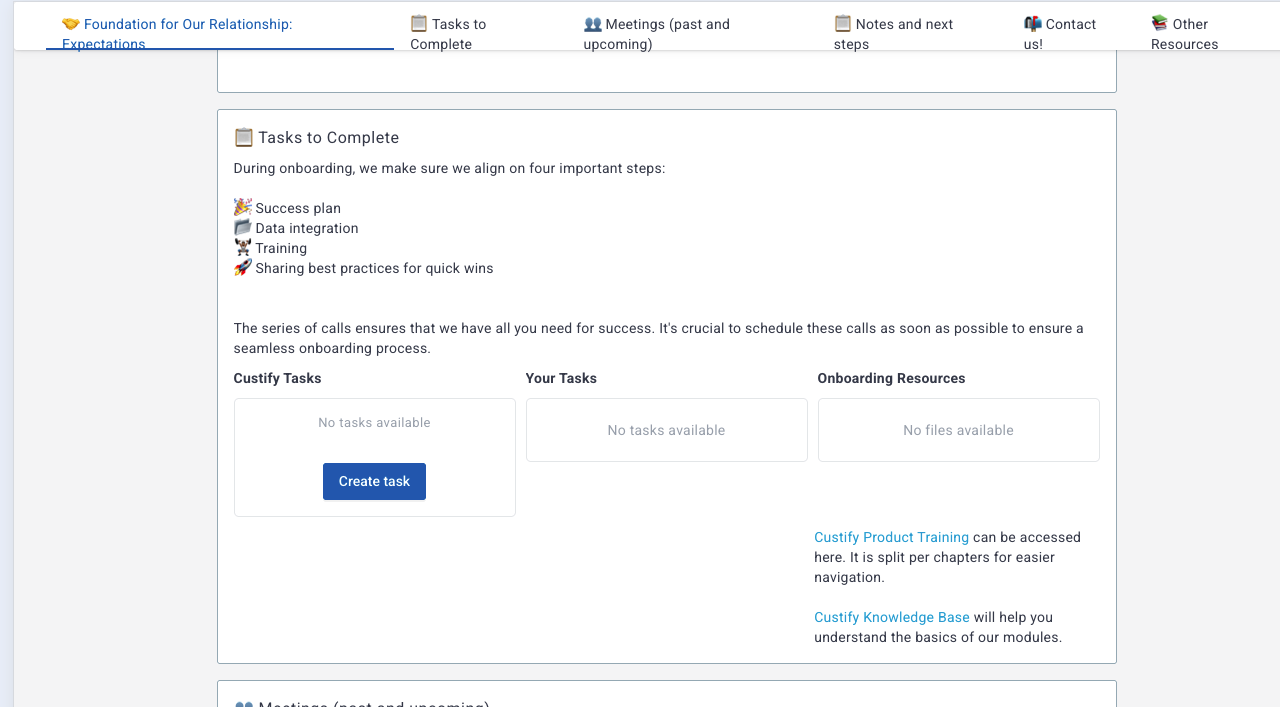
Customer portal. The portal shares notes, files, tasks, meetings, tickets and health scores with customers through a link, optionally password protected. Customers can complete or create tasks and comment. It supports branding, a custom domain and in-app access, is off by default and depends on your plan. Templates start from presets for onboarding, renewal and churn prevention.
AI. CustifyAI has 18 agents, including a 90-day renewal forecast with likelihood commentary, a renewal strategist, an expansion scout and QBR preparation. Agents run in chat, as playbook steps or in the background. Each account has a standard credit package, and extra packs of 4,000 credits cost $100. The conversation analysis agent is off by default and uses about 200 credits per 1,000 emails.
Integrations and data. HubSpot and Salesforce sync each attribute as import, export or two-way, but only manual edits made after activation are exported. Data can also arrive by API, Segment, a JavaScript snippet or CSV. Events roll up from people to companies, attributes don't. The catalog lists Pipedrive, Close, Zoho, Mixpanel, Amplitude, Pendo, Stripe, Chargebee, Zendesk, Intercom, Help Scout, Jira, BigQuery, Snowflake, Gong and Slack.
Setup. Concierge Onboarding runs four weeks in four steps: define success, a guide for your developers, verifying the implementation and training the team. Custify publishes no plan names or prices and states that data is stored in Germany.
- Starting price
- Custom, no public price
- Onboarding
- 4-week guided Concierge Onboarding
- AI
- CustifyAI agents billed in credits ($100 per 4,000 extra)
- Data location
- Germany, GDPR and ISO 27001 stated
HubSpot Service Hub
HubSpot's customer success workspace builds health scores, alerts and renewal tracking directly on the CRM records your team already uses.
HubSpot Service Hub fits companies whose customer data already lives in HubSpot CRM and want health scores and renewals on the same records as deals and tickets.
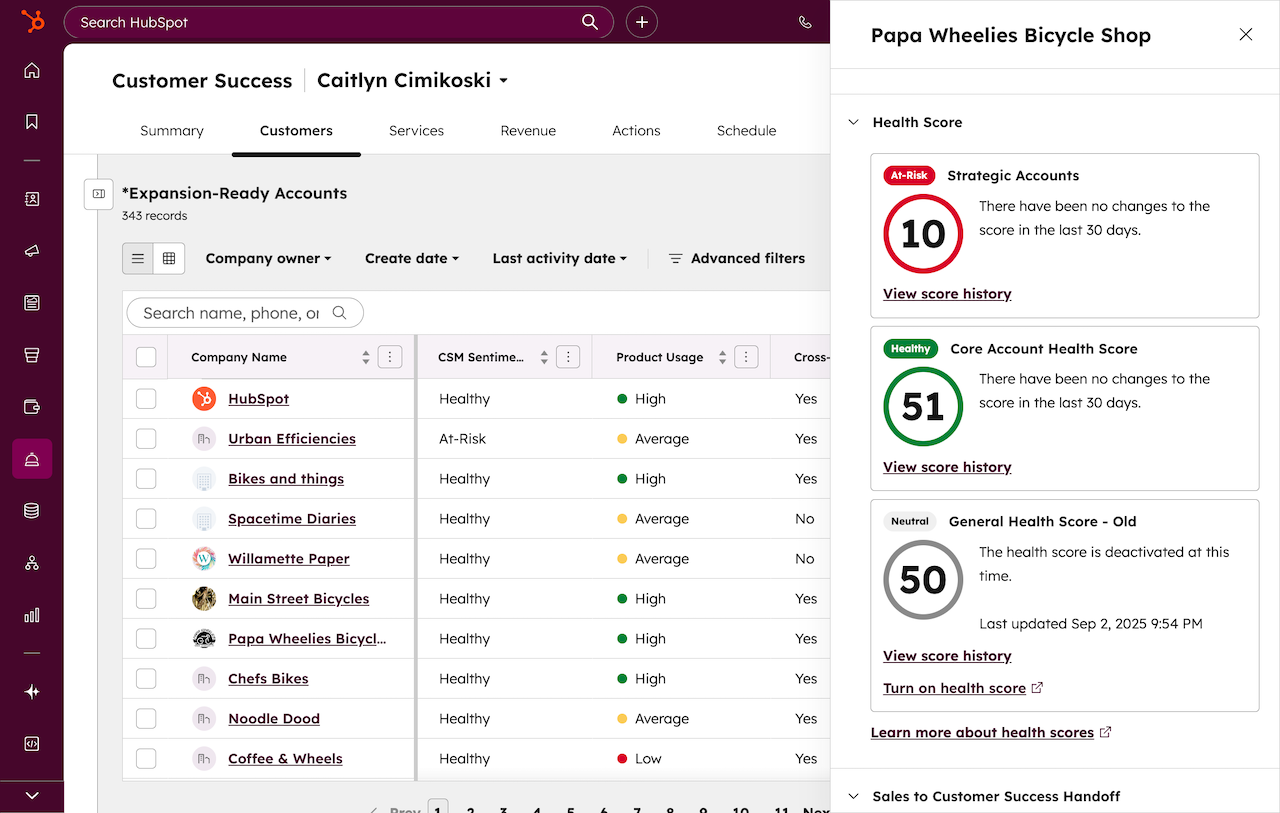
The customer success workspace builds health scores from event groups (for example one-to-one engagement, calls, support tickets or NPS) and property groups. Each group adds or subtracts points up to a maximum, over a timeframe and frequency you set, and scores can decay. Labels and thresholds turn the number into a status, and switching a score on creates health score and health status properties on the record, so every report and workflow in HubSpot can use them.
The Summary tab shows daily tasks, alerts when a customer's health status changes (they expire after 14 days), saved customer views and up to five pinned reports. The Customer Health Agent, in beta, grades account risk from logged CRM activity, call transcripts and public web information and suggests a retention playbook. It runs on HubSpot Credits.
- your accounts, deals and tickets are already in HubSpot and you want no sync to maintain
- you want a published per-seat price and a CS tool your sales team already knows
- you need product usage events in the score without extra work: HubSpot's docs found no dedicated ingestion path, and custom behavioral events are Enterprise only
- you need several health score models on Professional: multiple scores are Enterprise only
- Users like
- ease of use and the CRM integration
- Users dislike
- missing features, limited customization and cost
- Source: G2, 3,018 reviews
Plans, renewals and portal
Plans and limits. The workspace needs Service Hub Professional or Enterprise and an assigned Service Seat. Professional allows one customer success workspace, Enterprise up to five team workspaces, and using custom objects as the customer object requires Enterprise. Professional costs $90 per seat per month on annual billing (list price $100) plus a one-time $1,500 onboarding fee.
Renewals. You choose a renewal-date property and up to two revenue objects, such as deals or a custom subscription object, which fill a Revenue tab with a pipeline board. There is no separate forecasting module; renewals run on CRM properties and pipelines.
Customer-facing. HubSpot's support portal lets logged-in customers see and manage their tickets. It is a ticket portal, not a place to share success plans.
Handoffs. An Automated Sales to CS Handoff beta generates an AI summary of key contacts, goals and concerns from the customer record in the workspace sidebar.
- Starting price
- From $90 per seat per month on Professional billed annually (list price $100), plus a $1,500 one-time onboarding fee
- Needs
- Service Hub Professional or Enterprise plus a Service Seat
- Workspaces
- 1 on Professional, up to 5 on Enterprise
- Enterprise adds
- workflow-triggered sequences and multiple health score models
What customer success software costs
Customer success software is mostly sold on quotes. Only two of the nine tools publish a starting price: Odie (from $500 per month for the knowledge engine and $1,500 per month for the CS workspace, annual terms) and HubSpot Service Hub ($90 per seat per month plus onboarding). The other seven quote, and they quote on different units, which makes two proposals hard to compare unless you ask what drives the number.
| Platform | What the price is based on | Published figure (USD) | What adds to the bill |
|---|---|---|---|
| Gainsight | Package and full users | Quote only | Enterprise-only modules, Renewal Center, Atlas service |
| Totango (Odie) | Portfolio size and analysis depth | From $500 or $1,500 per month | AI tokens beyond the included pool |
| Planhat | Quote per customer | Quote only | Upgraded AI platform, portals package, email marketing |
| ChurnZero | Quote per customer | None (Capterra lists $12,000 per year) | AI Marketplace tiers and prepaid credits |
| Vitally | Touch-model plan | Quote only | Goals+, AI+, Email Service |
| Velaris | One license with 5 users | Quote only | Add-ons, customer portal |
| ClientSuccess | Number of CSMs and modules | Quote only | Meeting Intelligence, Automation and AI, portals |
| Custify | Quote per customer | Quote only | AI credit packs |
| HubSpot Service Hub | Service seats | $90 per seat per month | $1,500 onboarding, HubSpot Credits for agents |
The plan you pick matters as much as the vendor. Gainsight shows how much sits behind the higher package:
Gainsight Customer Success- EssentialsCustomer 360, playbooks and success plans, health scorecards, surveys, digital journeys and dashboards, with 10 full users and up to 100 customers per user
- EnterpriseAdds renewal and expansion forecasting, company news and organizational mapping with sponsor tracking, with 20 full users and up to 200 customers per user
A small team without budget for a platform can start with HubSpot's free CRM and a shared health view, but the customer success workspace itself needs a paid Service Hub plan. None of the nine tools in this guide offers a free plan for its CS product.
How to choose customer success software
Start with where your customer data already lives, then look at team size and touch model, and only then compare features. A platform that can't read your CRM and product usage cleanly will produce health scores your CSMs ignore.
- Enterprise CS org on Salesforce with a CS operations adminGainsight or Planhat
- Already on Totango or CatalystStay on the legacy platform and evaluate Odie at renewal
- Mid-market team that wants in-app messages and renewal forecasts in one toolChurnZero
- Team that wants a flexible workspace with several scores per accountVitally
- One license with AI agents, surveys and campaigns includedVelaris
- Small team that needs to go live within weeksClientSuccess or Custify
- Customer data already lives in HubSpotHubSpot Service Hub Professional
Data you need before any health score works
Most failed CS platform rollouts don't fail on features. They fail because the account in the CRM, the account in the billing system and the account in the product don't share an ID. Planhat drops Segment events with unmatched company IDs, and Vitally drops track calls from users without a parent account, so missing IDs mean missing usage in the score.
- One account ID shared by CRM, billing and product events
- Renewal date and contract value on every customer account
- Product usage sent per user and per account (events or daily aggregates)
- Support tickets linked to the same account record
- NPS or CSAT responses tied to contacts at the account
- A named owner (CSM) on every account
- A decision on which system is the source of truth for each field
How long implementation takes
Implementation time for customer success software is stated very differently by each vendor, and four of the nine don't state one at all. Treat these as the vendor's own estimates for a team whose data is ready.
| Platform | Vendor-stated go-live | What the setup covers |
|---|---|---|
| Gainsight | Essentials "in as little as four weeks" (navigation says two) | Not stated for Enterprise |
| Totango (Odie) | About eight weeks | Outcome agreement, knowledge interviews, data connections |
| ClientSuccess | Four to six weeks, eight to 12 for enterprise | CRM integration, data migration, health score setup, training |
| Custify | Four weeks (Concierge Onboarding) | Success definition, developer guide, verification, training |
| Velaris | "Weeks rather than quarters" | Hands-on implementation with the Velaris team |
| ChurnZero | Not stated | Standard or Premium package by use cases and data sources |
| Vitally, Planhat, HubSpot | Not stated | HubSpot charges a one-time onboarding fee instead |
How to measure the ROI of a customer success platform
Measure ROI against numbers you already report, not against the vendor's case studies. Before rollout, record gross revenue retention (GRR), net revenue retention (NRR), the number of accounts each CSM covers and the share of renewals that closed on time. Check the same four numbers two and four quarters after go-live. If retention holds but each CSM can cover more accounts, the platform paid for itself through capacity; if neither number moves, the health score probably isn't driving the work.
Questions to ask in a demo
- Which way does the CRM sync run for accounts, contacts and opportunities, and how often?
- Where does product usage come from (SDK, Segment, warehouse), and what happens to events without an account ID?
- Can different segments use different health score formulas, and which one applies when an account is in two?
- Which of the features you showed are in the package you are quoting, and which are add-ons?
- How are AI features billed, and what did a customer of our size use in a typical month?
- What does renewal forecasting read: CRM opportunities, contract records or fields we maintain?
- Who on your side runs the implementation, and what do you need from our team each week?
For the plan a CSM builds with a customer once the platform is live, see our customer success plan template.
What customer success platforms don't record
Health scores, playbooks and renewal forecasts track how an account is doing. None of the nine platforms keeps a dedicated record of what your team promised the customer: the integration review before their audit, the feature a CSM said would ship next quarter, the extra training session from the QBR. Those promises sit in call notes and email threads, and they get lost when an account changes hands.
FAQ
What is the best customer success software?
The best customer success software depends on team size and where your data lives. Gainsight suits enterprise teams on Salesforce with an admin, ChurnZero and Vitally suit mid-market SaaS teams, and ClientSuccess, Custify or HubSpot Service Hub suit smaller teams or companies that already run HubSpot.
What does a CSM do in customer success software every day?
A CSM starts with the accounts whose health dropped overnight, works the tasks that playbooks created, updates success plans after customer calls and checks which renewals are due in the next quarter. Managers use the same data to see risk and forecast across the whole book of business. The software doesn't replace the customer conversations themselves; it only decides which ones happen first.
What is the difference between a CSM platform and a CRM?
A CSM platform and a CRM differ in timing. A CRM tracks leads and deals until a contract is signed. A customer success platform takes over after the sale and tracks health, product adoption, goals and renewals. Most CS platforms read accounts and opportunities from the CRM and write health scores or renewal data back to it.
How much does customer success software cost?
Customer success software is usually priced by quote, because most vendors publish no price list. Vendors price on different units: Gainsight by package and full users, ClientSuccess by CSMs and modules, Velaris by a five-user license, Odie by portfolio size and HubSpot by seat. The published entry points are $500 per month for Odie's knowledge engine and $90 per HubSpot seat.
Is there free customer success software?
None of the nine platforms in this guide offers a free plan for its customer success product. HubSpot has a free CRM, but its customer success workspace and health scores need Service Hub Professional or Enterprise. Very small teams often start with a CRM, a spreadsheet health score and a shared task list.
How long does it take to implement customer success software?
Implementing customer success software takes four to eight weeks for a standard rollout, by the vendors' own statements: ClientSuccess four to six weeks, Custify four weeks, Gainsight Essentials as little as four weeks and Odie about eight. Enterprise deployments take longer, ClientSuccess cites eight to 12 weeks, and clean account IDs across CRM, billing and product data shorten every timeline.
Related: best customer segmentation software compares eight tools by how they build and use segments.
Related: best customer intelligence software compares eight tools by the customer signals they read and where the insight goes.