The best ChurnZero alternative depends on what you want to change. Custify and ClientSuccess suit smaller teams that want a faster start, Vitally and Planhat suit mid-market teams that want a more configurable data model, Gainsight and Totango (now Odie) suit larger programs with a dedicated admin, and Velaris is the one to look at if AI that reads customer conversations is the draw. This guide compares seven alternatives with ChurnZero as the reference, on what each one publishes about price and packaging, how long setup takes, how it builds the health score, what it connects to, and who should skip it.
It's written for customer success managers and CS leaders at B2B software companies. ChurnZero is a respectable platform, rated 4.7 on G2 from about 1,600 reviews, so most teams don't leave because it fails. They leave because the price is only available through sales, the setup and scoring need an owner, or the team has outgrown or undergrown the tool. Those are the cases this page sorts out.
- platforms compared, ChurnZero included
- 8
- G2 rating range
- 4.3 to 4.7
- publish a full USD price list
- 0 of 8
Why teams leave ChurnZero
ChurnZero holds a 4.7 rating on G2, with ease of use and customer support as the most common praise. The complaints are narrower, and they cluster around how much work it takes to get value out of it.
Three reasons sit behind those themes for a customer success team, and each one comes up when teams plan a switch.
- You can't see the price before the call. ChurnZero has no public pricing page and sells Professional and Enterprise editions by quote. Its AI bundle, Agentic Essentials, is a separate flat-fee subscription on top of either edition, and the dollar amount isn't published either. That makes a renewal hard to benchmark.
- The score is something you build. A standard ChurnScore is assembled by hand: you pick segments, a red, yellow and green scale, and factors whose points add up to 100. That's transparent, and it's also a job someone has to own and keep tuned as the product and the customer base change.
- The tool has to fit your team's shape. A team of three with one CRM needs something different from a program with several segments, pooled accounts and a CS operations owner. Teams on either side of the middle start comparing.
If none of these is your reason, skip ahead to the section on when to stay on ChurnZero.
ChurnZero alternatives at a glance
 Best for a fast startCustifyVendor-stated four-week start, no setup fees and a 4.7 G2 rating. Scores refresh once a day.
 Best for smaller B2B SaaS teamsClientSuccessThree packages with published customer and license limits, and a vendor-stated four to six weeks to go live.
 Best for configurable scoring by segmentVitallyNo-code health score profiles recalculated hourly, with packages for tech-touch, hybrid and high-touch teams.
 Best for a flexible data modelPlanhatRules-based 0 to 10 health profiles and a platform fee plus core-user pricing. Plans bill annually upfront.
 Best for large, complex programsGainsight Customer SuccessThe deepest feature set in this group, with a steeper climb: G2 reviewers average about five months to implement.
 Best if you already run Totango or CatalystTotango (now Odie)Weighted 0 to 100 scorecards with contract value at risk. The company now sells under the Odie name as well.
 Best for AI that reads conversationsVelarisA weighted score plus AI over tickets, emails and call transcripts, on one license with no module gating.
 Our product · for the gap none of these fillThe Customer Success ManagerRecords what your team promised each customer, with an owner, evidence and a verification step.
| Tool | Best for | What it passes to the CSM | Published price | Rating |
|---|---|---|---|---|
 ChurnZero | The reference: hand-built ChurnScores and journeys | A segment-specific ChurnScore with alerts to CSMs, plus AI risk flags with urgency, impact and next steps. | Quote only (not published; no pricing page) | 4.7 (1,633) |
| Gainsight Customer Success | Large programs with a CS ops owner | A configurable health score plus AI risk analyses with playbooks, stakeholders and CTAs in the CSM workflow. | Quote only (Essentials and Enterprise tiers) | 4.5 (1,772) |
| Vitally | Configurable scoring by segment | Hands CSMs a weighted account health score with Playbook tasks and alerts, plus AI summaries of calls and emails that flag risk. | Quote only | 4.5 (713) |
| Planhat | Flexible data model, RevOps-heavy teams | Health score changes and AI sentiment that trigger alerts, tasks and playbooks in the CS workflow. | Quote only, no public USD price | 4.5 (964) |
| Custify | Fast start for smaller teams | Daily health scores plus Slack, email or task alerts and playbooks for at-risk accounts. | Quote only, no public USD price | 4.7 (535) |
| Totango (now Odie) | Scorecards with contract value at risk | Hands CSMs a weighted health score per account plus SuccessBLOC scorecards and SuccessPlays for follow-up. | Quote only | 4.3 (1,150) |
| ClientSuccess | Smaller B2B SaaS teams | SuccessScore health profiles, playbooks and renewal alerts | Custom, no public price (Startup, Growth and Enterprise packages, quoted by number of CSMs and modules) | 4.4 (423) |
| Velaris | AI over conversations | Hands CSMs a color-banded health score plus AI risk summaries and tasks or playbooks when an account drops. | Quote only; one license, no public price | 4.5 (126) |
| The Customer Success Manager Our product | Commitment ledger, not a CS platform | Not a CS platform: records the promises your team makes to a customer, with owner and evidence | From $49/mo per workspace | No reviews yet |
Prices as published on vendor pages in October and November 2026. None of the eight CS platforms lists a USD price; all are sold by quote.
What each platform publishes about price and setup
Every platform here is sold by quote, so the useful comparison is what each one tells you before you talk to sales: how it's packaged, what limits it states and how long it says setup takes.
| Platform | How it's packaged | Stated limits | Setup time (weeks or months) |
|---|---|---|---|
| ChurnZero | Professional and Enterprise editions; Agentic Essentials AI bundle sold separately | Not published | Not published |
| Gainsight | Essentials and Enterprise tiers | 10 full users on Essentials, 20 on Enterprise | About 5 months average per G2 reviewers |
| Vitally | Tech-Touch, Hybrid-Touch and High-Touch packages | Unlimited automations and observer seats on all; unlimited full seats on High-Touch | Not published |
| Planhat | Platform fee plus a minimum number of core users, billed annually upfront | Unlimited view users on all plans | Not published; paid onboarding plans available |
| Custify | Quote only; no plan names listed | Not published | Vendor claims a start in 4 weeks; no setup fees |
| Totango | Demo only | Not published | Not published |
| ClientSuccess | Startup, Growth and Enterprise | 500, 5,000 and unlimited customers; 10, 50 and unlimited full licenses | Vendor says 4 to 6 weeks, 8 to 12 for larger deployments |
| Velaris | One license, no module gating | Not published | About 2 months average per G2 reviewers |
Read the setup column with care. Where it says "per G2 reviewers" the figure comes from review data, and where it says "vendor" the vendor is describing its own best case.
If you're a smaller team that wants a faster start
Teams with a handful of CSMs and one CRM usually don't need a platform that takes months to configure. These two are built for that.
Custify
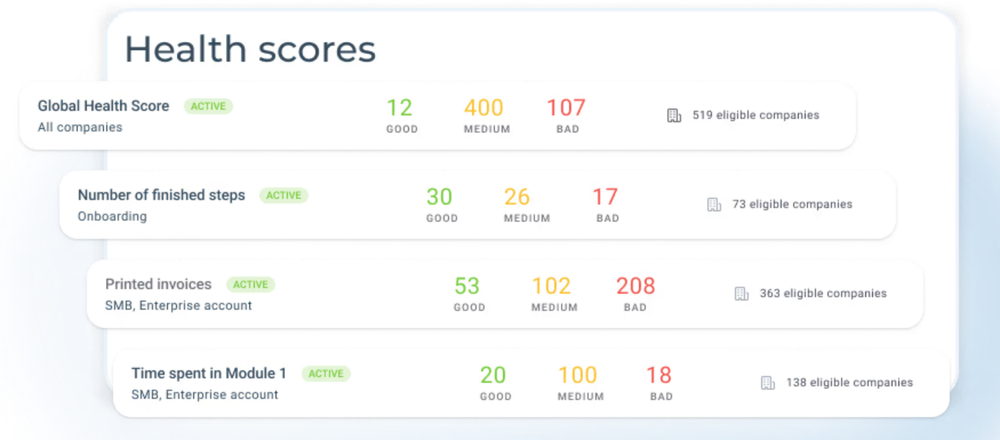
Custify computes churn risk with rules-based health scores built from events, attributes and metrics, combined into a weighted global score recalculated once a day. CustifyAI, launched November 2025, adds a 0 to 100 churn risk score read from emails and messages. Pricing and AI plan gating are not published.
Custify bundles health scores, alerts and playbooks into one view of the customer, and it's the one here that leads with a four-week start and no setup fees.
Custify builds health scores from events, attributes and metrics, then combines them into a weighted global score that recalculates once a day, near midnight. A CSM edits the weights without a data scientist. Alerts, tasks and playbooks hang off those scores, so an account that drops starts a task or a Slack or email alert. CustifyAI, launched in November 2025, adds a separate 0 to 100 churn risk score read from emails and messages.
The vendor's page claims you can start in four weeks with concierge onboarding and says it charges no setup fees. No plan names or USD prices are listed, so the quote is where you learn the cost.
- You want configurable health scores with clear weighting that a CSM can edit without a data scientist.
- You want churn risk from email and message content next to usage-based scores.
- You need real-time scoring, since scores refresh once a day.
- You need published pricing or a trained churn probability model with documented accuracy.
- Users like
- Reviewers like having customer data, health scores and playbooks in one place, and responsive support.
- Users dislike
- Reviewers mention a heavy setup, with some events needing API calls, plus reporting and nested settings that need polish.
- Source: G2, 535 reviews
How it works in practice
Reviewers on G2 like having customer data, health scores and playbooks in one place, and they credit responsive support. The recurring complaint is a heavy setup, with some events needing API calls, plus reporting and nested settings that need polish. If your health score needs to react within the hour, the daily refresh is the limit to test in a demo.
Compared with ChurnZero, the trade is a smaller, simpler platform for a team that mostly needs scores, alerts and playbooks. Compared with the platforms below it, you give up some depth in exchange for speed.
- Starting price
- Quote only, no public USD price
- Scoring type
- Rules-based health scores, global weighted average
- Refresh
- Once a day, near midnight
- AI
- CustifyAI 0 to 100 churn risk from emails
- Plan gating
- Not published
- Actions
- Alerts, tasks, playbooks
- Setup claim
- 4 weeks, vendor-stated
- Setup fees
- None, vendor-stated
- Score refresh
- Once a day
ClientSuccess
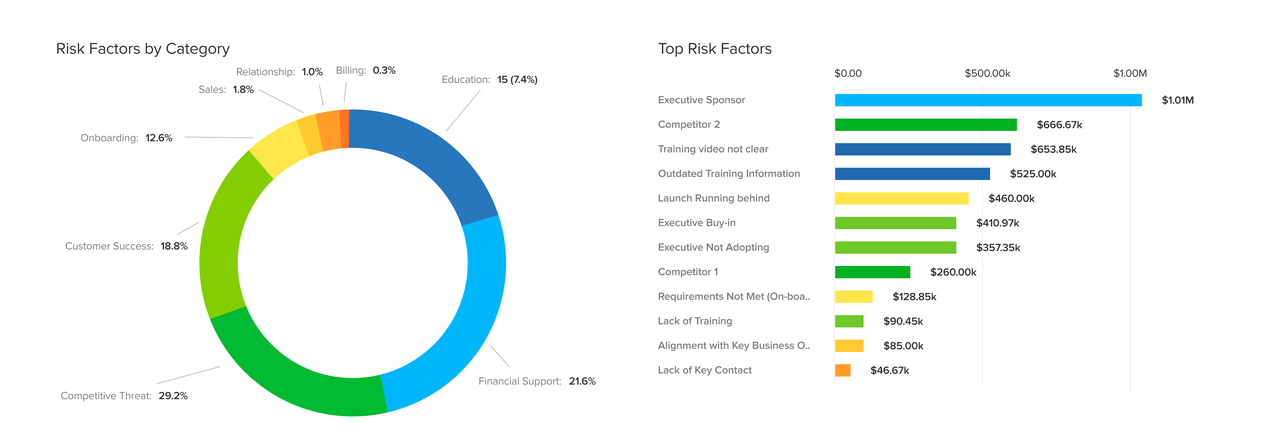
A customer success platform for small and mid-size B2B SaaS teams with weighted SuccessScore health profiles, lifecycle playbooks, goal tracking and an AI layer called SmartCS.
ClientSuccess is packaged by customer count, which makes it easy to see which package your book of business fits before you ask for a quote.
The Startup package covers up to 500 customers and 10 full licenses, Growth covers 5,000 customers and 50 licenses, and Enterprise is unlimited. All three include a client 360 dashboard, an integration library, playbooks, health scoring and automations. Custom dashboards and reports and the customer portal are add-ons below Enterprise, and so are meeting intelligence and AI automation.
Health runs on weighted SuccessScore profiles. A CSM configures them, and the vendor says most customers are live in four to six weeks, with larger deployments taking eight to twelve. Quotes depend on team size, contract length and integrations, and annual contracts are typically 15 to 20 percent below month-to-month rates, per the pricing page. There are no setup or implementation fees.
- you want a weighted health score you can configure without an admin team, and a vendor-stated go-live of four to six weeks
- you run Salesforce or HubSpot and want renewals, goals and NPS in one account view
- you need customer-facing portals or custom dashboards in the base package: on Growth they are add-ons
- you need enterprise-scale data modeling: reviewers rate its playbooks below Gainsight's
- Users like
- ease of use, quick implementation and responsive support
- Users dislike
- no public pricing, and playbooks rated below some rivals
- Source: G2, 423 reviews
How it works in practice
ClientSuccess has a read-only MCP server and an AI layer called SmartCS that drafts and summarizes. G2 reviewers praise ease of use, quick implementation and responsive support. The recurring complaints are that there is no public pricing and that its playbooks rate below some rivals.
Watch the add-ons: if you expect customer-facing portals or custom dashboards on the Growth package, price them in before you compare.
- Starting price
- Custom, no public price (Startup, Growth and Enterprise packages, quoted by number of CSMs and modules)
- Packages
- Startup 500 customers, Growth 5,000, Enterprise unlimited
- Go-live (vendor)
- 4 to 6 weeks, 8 to 12 for enterprise
- AI
- SmartCS drafts and summaries, read-only MCP server
- Full licenses
- Startup 10, Growth 50, Enterprise unlimited
- Add-ons
- Custom dashboards/reports and customer portal below Enterprise; meeting intelligence, AI automation
- Contract
- Annual typically 15 to 20% below monthly (vendor)
- Go-live, vendor-stated
- 4 to 6 weeks
- Works with
- Salesforce and HubSpot
If you want a more configurable platform for the middle of the market
Vitally and Planhat offer more control over the data model than a team of three needs. They fit teams with a CS operations person who will own the configuration.
Vitally
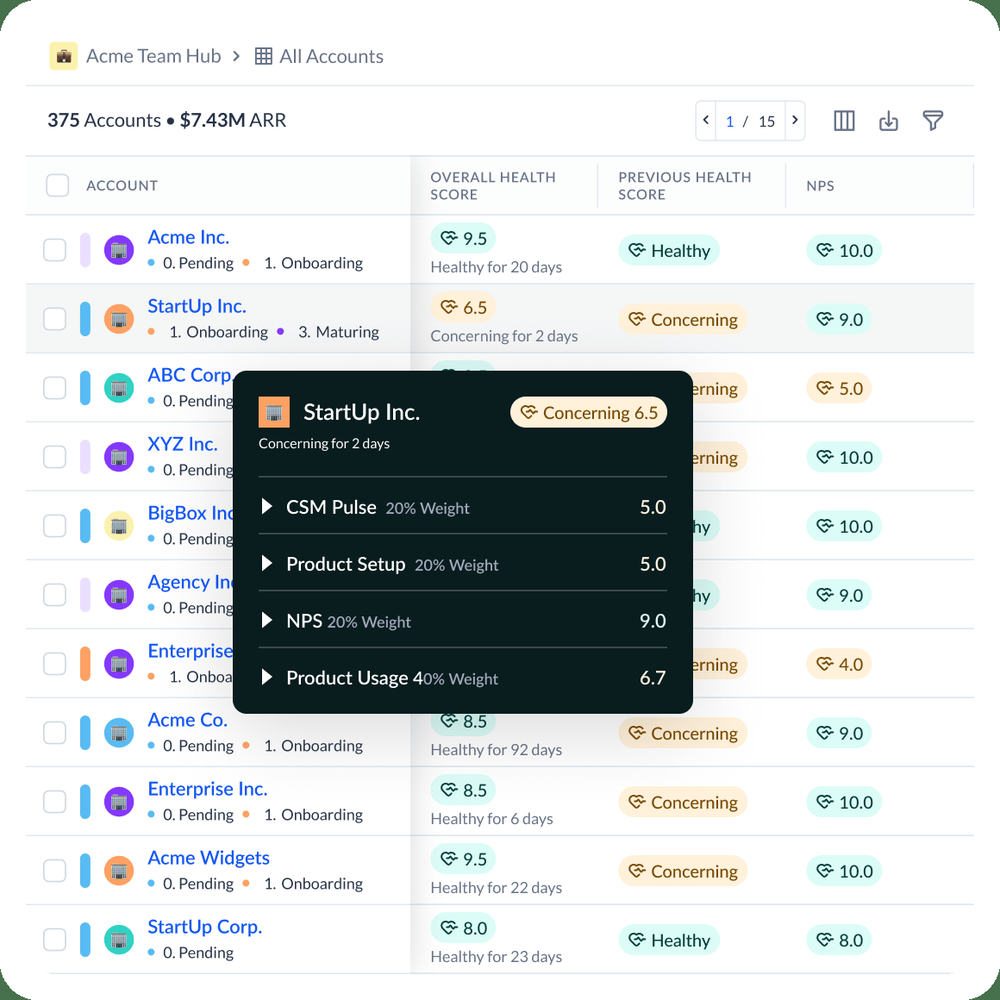
Vitally scores health with a no-code, rules-based builder where you set weights and thresholds per segment, recalculated hourly. A separate AI copilot reads calls, emails and tickets to flag churn risk. No trained churn probability model is described.
Vitally lets a CSM build a health score profile per segment with no code, and the score recalculates hourly.
Scores are weighted 0 to 10 and built in a no-code builder where you set weights and thresholds per segment. Per the docs, one workspace can hold 10 scores and 50 properties. A separate AI copilot reads calls, emails and tickets and flags churn risk next to the score, but no trained churn probability model is described.
Packaging is by motion rather than by size: Tech-Touch for one-to-many and product-led teams, Hybrid-Touch for mixed models and High-Touch for one-to-one programs. All three advertise unlimited automations, unlimited observer seats, single sign-on and the full integration library, and High-Touch adds unlimited full seats. No USD prices are listed. After you contact sales you can try a dedicated trial sandbox. Vitally connects to Salesforce and HubSpot.
- You want per-segment health score profiles a CSM can change without code.
- You want AI summaries of calls and emails to surface risk next to the score.
- You need a predicted churn probability from a trained model, which is not described.
- You need a published price or self-serve trial.
- Users like
- Flexible, segmentable health scores and a useful AI assistant.
- Users dislike
- A few early reviewers say the interface feels overwhelming at first
- Source: G2, 713 reviews
How it works in practice
G2 shows 4.5 from 713 reviews. Reviewers praise flexible, segmentable health scores and a useful AI assistant, and a few early reviewers say the interface feels overwhelming at first. Our Vitally pricing guide covers what is and isn't published.
- Starting price
- Quote only
- Scoring
- Rules-based, weighted 0 to 10
- Refresh
- Hourly per docs
- Limits
- 10 scores, 50 properties
- AI
- Copilot reads calls, emails, tickets
- Pricing
- Not published
- CS packages
- Tech-Touch, Hybrid-Touch, High-Touch
- Unlimited automations
- Advertised across plans
- Observer seats
- Unlimited advertised
- SSO
- Advertised across plans
- CRM connectors
- Salesforce, HubSpot
- Published USD price
- Request pricing
- Packages
- Tech-Touch, Hybrid-Touch, High-Touch; unlimited full seats on High-Touch
- Trial
- Sandbox after contacting sales
- Score refresh
- Hourly, per docs
- Scale
- 0 to 10, weighted
Planhat
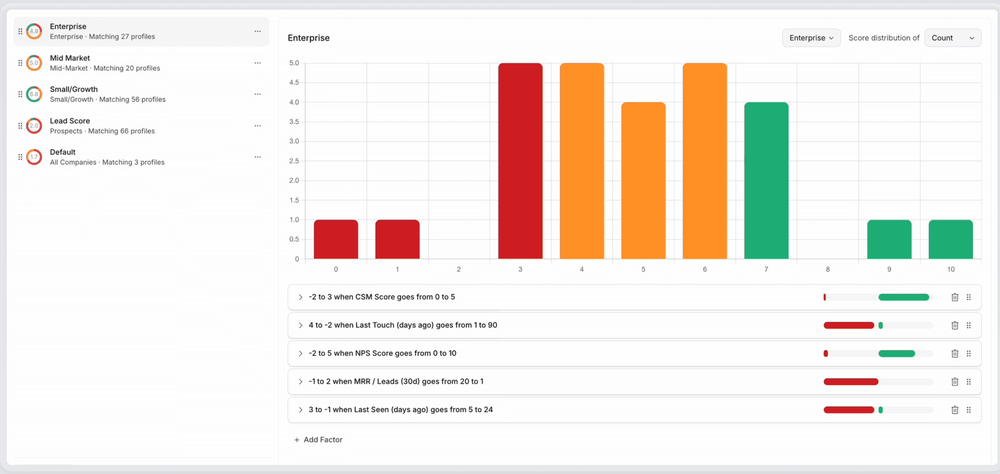
Planhat scores churn risk with rules you configure: health profiles built from usage, NPS, metric and field conditions, scored 0 to 10. AI adds sentiment from emails, chats and calls that can feed those scores. The AI overview does not describe a trained churn probability model, and the health article does not state refresh frequency.
Planhat gives you a flexible data model with health profiles you define, and it prices on a platform fee plus a minimum number of core users.
Health profiles are rules you configure from usage, NPS, metric and field conditions, scored 0 to 10 with a baseline of 5. AI adds sentiment from emails, chats and calls that can feed those scores, with credits for AI usage. The AI overview doesn't describe a trained churn probability model, and refresh frequency isn't stated.
The pricing page describes quote-based pricing: a platform fee with a minimum number of core users, plus extra core users and add-ons such as an upgraded AI platform, advanced service, email marketing and advanced portals. Unlimited view users are included on every plan. All plans bill annually upfront and in USD by default, and onboarding resources are included, with paid implementation plans available.
- You want per-segment health profiles that a CS ops person can tune without a data scientist.
- You want email, chat and call sentiment to feed health scores and automations.
- You need a documented trained churn probability or revenue-at-risk model out of the box.
- You want published pricing or a team with no technical resources for configuration.
- Users like
- Reviewers praise flexibility of the data model and workflows, plus onboarding and support quality.
- Users dislike
- Reviewers cite a steep learning curve and the need for technical skills for automations and customization.
- Source: G2, 964 reviews
How it works in practice
G2 shows 4.5 from 964 reviews. Reviewers praise the flexibility of the data model and workflows, plus onboarding and support quality. The recurring complaint is a steep learning curve and the need for technical skills for automations and customization, which is the same complaint ChurnZero gets. If that's why you're leaving, Planhat doesn't solve it.
- Starting price
- Quote only, no public USD price
- Scoring type
- Rules-based, 0 to 10, baseline 5
- Inputs
- Fields, metrics, NPS, usage, AI sentiment
- AI
- Sentiment and summaries, credit based
- Plan gating
- Not published; AI add-on listed
- Refresh
- Not published
- Pricing model
- Platform fee plus minimum core users; extra core users and add-ons
- Billing
- Annual, upfront
- View users
- Unlimited on all plans
- Scale
- 0 to 10, baseline 5
- Viewers
- Unlimited view users on all plans
If you're moving to a larger platform
When the program has several segments, a CS operations owner and a CRM that drives account views, these two are the usual shortlist.
Gainsight Customer Success
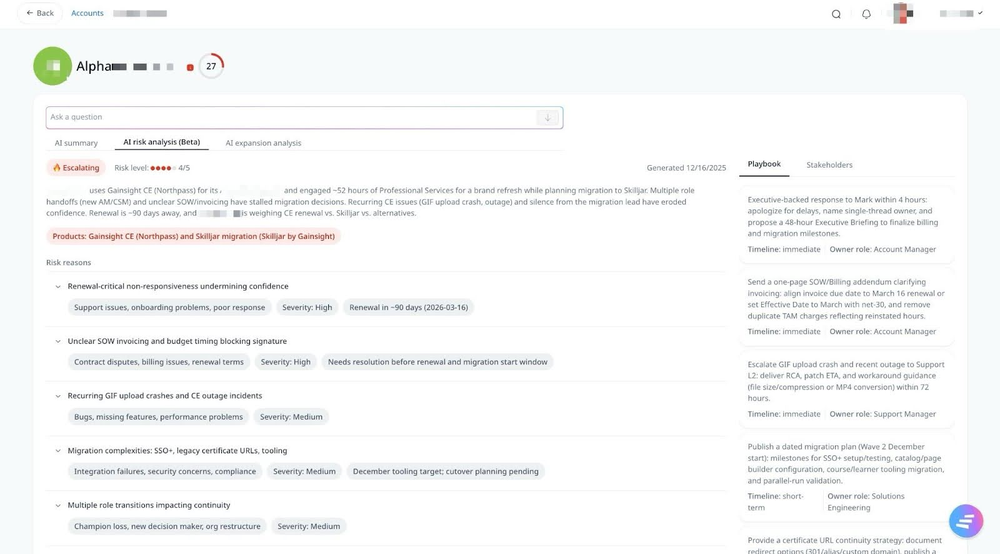
Gainsight computes health in two ways. Scorecards are a rules-based, weighted health score that admins configure, with AI suggestions for measures and weights. Staircase AI adds a communication-driven layer that reads emails, calls, tickets and meetings, flags churn risk events, and rates risk 1 to 5 with reasons and a playbook. It does not publish a churn probability or revenue-at-risk figure.
Gainsight is the broadest platform in this list, with configurable scorecards and AI that reads customer communications, and it takes the longest to stand up.
Scorecards are a rules-based, weighted health score that admins configure, with AI suggestions for measures and weights. Staircase AI adds a communication layer that reads emails, calls, tickets and meetings, flags risk events and rates risk 1 to 5 with reasons and a playbook. A risk summary refreshes about every 8 hours while risk is active. Gainsight's agents include a Handoff Analyst for post-sale context, a Risk Analyst and an Expansion Analyst.
The Essentials and Enterprise tiers include 10 and 20 full users respectively, and pricing is by request. Connectors cover Salesforce and HubSpot. Gainsight's page emphasizes complex accounts and multiple business units rather than a company size.
- You want configurable scorecards by segment plus AI that reads customer communications for risk
- You have an admin or CS ops owner who can run a larger platform and route risk into CTAs and journeys
- You need a quick setup; G2 reviewers flag a steep learning curve and 5 months average implementation
- You need published pricing or a churn probability score; neither is published
- Users like
- Ease of use, centralized information, visibility
- Users dislike
- Not intuitive, steep learning curve, limited customization
- Source: G2, 1,772 reviews
How it works in practice
G2 shows 4.5 from 1,772 reviews. Reviewers praise ease of use, centralized information and visibility, and they cite it as not intuitive with a steep learning curve and limited customization. Average implementation is about five months. Our Gainsight vs ChurnZero comparison covers the head-to-head, and the Gainsight pricing guide covers the tiers.
- Starting price
- Quote only (Essentials and Enterprise tiers)
- Risk method
- Weighted scorecard (rules) plus Staircase AI communication analysis
- Risk output
- Health score 0 to 100, Risk Level 1 to 5
- Inputs
- Usage and CRM via scorecards; emails, calls, tickets, meetings via Staircase AI
- Refresh
- Risk summary about every 8 hours while risk is active
- Tiers
- Essentials and Enterprise; Staircase AI gating not published
- Vendor claim
- Up to 95% renewal forecast accuracy (unverified)
- CS packages
- Essentials, Enterprise
- Essentials full users
- 10
- Enterprise full users
- 20
- CRM connectors
- Salesforce, HubSpot
- Published USD price
- Request pricing
- Renewals
- Confirm add-on entitlement
- Full users
- 10 on Essentials, 20 on Enterprise
Totango (now Odie)
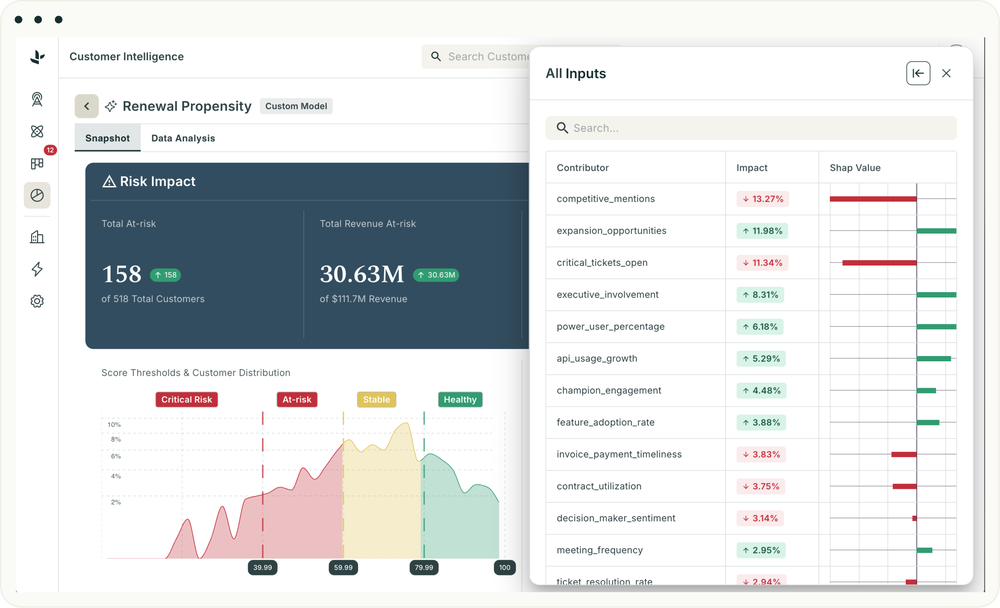
Totango's classic health model is a rules-based weighted score you configure by dimension and metric. The Unison layer adds AI scoring from emails, calls and tickets. The company rebranded to Odie on September 10, 2026, and existing Totango customers see no change yet.
Totango's weighted scorecards show contract value at risk by health dimension, but the company now sells three product lines, which makes the path less clear.
The classic Totango health model is a rules-based weighted 0 to 100 score you configure by dimension and metric, and a scorecard can show the contract value at risk behind each dimension. The Unison layer adds AI scoring from emails, calls and tickets with daily analysis. On September 10, 2026, the company announced Odie, a Customer Knowledge Engine for post-sales teams, and its site now lists Totango (customer success), Catalyst (customer growth) and Odie side by side. Existing Totango customers see no change yet.
There are no published prices or self-serve plans. The only call to action is a demo request.
- You want an admin-tunable weighted health score with dimension weights and segment-specific profiles.
- You need contract value at risk shown by health dimension on a scorecard.
- You need a published price or self-serve plans, since pricing is demo-only.
- You want a clear single product path, since Totango, Catalyst and Odie now sit side by side.
How it works in practice
G2 shows 4.3 from 1,150 reviews, the lowest rating in this list. Before you shortlist it, ask which of the three product lines the quote covers and what the roadmap is for the one you would buy.
- Starting price
- Quote only
- Scoring
- Rules-based weighted 0 to 100 score
- AI layer
- Unison, daily analysis
- Inputs
- Usage, CRM, email, calls, tickets
- Pricing
- Demo only
- Rebrand
- Odie, Sept 10, 2026
- Scale
- 0 to 100, weighted
If AI that reads customer conversations is the draw
Velaris
Velaris combines a rules-based health score you weight yourself with an AI layer (AI Pulse, Risk Watchdog) that reads tickets, emails and call transcripts for risk. It surfaces risk through threshold alerts, playbooks and tasks. It does not publish a probability, accuracy figure or refresh interval.
Velaris pairs a health score you weight yourself with AI that reads tickets, emails and call transcripts, on a single license.
The rules-based score uses usage, tickets, NPS, call transcripts and sentiment, and the AI layer (AI Pulse and Risk Watchdog) reads conversations for risk. Risk surfaces through threshold alerts, playbooks and tasks. No probability, accuracy figure or refresh interval is published, and there is no module-level plan gating: it's one license with no public price.
- You want a configurable health score plus AI that reads conversations for risk
- You want one license with no module-level plan gating
- You need a trained churn probability with published accuracy
- You need a public price before talking to sales
- Users like
- Automation and ease of use
- Users dislike
- Limited customization and implementation problems
- Source: G2, 126 reviews

How it works in practice
G2 shows 4.5 from 126 reviews, a much smaller sample than the platforms above. Reviewers praise automation and ease of use, and they cite limited customization and implementation problems. With few reviews, treat the rating as a weaker signal and ask for references.
- Starting price
- Quote only; one license, no public price
- Risk method
- Weighted rules score plus AI conversation analysis
- Inputs
- Usage, tickets, NPS, call transcripts, sentiment
- Output
- Weighted score with limits and alerts
- Refresh
- Not published
- Plan gating
- None published, one license
- Implementation (G2 avg)
- 2 months
- Licensing
- One license, no module gating
- Setup, per G2
- About 2 months
Moving off ChurnZero
When to stay on ChurnZero
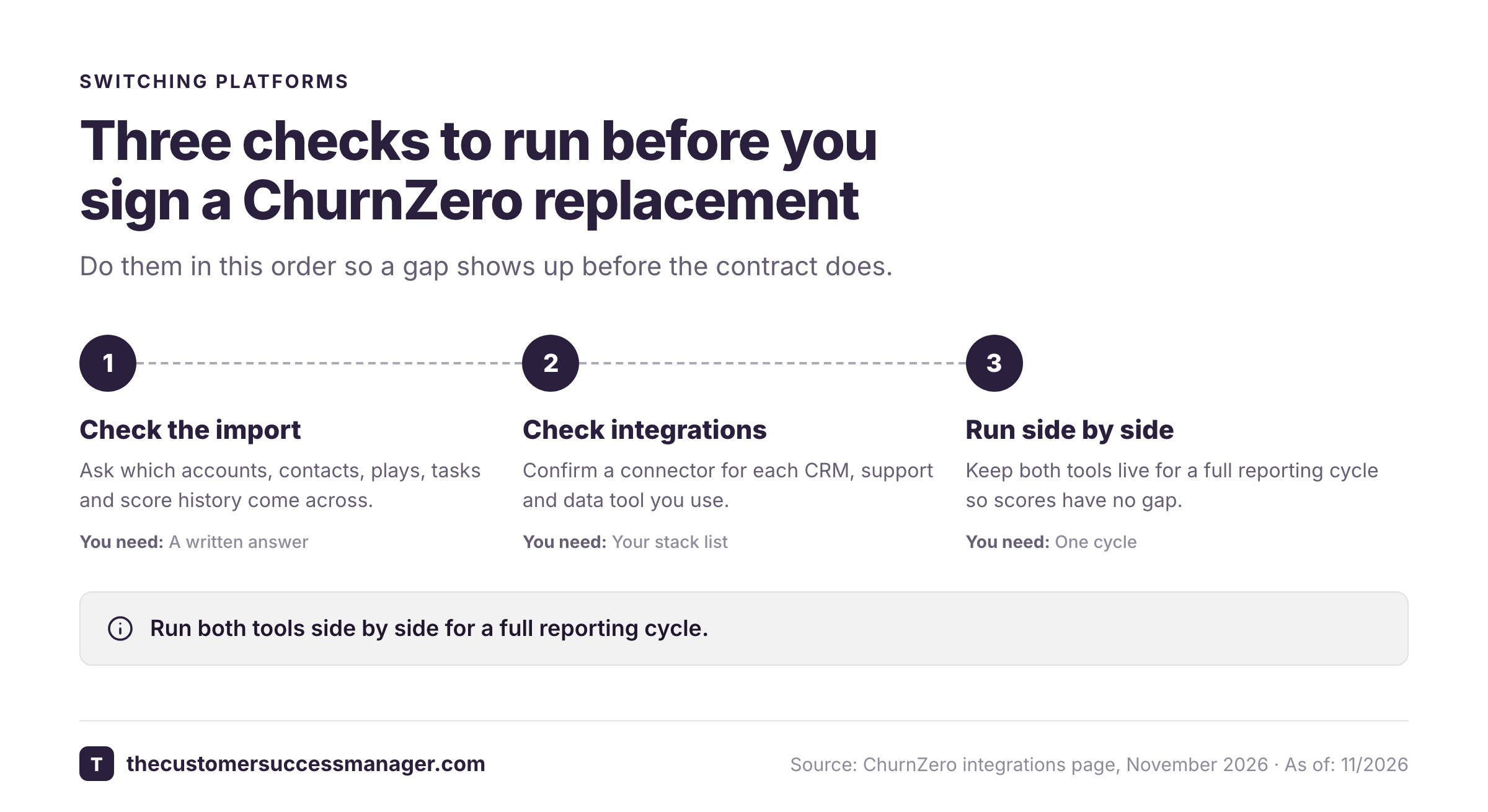
Staying is a legitimate answer. Keep ChurnZero if your CSMs already build and trust their ChurnScores, because rebuilding that logic is the real cost of switching. Keep it if the Plays and journeys you run today would need to be rebuilt, if its integrations cover your stack, or if the AI bundle is what you were about to buy anyway.
Switch when the price can't be justified without a number, when only one person understands how the scores are built, or when the tool no longer matches the size of your team. Our ChurnZero pricing guide covers what is and isn't published.
What none of these platforms record
Health scores and risk flags tell you how an account is doing. None of these platforms keeps the specific promises your team made to the customer. A renewal call that opens with a green score still goes badly if the customer asks about the integration review you agreed to in March, and nobody can say who owned it. The Customer Success Manager is a small ledger for that: it keeps each customer commitment with an owner, a due date, the source excerpt and a reviewer's verification, and you can ask about open promises from Claude over MCP. It sits beside a CS platform, not instead of one.
Which ChurnZero alternative should you pick?
- A faster start for a small teamCustify
- Clear customer and license limits before you talk to salesClientSuccess
- Hourly health scores built per segment with no codeVitally
- A flexible data model and a CS ops owner to run itPlanhat
- Large programs with several segments and business unitsGainsight
- Contract value at risk on the scorecardTotango (Odie)
- AI over tickets, emails and call transcripts on one licenseVelaris
- A tool that records customer promises, not healthThe Customer Success Manager, beside your platform
FAQ
What is the best alternative to ChurnZero?
The best alternative to ChurnZero depends on team size. Custify and ClientSuccess suit smaller teams that want a faster start, Vitally and Planhat suit mid-market teams that want configurable scoring, and Gainsight suits large programs with a dedicated admin.
Is there a free or cheaper alternative to ChurnZero?
None of the eight platforms compared here publishes a USD price or lists a free plan, so no alternative can be called free or cheaper without a quote. ClientSuccess publishes its package limits and says annual contracts are typically 15 to 20 percent below month-to-month rates, and Custify says it charges no setup fees.
How much does ChurnZero cost?
ChurnZero doesn't publish its price. It sells Professional and Enterprise editions by quote, and its Agentic Essentials AI bundle is a separate flat-fee subscription whose amount is also unpublished.
Is ChurnZero better than Gainsight?
ChurnZero and Gainsight are both rated about 4.5 to 4.7 on G2, so the choice is mostly about scale. ChurnZero scores are built by hand by a CSM, while Gainsight offers more depth for complex programs with a longer setup, averaging about five months per G2 reviewers.
What type of software is ChurnZero?
ChurnZero is customer success platform software for B2B teams. It combines hand-built health scores called ChurnScores, alerts and automated plays for CSMs, an AI agent called Harbinger that flags relationship risk, and integrations with CRMs and support tools.
Should I replace ChurnZero or add a tool beside it?
Replace it if the price, setup effort or team fit is the problem. Add a tool beside it if the gap is something a health score can't record, such as the specific commitments your team made to each customer.