The best voice of customer software for a customer success team depends on how customers reach you.  Qualtrics CustomerXM and
 Medallia run a whole program across many teams,
 Chattermill and
 Enterpret read the feedback customers already leave in tickets, reviews and calls, and
 Survicate,
 Zonka Feedback,
 AskNicely and
 CustomerGauge ask the questions themselves. Seven of the eight tools do not publish a full price for their paid plans.
- tools compared
- 8
- program roles
- 3
- tool with an account-level NPS
- 1
- G2 rating range
- 4.3 to 4.7
Best voice of customer software at a glance
Every tool below turns what customers say into something a team can act on, but they hear customers in different ways. Some send the survey, some read what customers already wrote, and the enterprise suites do both. The picks follow that split. Most customer success teams pair one tool that asks with one that reads, and that's worth knowing before you build a shortlist.
- Best for a full programQualtrics CustomerXMSurveys, calls, chat, social and review sites in one suite, with follow-up tickets in ServiceNow, Zendesk or Salesforce.
- Best for many people acting on feedbackMedalliaUnlimited users and alerts scoped by region, location or team, priced by interaction records.
- Best for ranking themesChattermillTags every survey answer, review, chat and call with themes and sentiment, ranked by effect on NPS or CSAT.
- Best for feedback tied to accountsEnterpretLinks tickets, reviews and calls to accounts and revenue, with anomaly alerts and Jira or Linear handoffs.
- Best for account-level NPSCustomerGaugeRolls several stakeholders into one account score next to revenue and renewal date.
- Best for assigned follow-upAskNicelyA detractor score opens a case with an owner and a deadline.
- Best for a quick start with a priceSurvicateNPS, CSAT and CES in email, web and product, with a published price and a 10-day trial.
 For what none of them trackThe Customer Success ManagerRecords the promises your team made to each customer. It does not read feedback.
How the eight tools compare
| Tool | Type of tool | Where the answer goes | Starting price | G2 rating |
|---|---|---|---|---|
| Qualtrics CustomerXM | Enterprise experience management suite | Follow-up tickets in ServiceNow, Zendesk or Salesforce | Quote only: CX is priced by interactions, no public price and no free trial | 4.3 (751) |
| Medallia | Enterprise experience management suite | Scoped alerts, replies from the app, Salesforce cases | Quote only: annual tiers by Experience Data Records (one record per interaction), unlimited users | 4.5 (199) |
| Chattermill | Feedback analytics (VoC intelligence) | Slack, email and Jira alerts | No public price: the pricing page leads to a demo request | 4.4 (238) |
| Enterpret | Customer feedback intelligence | Jira, Linear and Slack | No public price: the vendor pricing page returned a 404 on 2026-11-08 and G2 lists no pricing | 4.6 (110) |
| Survicate | Customer feedback survey tool | Slack and email alerts, HubSpot and Salesforce sync | Starter monthly plan (up to 500 responses a month, page title says from $56 per month), Growth from $114 per month billed annually (250 responses a month), Pro from $349, Enterprise from $569; 10-day free trial | 4.6 (215) |
| Zonka Feedback | Customer feedback and CX platform | Response inbox, alerts, CRM and helpdesk workflows | Custom quote; G2 lists from $99 per month for Customer Feedback | 4.7 (85) |
| AskNicely | Customer experience / NPS platform | Assigned cases with SLAs, Slack and Teams alerts | Not published. Quote based from 500 responses per year, annual contract, no free trial. | 4.7 (1,051) |
| CustomerGauge | Account-based B2B NPS and customer experience platform | Detractors assigned to the account's CSM | Starting at $24K, custom quote; the page states no period or currency | 4.6 (50) |
| The Customer Success Manager Our product | Customer commitment tracking | Records what your team promised each customer and whether delivery was verified | From $49 per month per workspace; card required at checkout (vendor homepage, as of 2026-11-05) | No reviews yet |
Prices and plan details as of November 2026. G2 review counts are rounded.
What voice of customer software does
Voice of customer software collects what customers say in surveys, support tickets, calls, reviews and chat, finds the themes and sentiment in it, and sends the result to the person who can act. For a customer success manager that means a short answer to questions such as why scores dropped this quarter, which accounts are unhappy and whether anyone has replied to the unhappy ones.
How it differs from a survey tool and a CRM
- A survey tool sends questions and shows the answers. Voice of customer software adds the part after the answer: themes across open-text comments, alerts and a follow-up that someone owns. Several tools below, such as Survicate, sit between the two.
- A CRM stores the records your team enters. Voice of customer software reads what customers wrote or said and can write the result back to those records.
- Customer intelligence software is the wider category that also reads product usage and health signals. Our customer intelligence software guide covers that side.
- A customer success platform scores health and runs playbooks. Voice of customer software feeds one, and it doesn't replace it.
How feedback becomes action
Every tool in this list follows the same three steps of feedback becoming action: ask, listen, route. The tool collects what customers say, finds the pattern, and hands a conclusion to a person with a deadline. Each step is where a tool can fall short, and the sections below say which.
- Step 1Ask
- Survicate
- Zonka Feedback
- AskNicely
Limit a survey only hears the customers who answer, so response rate and survey frequency decide what you learn - Step 2Listen
- Chattermill
- Enterpret
Limit reading tickets, reviews and calls covers customers who never answer a survey, but only the channels you connect - Step 3Route
- Qualtrics CustomerXM
- Medallia
- CustomerGauge
Limit an answer with no owner is a dashboard, so check who is assigned, by when and in which system
Enterprise VoC suites: one program across many teams
Qualtrics CustomerXM and Medallia both ask and listen, and both build the follow-up into the product. They suit a company that runs a formal feedback program with an admin team behind it. Both are quote only.
Qualtrics CustomerXM
Qualtrics CustomerXM
Voice path: asked and overheard. Surveys, calls, chat, SMS, email, social and review sites in, follow-up tickets out.
Qualtrics lists the channels it listens on: digital experiences, contact center calls, IVR, chat, SMS, email, social media and review sites, and it puts survey answers and unsolicited mentions into one platform. Conversational feedback uses AI to ask a follow-up when an answer is vague, and the vendor says this produced 42 percent richer feedback with no rise in drop-off. Qualtrics Assist lets you ask questions about themes and sentiment in plain language and returns theme counts and trends.
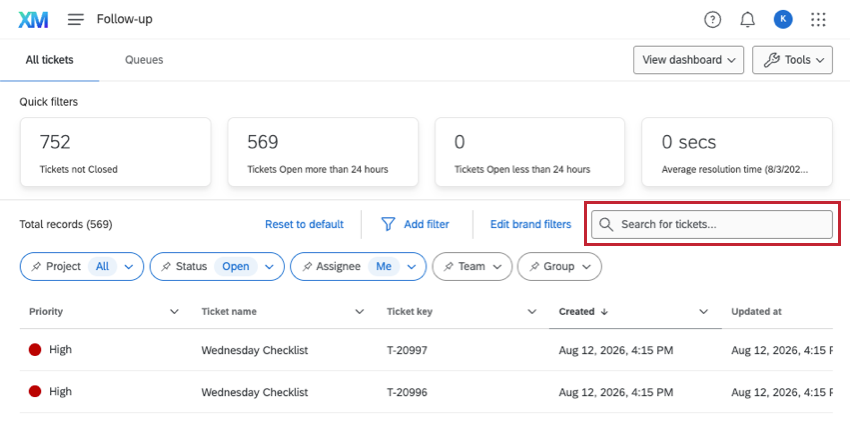
The loop is split in two. The inner loop answers a customer while they are still in the survey, and the outer loop routes recurring issues to the teams that can fix them. Intelligent ticketing creates and manages cases in ServiceNow, Zendesk or Salesforce, and Active Follow-ups lets you set a threshold on CSAT, an engagement score or NPS so that a breach creates a ticket for the owner. The Salesforce link is two way, and the Salesforce extension needs a license that includes it.
A Qualtrics Community thread says contacts in XM Directory have no native account relationship field, with an account ID on every contact row as an unofficial workaround. If your answer has to be per account, ask for a demo of exactly that.
- You run a formal feedback program across teams and want surveys, call and chat analysis and follow-up tickets in one suite
- You need threshold triggers on CSAT, NPS or engagement that create tickets in ServiceNow, Zendesk or Salesforce
- You need account-level roll-ups out of the box: the contact model is person based
- You want a published price or a light setup: price is quote only and G2 reviewers call it complex for basic needs
- Users like
- analytics, ease of use and a robust feature set
- Users dislike
- complexity for basic needs and sentiment analysis missing from basic licenses
- Source: G2, 751 reviews
Reviews and price
G2 lists Qualtrics Customer Experience at 4.3 from about 750 reviews. Reviewers praise analytics, ease of use and a robust feature set, and they note that sentiment analysis is missing from basic licenses. Pricing is quote only, by interactions, with no free trial.
- Starting price
- Quote only: CX is priced by interactions, no public price and no free trial
- Pricing unit
- Interactions (quote only)
- Follow-up queue
- Tickets with owners, statuses, 10,000-row view
- AI
- Experience Agents, predictive churn models
- Hears
- Asked and overheard, across surveys, calls, chat, social and reviews
- Level
- Customer profile (person level)
- Handoff
- Follow-up tickets; two-way Salesforce
- Gate
- Salesforce extension needs a license that includes it
Medallia
An enterprise experience platform that captures feedback from surveys, voice, chat, web and social, and pushes alerts and follow-up cases to the teams that own each account or location.
Voice path: asked and overheard. Surveys, voice, chat, web behavior and social in, scoped alerts and action plans out.
Medallia collects feedback from surveys, voice, chat, web behavior, social and employee programs, and adds AI themes and root-cause analysis on top of survey and free-text answers. Pricing is built on Experience Data Records, one record per customer or employee interaction, sold in annual tiers with unlimited users. Analytics, automatic alerting and closed-loop feedback are included in that price.
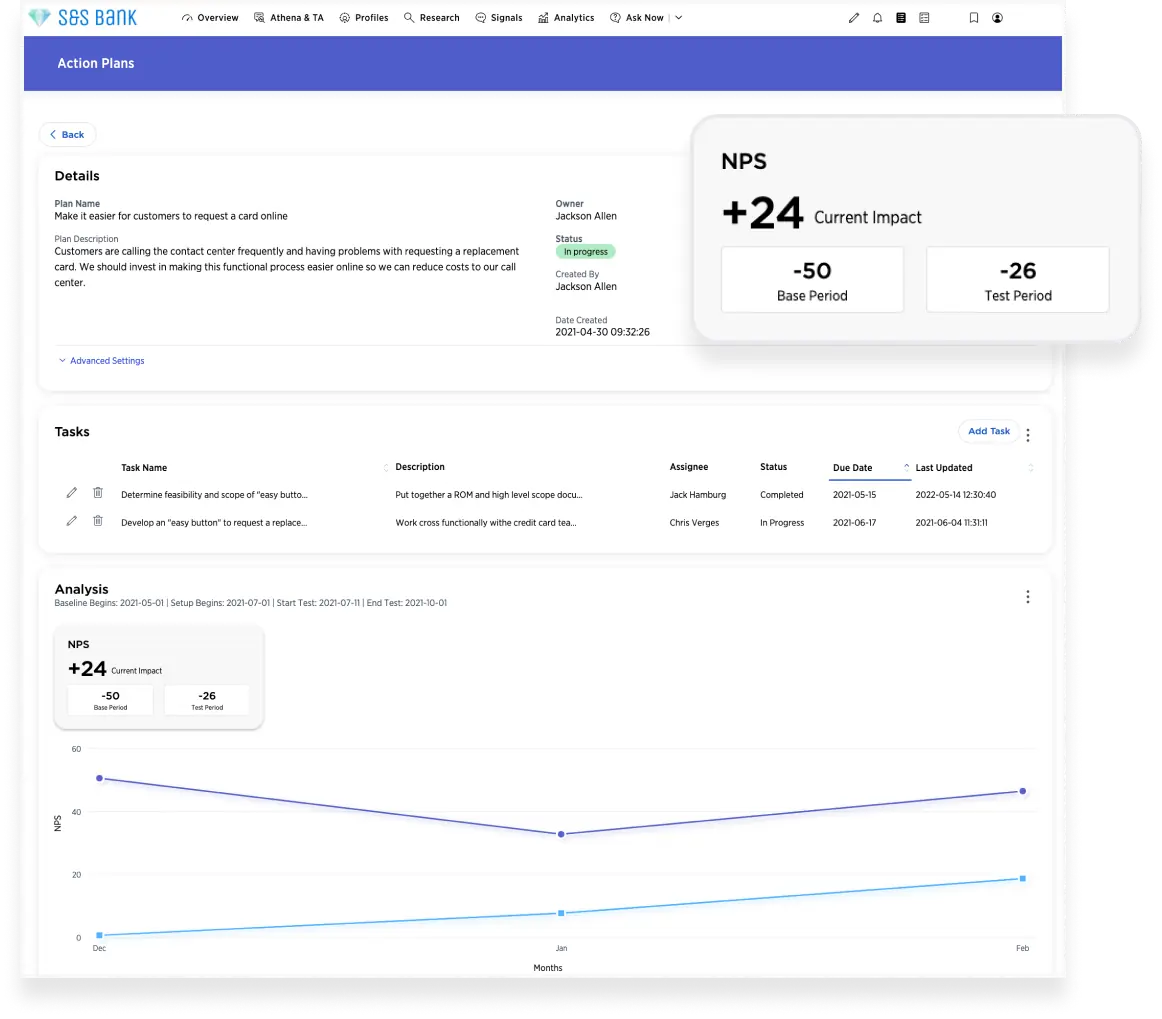
Alerts can be scoped by region, location, product line, team or a hybrid hierarchy and delivered in the web app, the mobile app, Slack or Workplace, and staff can reply to feedback by email or phone from the mobile app. For B2B, Total Experience (TX) Profiles put individual customers and business accounts on one timeline. The admin documentation describes a Medallia for Salesforce managed package that creates follow-up cases in Salesforce from feedback and can send a survey after a case closes.
Medallia is built for enterprise programs with a configuration team. A CS team that wants surveys live next week will find the setup heavy, and the pricing starts with an annual tier, not a monthly plan.
- You want unlimited users, so every account owner and frontline manager can see and act on feedback without extra seats
- You need individual customers and B2B accounts on one timeline and follow-up cases created in Salesforce
- You have no admin capacity: G2 reviewers score ease of setup (7.2) and ease of admin (7.7) lowest
- You run a small program: pricing starts with an annual tier of interaction records
- Users like
- instant, actionable feedback with flexible collection and custom dashboards
- Users dislike
- complex configuration that needs specialist expertise; ease of setup scores 7.2 out of 10
- Source: G2, 199 reviews
Reviews and price
G2 lists Medallia Customer Experience at 4.5 from about 200 reviews. Reviewers praise instant, actionable feedback and flexible collection with custom dashboards, and they call the configuration complex enough to need specialist expertise. Pricing is quote only.
- Starting price
- Quote only: annual tiers by Experience Data Records (one record per interaction), unlimited users
- Pricing unit
- Experience Data Records, annual tiers
- Users
- Unlimited
- Account view
- TX Profiles for individuals and B2B accounts
- Hears
- Asked and overheard, across surveys, voice, chat, web and social
- Level
- Individuals and B2B accounts (TX Profiles)
- Handoff
- Scoped alerts, app replies, Salesforce cases
- Gate
- Annual tier by Experience Data Records
Listening and analysis layers: what customers say when nobody asks
Chattermill and Enterpret don't send surveys. They read the feedback that already exists in surveys, tickets, reviews and calls and group it into themes. For a CS team they surface the complaints that never made it into a score.
Chattermill
Chattermill
Voice path: overheard. Survey answers, reviews, chats and calls in, ranked themes and alerts out.
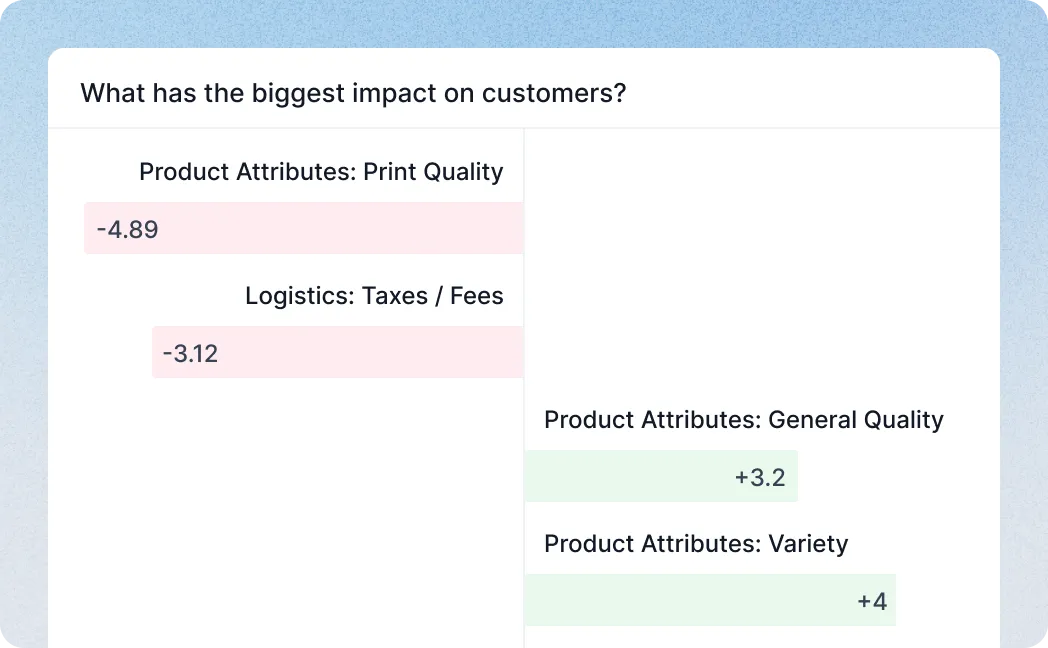
Chattermill pulls feedback from surveys, review sites, support chats and calls into one data layer and adds context such as customer ID and channel to each comment. A taxonomy classifies every piece of feedback, and its Lyra AI model combines aspect-based sentiment analysis, supervised learning and large language models to tag themes and sentiment. Precision Insights rank issues by volume with the customer quotes behind them, and Impact Analysis shows which themes lift or drag metrics such as NPS and CSAT.
Anomaly Detection and Proactive Insights watch in the background and flag spikes or new issues. Alerts can go to Slack, email or Jira. The integration library lists Qualtrics, Delighted, Intercom, Salesforce, Trustpilot, Slack and Jira, and the vendor states SOC 2 Type II compliance.
Public documentation does not describe account-level or B2B roll-ups, so it answers why scores move across your customer base better than it answers how one account is doing. The pricing page offers only a demo.
- You already collect feedback in surveys, support tools and reviews and need themes ranked by impact on NPS or CSAT, with quotes
- You want anomaly alerts pushed to Slack or Jira so customer success and product see new issues early
- You need an account-level view: public documentation does not describe B2B account roll-ups
- You need to send surveys or want a published price: Chattermill analyzes feedback collected elsewhere and quotes after a demo
- Users like
- ease of use and grouping large volumes of feedback
- Users dislike
- an interface some reviewers call not intuitive, and reliance on the tech team
- Source: G2, 238 reviews
Reviews and price
G2 lists Chattermill at 4.4 from about 240 reviews. Reviewers name ease of use and grouping large volumes of feedback as strengths and call the interface not intuitive. Pricing is demo only. Our customer feedback software guide compares tools that collect the feedback in the first place.
- Starting price
- No public price: the pricing page leads to a demo request
- Tagging
- Aspect-based sentiment per comment
- Alerts
- Slack, email, Jira
- Zendesk import
- CSAT with comments, hourly, one-way
- Hears
- Overheard, across surveys, reviews, chats and calls
- Level
- Theme across feedback; account roll-up not described
- Handoff
- Slack, email, Jira
- Gate
- Not published
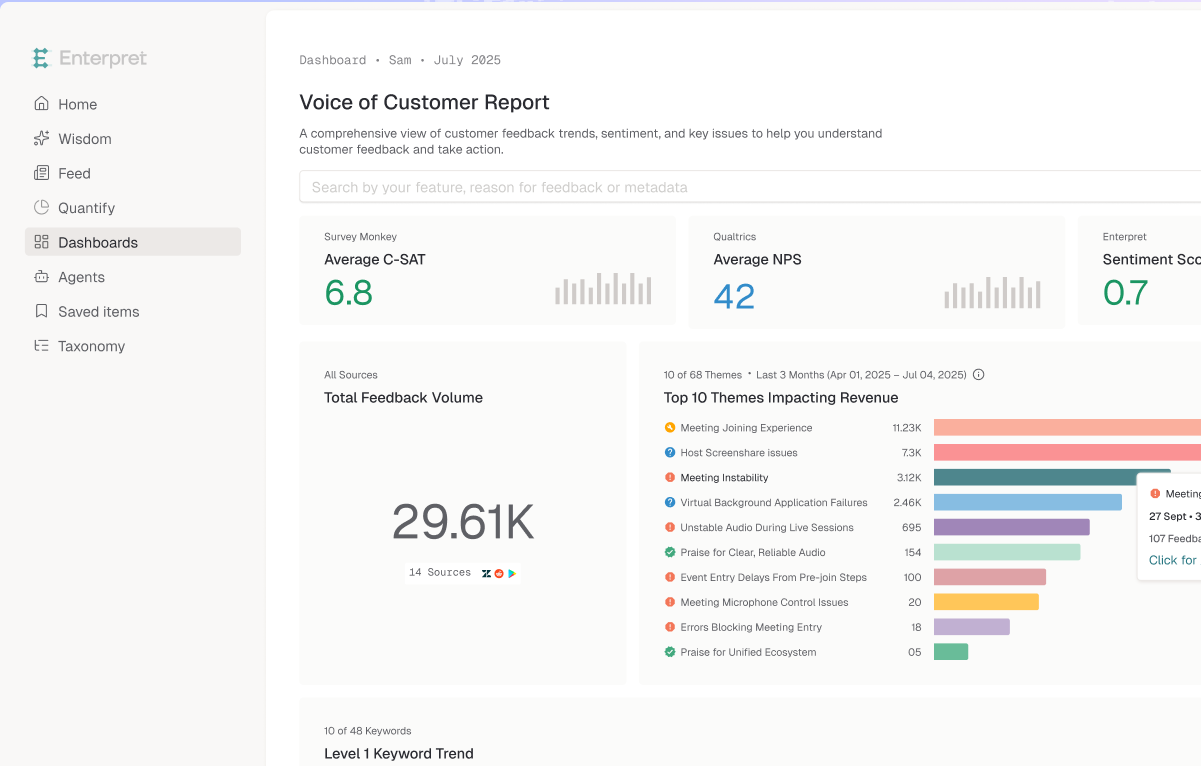
Enterpret
Enterpret
Voice path: overheard. Tickets, reviews, calls, surveys and social in, account-linked themes and escalations out.
Enterpret pulls feedback from support tickets, reviews, calls, surveys and social channels into a Knowledge Graph. Cross-source entity resolution merges the same user and account across sources into one identity, and you model your own entities, such as accounts, opportunities and personas, so each comment links to them without manual tagging. An adaptive taxonomy classifies feedback into five levels, from L1 down to sub-theme, plus intent categories: help, improvement, complaint and praise.
Quantify and Trends filter feedback by revenue, CSAT, NPS or region and rank themes by business impact, and Anomaly Detection flags activity above baseline. The integration library lists Zendesk, Delighted, Gong, Salesforce Sales Cloud, Slack and Jira, and Linear issues can be created from feedback with customer counts and evidence.
No price is published. Public documentation does not say whether it writes into Gainsight or ChurnZero.
- You want support, survey and call feedback tied to accounts and revenue so CSMs see which issues hit key customers
- You want themes, anomaly alerts and Jira, Linear or Slack handoffs for escalations from customer success to product
- You need a customer success platform with health scores and playbooks: Enterpret analyzes feedback
- You need a public price or a light setup: pricing is not published and G2 reviewers mention complex setup
- Users like
- aggregating insight from support tickets and in-app surveys, and responsive support
- Users dislike
- inconsistent AI insights, a learning curve and export limits
- Source: G2, 110 reviews
Reviews and price
G2 lists Enterpret at about 4.6 from roughly 110 reviews. Reviewers praise how it aggregates ticket and in-app survey feedback and cite inconsistent AI insights, a learning curve and export limits.
- Starting price
- No public price: the vendor pricing page returned a 404 on 2026-11-08 and G2 lists no pricing
- Sources
- 50+ claimed
- Taxonomy
- Five levels plus intent
- Alerts
- Anomaly Detection
- Hears
- Overheard, across tickets, reviews, calls, surveys and social
- Level
- Theme linked to accounts and revenue
- Handoff
- Jira, Linear, Slack
- Gate
- Not published
Asking tools: surveys and account-level relationship loops
Survicate, Zonka Feedback, AskNicely and CustomerGauge send the questions. They differ in what happens to a low score: an alert, a response inbox, an assigned case, or an account-level roll-up. Our net promoter score software guide goes deeper on the NPS side of these four.
Survicate
Survicate
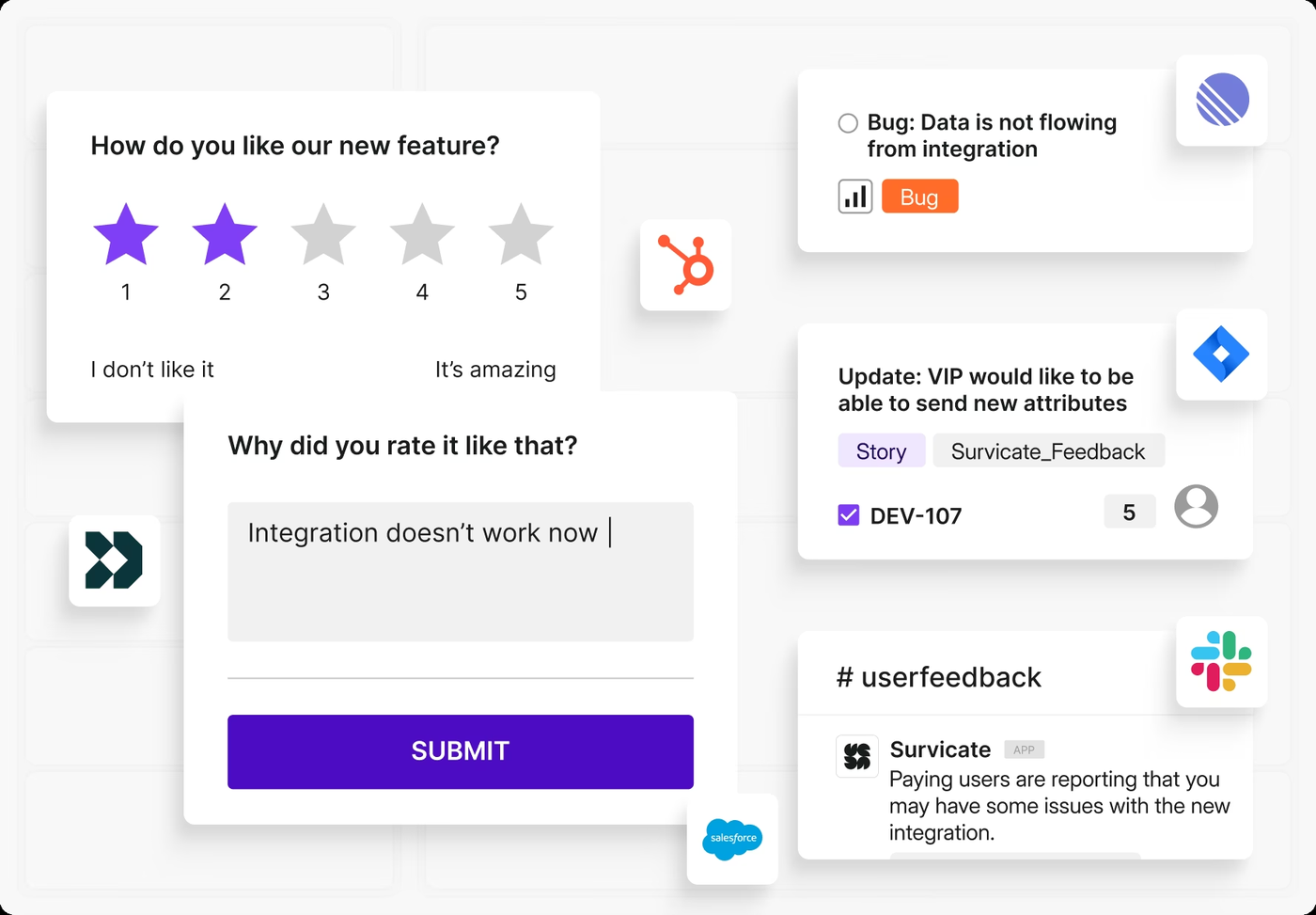
Voice path: asked. NPS, CSAT and CES in email, web, product and mobile, alerts and CRM syncs out.
Survicate runs NPS, CSAT and CES across email, website, in-product and mobile surveys. Website and in-product surveys target anonymous visitors, identified users through a unique user ID, or a CSV list of up to 10,000 rows. Slack posts each response to a channel in real time, with conditions on answers or attributes, and email alerts can fire on survey completion or on custom answer conditions. The HubSpot integration maps answers to contact properties and writes survey activity to the contact timeline, and the Salesforce integration maps answers to Lead, Contact, Company, Opportunity and Case fields.
Every plan includes a Research Hub for reading answers, and AI categorization and sentiment analysis start at the Pro plan. It breaks on accounts and cases: the documentation describes attributes per respondent with no separate account scope, and follow-up tasks live in your CRM or help desk.
- You want NPS, CSAT and CES surveys running inside your product and email this week, with a published price
- You run HubSpot and want survey answers written to contact properties and the timeline
- You need an account-level score across several contacts: the documentation describes attributes per respondent and no account scope
- You want case management for follow-ups: it alerts and syncs, but tasks live in your CRM or help desk
- Users like
- an intuitive tool that needs little training and a fast, helpful contact
- Users dislike
- going live can depend on a developer when the survey must be added to a web interface (one reviewer)
- Source: G2, 215 reviews
Plans and reviews
The pricing page lists a Starter monthly plan with up to 500 responses a month (the page title says from $56 a month), Growth from $114 a month billed annually with 250 responses a month, Pro from $349 and Enterprise from $569. A 10-day free trial needs no card. On G2 Survicate holds 4.6 from about 215 reviews. Reviewers like an intuitive tool that needs little training and a fast, helpful contact, and one says going live depends on a developer when the survey must be added to a web interface.
- Starting price
- Starter monthly plan (up to 500 responses a month, page title says from $56 per month), Growth from $114 per month billed annually (250 responses a month), Pro from $349, Enterprise from $569; 10-day free trial
- Metrics
- NPS, CSAT, CES
- Channels
- Email, website, in-product, mobile, link
- Growth plan
- 250 responses a month on the pricing card, 10 user seats
- Hears
- Asked, across email, web, product and mobile
- Level
- Respondent (person level)
- Handoff
- Slack, email, HubSpot, Salesforce
- Gate
- AI categorization and sentiment from Pro
Zonka Feedback
Zonka Feedback
Voice path: asked. NPS, CSAT and CES across email, SMS, WhatsApp, web and in-app, a response inbox out.
Zonka Feedback runs NPS, CSAT and CES across email, SMS, WhatsApp, website, in-product, an in-app SDK and offline devices. A survey setting limits how often one respondent can be asked. Its G2 listing describes real-time alerts by email, SMS, WhatsApp, Slack and Microsoft Teams, a response inbox, case management with assignments and workflow automation, with integrations for Salesforce, HubSpot, Intercom and Zendesk. Others named on its pages include Pipedrive, Freshdesk, Help Scout, Front, Jira, Zapier and Make.
The vendor's own pages list closing the feedback loop as a feature but don't map features to plans. It breaks on clarity: the pricing page shows no plan names or prices, and no account-level roll-up is described in the published vendor pages.
- You survey through many channels, including WhatsApp and SMS, and want alerts in Slack or Teams
- You want a response inbox with case management for follow-up on detractors
- You need per-account scores rolled up by company: no roll-up is documented
- You need public list prices or a free plan: only a 14-day trial and a custom quote are published
- Users like
- Responsive support and easy onboarding
- Users dislike
- Learning curve on advanced automation and reporting
- Source: G2, 85 reviews

Price and reviews
Pricing is custom by feedback volume. G2 lists the Customer Feedback product from $99 a month and AI Feedback Intelligence from $399 a month, figures provided by Zonka. On G2 Zonka holds 4.7 from about 85 reviews. Reviewers praise responsive support and easy onboarding and cite a learning curve on advanced automation and reporting.
- Starting price
- Custom quote; G2 lists from $99 per month for Customer Feedback
- Pricing
- Custom quote, no list prices on vendor page
- Trial
- 14 days, no free plan
- Account roll-up
- Not published
- Integrations
- Salesforce, HubSpot, Zendesk, Intercom, Slack, Teams
- Hears
- Asked, across email, SMS, WhatsApp, web, in-app and offline
- Level
- Respondent (person level)
- Handoff
- Response inbox, alerts, CRM and helpdesk workflows
- Gate
- Plans not mapped to features
AskNicely
AskNicely
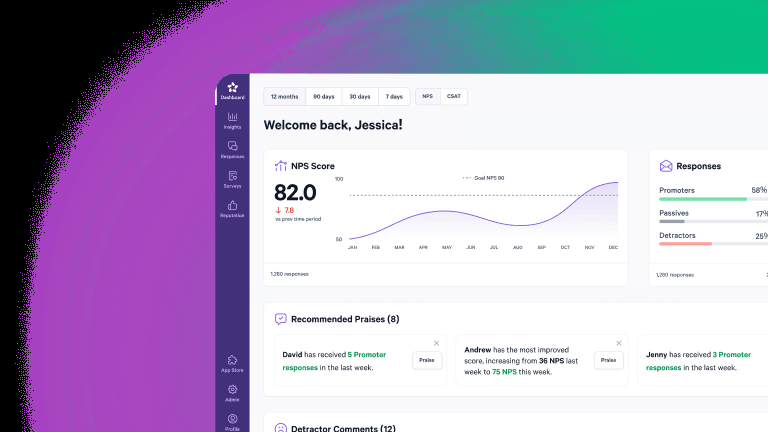
Voice path: asked. Email, SMS and web surveys in, assigned cases with deadlines out.
AskNicely surveys by email, SMS, web and kiosk. A Global Contact Rule sets how many days must pass before the same contact is surveyed again, plus a delay for new contacts, and a contact who unsubscribes is permanently marked Do Not Contact. Its case workflow can open a case automatically when a score is 6 or less, assign it to a user, track the SLA and send overdue notices, with email and mobile push alerts for the assignee. Advanced case management is on the Grow and Transform plans, while Learn has basic case management.
Listed links include Salesforce, HubSpot, Microsoft Dynamics, Zendesk, Slack, Teams and the customer success platforms ChurnZero, ClientSuccess and Intercom. It breaks on account scoring: feedback is stored on contacts, and the vendor does not document an account-level roll-up.
- You want detractor scores to open assigned cases with SLAs and alerts in Slack, Teams or a help desk
- You need links to CRM and customer success platforms such as Salesforce, HubSpot or ChurnZero
- You need a self-serve trial or public prices before talking to sales
- You need account-level scores: the vendor does not publish how contacts roll up to accounts
- Users like
- Ease of use and customer support
- Users dislike
- Survey limitations, difficult reporting and limited customization
- Source: G2, 1,051 reviews
Plans and reviews
AskNicely doesn't publish a price. The Learn, Grow and Transform plans start at 500 responses a year, all with unlimited users, and the price scales with response volume. Plans are mainly annual and there is no free trial. On G2 it holds 4.7 from about 1,050 reviews. Reviewers praise ease of use and support and cite survey limitations, difficult reporting and limited customization.
- Starting price
- Not published. Quote based from 500 responses per year, annual contract, no free trial.
- Pricing
- Not published, from 500 responses per year
- Free trial
- No
- Contact rule
- Resend delay in days, set on the Send page
- Case management
- Advanced on Grow and Transform; basic on Learn
- Hears
- Asked, by email, SMS, web and kiosk
- Level
- Contact (person level)
- Handoff
- Cases with owners and SLAs; Slack and Teams from Grow
- Gate
- Advanced case management on Grow and Transform
CustomerGauge
CustomerGauge
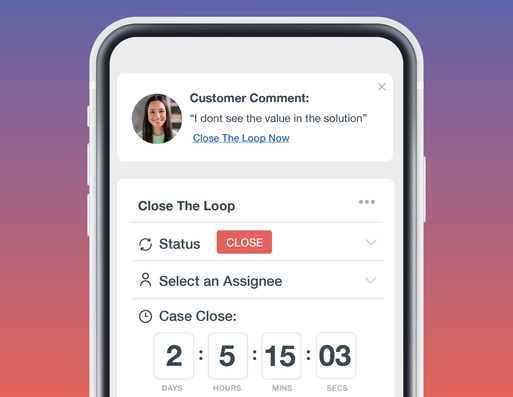
Voice path: asked, per account. Relationship surveys in, an account score and assigned detractor cases out.
CustomerGauge scores the account, not the individual contact. Its Account Hierarchy rolls feedback from several stakeholders into one account-level NPS, and one dashboard shows that score beside revenue, lifecycle stage, recent feedback, open cases and the renewal date. Accounts are ranked by revenue and NPS together and classed as safe, at risk or ready to expand. Surveys reach people as pop-ups inside software through Pendo and MadCap Flare, as end-of-call surveys through Genesys, after tickets through ServiceNow, or by survey link. The vendor states that every detractor response is assigned to the right customer success manager with a deadline and account context.
It breaks on cost and access: there is no free trial, and the engagement starts with a paid pilot.
- You run enterprise B2B accounts with several stakeholders each and want NPS tied to revenue and renewal date
- You need Salesforce or Dynamics sync, ServiceNow or Genesys triggers and an assigned follow-up on every detractor
- Your budget is below the $24K starting price or you want a self-serve trial
- You want metrics beyond NPS or highly custom reports without vendor help
- Users like
- Clear NPS dashboards and helpful support team
- Users dislike
- Report customization and advanced setup need help
- Source: G2, 50 reviews
Price, pilot and integrations
The pricing page says plans start at $24K and describes one flat platform fee with unlimited surveys, users and integrations, but it states no billing period or currency, so read it as an annual USD figure to confirm. Pricing depends on the size of the account base and the modules you activate. Pilots are scoped to a defined set of accounts and typically run 60 to 90 days. Listed integrations are Salesforce, Microsoft Dynamics 365, Slack, Pendo, ServiceNow, Jira and Gainsight through CSV or API. On G2 it holds 4.6 from about 50 reviews. Reviewers praise clear NPS dashboards and helpful support and say report customization and advanced setup need the vendor's help.
- Starting price
- Starting at $24K, custom quote; the page states no period or currency
- Entry price
- Starting at $24K, quote only
- Roll-up
- Account Hierarchy, account-level NPS
- Limits
- Unlimited surveys, users, integrations
- Trial
- No free trial, paid 60 to 90 day pilot
- Hears
- Asked, per account with several stakeholders
- Level
- Account (Account Hierarchy)
- Handoff
- Detractors assigned to the account's CSM
- Gate
- Starting at $24K; paid pilot
Who is heard and who acts: the eight tools side by side
The table puts the eight tools on the three things that decide whether customer feedback reaches a CSM: who the tool hears, whether the answer is per account, and where it goes next.
| Tool | Who is heard | Answer level | Where it goes next | Gate or price basis (USD) |
|---|---|---|---|---|
| Qualtrics | Asked and overheard | Person | Tickets in ServiceNow, Zendesk, Salesforce | Quote, by interactions |
| Medallia | Asked and overheard | Individuals and B2B accounts | Scoped alerts, app replies, Salesforce cases | Quote, annual tiers by interaction records |
| Chattermill | Overheard | Theme; account roll-up not described | Slack, email, Jira | Demo only |
| Enterpret | Overheard | Theme linked to accounts | Jira, Linear, Slack | Not published |
| Survicate | Asked | Person | Slack, email, HubSpot, Salesforce | From $114 a month annually (Growth) |
| Zonka | Asked | Person | Response inbox, alerts, CRM and help desk | Custom quote |
| AskNicely | Asked | Contact | Cases with owners and SLAs | Quote, from 500 responses a year |
| CustomerGauge | Asked, per account | Account | Detractors assigned to the CSM | From $24K, paid pilot |
Two patterns show up in the table. Only the enterprise suites and the two analysis layers hear customers who never answer a survey, and only CustomerGauge and Medallia describe a view above the individual person. If your renewals depend on accounts with several stakeholders, that second column should decide your shortlist before price does.
What to check before you buy
Demos are easy to steer, so ask every vendor the same questions and ask them to answer on your own accounts, not on a sample brand.
- Name the one decision the tool has to support, such as which accounts need a call before renewal
- List the channels customers use with you today: survey, tickets, calls, reviews, chat
- Ask which channels the tool reads natively and which need a connector, an add-on or a higher plan
- Ask whether the answer is per account or per person, and how several contacts roll up to one account
- Ask who is assigned when a score is low, by when, and where that case lives
- Ask how often the same customer can be surveyed and who controls that rule
- Ask which plan holds text analytics and AI features and whether they use credits
- Ask for a price in writing and the unit it scales with, since seven of the eight tools here publish no full price
Which tool fits which team
- You run a formal feedback program across many teams and want follow-up tickets built inQualtrics
- Hundreds of managers should see and act on feedback without paying per seatMedallia
- You collect feedback elsewhere and need to know why scores moveChattermill
- You want feedback themes tied to accounts and revenueEnterpret
- You want surveys in email and product this week with a published priceSurvicate
- You survey by SMS or WhatsApp and want a response inboxZonka Feedback
- A detractor must become an assigned case with a deadlineAskNicely
- You sell to enterprise accounts and need one NPS per account tied to revenueCustomerGauge
The eight tools often work in pairs. Chattermill and Enterpret both list Delighted as a survey source, Chattermill also lists Qualtrics, and the two suites can replace both layers if you have the budget. Start with the channel you are blind to today. For a wider look at the platforms that turn this into health scores, see our customer success software guide, and for the wider experience programs see customer experience management software.
What these tools don't record
Voice of customer software tells you what a customer said and how they felt. It doesn't tell you what your team promised back. A commitment made on a call or in a QBR shows up in a survey comment as a complaint that nobody answered, in a ticket as a sentence, and nowhere as an owned item with a due date and proof of delivery. The Customer Success Manager keeps that ledger. It isn't a voice of customer tool, and it reads no feedback.
FAQ
What is voice of customer software?
Voice of customer software collects what customers say in surveys, tickets, calls, reviews and chat, finds the themes and sentiment in it, and sends the result to the team that can act, with an owner and a follow-up.
How much does voice of customer software cost?
Voice of customer software is mostly quote only. Of the eight tools here, only Survicate publishes plan prices: Growth from $114 a month billed annually, Pro from $349 and Enterprise from $569, plus a monthly Starter plan. CustomerGauge states a starting price of $24K, and Qualtrics, Medallia, Chattermill, Enterpret, Zonka and AskNicely quote after a conversation.
What is the difference between a VoC platform and a survey tool?
A survey tool sends questions and shows answers. A VoC platform adds analysis of open-text comments, alerts and a follow-up workflow, and the larger ones also read tickets, calls and reviews that no survey asked for.
Do voice of customer tools collect feedback or only analyze it?
Whether a voice of customer tool collects or only analyzes depends on the tool. Qualtrics and Medallia do both, Survicate, Zonka, AskNicely and CustomerGauge collect through surveys, and Chattermill and Enterpret only analyze feedback that comes from other tools such as surveys, help desks and reviews.
Can voice of customer software give an account-level score?
Of these eight, CustomerGauge describes an account-level NPS built from several stakeholders, and Medallia describes Total Experience profiles for B2B accounts. Enterpret links feedback to accounts and revenue. For the others, public documentation describes person-level answers or themes.
How do I choose voice of customer software?
To choose voice of customer software, write down the decision it must support, list the channels your customers use, and check which tools read them natively. Then check whether the answer is per account, who is assigned to a low score and what the price scales with. Most teams pair one tool that asks with one that reads.