Customer experience management software collects feedback and interaction data across channels, shows what drives satisfaction and loyalty, and routes each problem to the person who has to fix it. This guide compares eight tools for B2B teams, from enterprise suites such as Qualtrics and Medallia to account-level NPS in CustomerGauge and NPS, CSAT and CES surveys in Survicate, by the kind of CX program they fit, how a low score turns into a follow-up, and what each one costs. For the NPS survey side alone, see our guide to the best net promoter score software.
The list leaves out pure CRMs and contact-center suites. They hold customer data, but they don't measure how the experience feels or close the loop on it, which is the job a customer success or CX lead is buying for.
 Best for enterprise VoC programsQualtrics CustomerXMSurveys, interaction data and follow-up tickets with owners in one suite, priced by interactions.
 Best when everyone needs accessMedalliaUnlimited users, alerts scoped by team or account, and follow-up cases created in Salesforce.
 Best for B2B account NPSCustomerGaugeRolls several contacts into one account score tied to revenue, then opens cases with owners.
 Best for feedback you already collectChattermillTags every ticket, survey answer and review by theme and sentiment, and alerts on spikes.
 Best published price for lean teamsSurvicateNPS, CSAT and CES in email, web and in-product, from $114 per month billed annually.
 Best if your CRM is HubSpotHubSpot Service HubNPS, CSAT and CES surveys on the same contact and company records your team already uses.
| Tool | Program type | How a low score turns into action | Starting price (USD) | G2 rating |
|---|---|---|---|---|
| Qualtrics CustomerXM | Enterprise experience management suite | Follow-up tickets routed to experience owners | Quote only: CX is priced by interactions, no public price and no free trial | 4.3 (751) |
| Medallia | Enterprise experience management suite | Scoped alerts and closed-loop workflows, cases in Salesforce | Quote only: annual tiers by Experience Data Records (one record per interaction), unlimited users | 4.5 (199) |
 Sprinklr | Unified CXM suite for service, social and insights | Predicted low CSAT escalates; feedback creates cases | Quote only: priced by users, modules, channel volume and AI use, on 12 to 36 month terms; no trial | 4.3 (731) |
| Chattermill | Feedback analytics (VoC intelligence) | Theme and anomaly alerts to Slack, email or Jira | No public price: the pricing page leads to a demo request | 4.5 (218) |
| CustomerGauge | B2B account experience and NPS platform | Account-level NPS with auto-created cases and owners | From $24K per year: flat platform fee with unlimited surveys, users and integrations; paid 60 to 90 day pilot | 4.6 (50) |
| Survicate | Customer feedback survey tool | Slack and email alerts on low scores; answers sync to the CRM | Growth from $114 per month billed annually (250 responses a month), Pro from $349, Enterprise from $569; 10-day free trial | 4.6 (201) |
 Zendesk | Service suite with CSAT, QA and AI agents | CSAT after every solved ticket; AutoQA scores conversations | From $55 per agent per month billed annually on Suite Team ($69 monthly); QA and Copilot are add-ons | 4.3 (6,700) |
| HubSpot Service Hub | CRM-native service and customer success suite | Low NPS or CSAT answers you reply to from the Responses tab or route with workflows | From $90 per seat per month on Professional billed annually (list price $100), plus a $1,500 one-time onboarding fee | 4.4 (3,018) |
 The Customer Success Manager Our product | Customer commitment tracking | Records the promise made in the follow-up call, with owner, due date and evidence | From $49/month per workspace | No reviews yet |
Checked October 22, 2026. Quote only means the vendor publishes no figure; the cost section explains what each quote is based on. G2 ratings and counts are listing figures and can differ slightly from the live page. The Sprinklr rating is for its Service product.
What is customer experience management software?
Customer experience management (CXM or CEM) software is a system that unifies customer feedback and interaction data from surveys, tickets, calls, chats and reviews, measures how customers feel with metrics such as NPS, CSAT and CES, and turns low scores and recurring complaints into assigned follow-ups. Vendors also sell it as a voice of the customer (VoC) platform, an experience management (XM) platform or simply a CX platform. If you only need to collect and route feedback, our guide to the best customer feedback software compares lighter tools.
Every tool in this guide covers some of three jobs:
- Listen: the software collects feedback by email, in the product, on the website, after a support ticket or from public reviews, and pulls in conversations that were never a survey.
- Understand: it tags comments by theme and sentiment, shows which themes move the score, and rolls answers up by segment, location or, for B2B, by account.
- Act: it alerts the right owner, opens a ticket or case, tracks whether someone followed up, and reports the loop back to the customer.
The enterprise suites do all three. The other tools are strong in one or two and lean on your CRM, help desk or customer success platform for the rest.
CXM vs CRM vs help desk vs customer success platform
CXM platforms, CRMs, help desks and customer success platforms overlap, and vendors blur the lines on purpose. The easiest way to tell them apart is the question each one answers.
| Software | Question it answers | Examples in this guide |
|---|---|---|
| Customer experience management (CXM) or VoC platform | How does being our customer feel, and who fixes what? | Qualtrics, Medallia, Sprinklr, CustomerGauge |
| Feedback analytics | What are customers saying across every channel, and what drives the score? | Chattermill |
| Survey tool | What does this customer think right now? | Survicate |
| Help desk | What does this customer need right now? | Zendesk |
| CRM | Who is this customer, and what did they buy? | HubSpot (CRM side) |
| Customer success platform | Is this account getting value, and will it renew? | See our customer success software guide |
A CRM records who each customer is: contacts, companies, deals, renewals and often support tickets. There is no single number one CRM for CX work; the deciding condition is whether your CXM tool syncs with the CRM you already run. In this guide, Medallia, CustomerGauge, Sprinklr and Survicate document Salesforce integrations, while Sprinklr and Survicate also list HubSpot, and CustomerGauge lists Microsoft Dynamics 365 but not HubSpot.
For a customer success team, the CXM tool is usually the source of the signal and the customer success platform or CRM is where the account owner acts on it. That handoff is what the tool cards below look at first.
How we picked and judged these tools
We started from the tools the ranking guides and review sites name for this category, removed CRMs, contact-center suites and product analytics, and kept tools that measure experience and help someone act on it. For each tool we read the US pricing page, a product page, a help-center or docs page and the review listing on G2.
Each card is judged on four things a B2B customer success or CX lead has to live with:
- The closed loop: we checked what happens after a detractor answers, who is alerted, where the follow-up lives and whether its status is tracked.
- Account roll-up: we checked whether answers from several contacts at one company can become one account-level view.
- Fit with the stack: we checked which way data moves to the CRM, help desk or customer success platform.
- The price model: we checked what the bill is based on, so you know what makes it grow.
Enterprise experience management suites
Enterprise experience management suites cover listening, analytics and action across many teams. They fit companies with a CX or VoC team, several feedback programs and the admin capacity to run them.
Qualtrics CustomerXM
An enterprise experience management suite that joins surveys, calls, chats and digital behavior into customer profiles and routes low scores to the right owner as follow-up tickets.
Fits: a company with a central CX or VoC team that runs relationship and transactional surveys across several business units and wants every low score to land in a tracked queue.
Qualtrics joins surveys, calls, chats, email, social and digital behavior into one profile per customer. The CX product is sold in four versions: CX Foundational as the first step for a new program, plus versions for digital owners, for CX and contact-center leaders and for location-based industries.
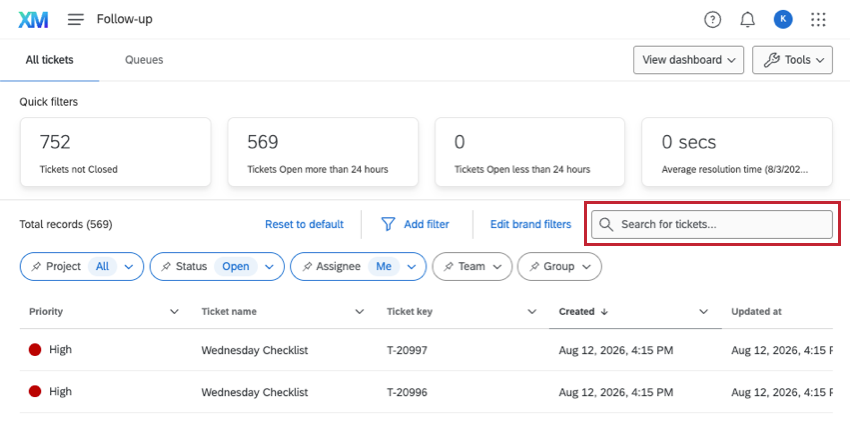
What that team gets. Closed-loop workflows send feedback to the right experience owner when a trigger fires. Qualtrics' own examples are CSAT below 3.0, engagement below 40%, a negative NPS or three low scores in a row. Owners work from a follow-up page with cards for tickets not closed, tickets open for more than 24 hours and the average resolution time, and can filter by project, status, assignee, team, group and priority. Admins set custom statuses and the rules for moving between them. Ticket data shows up in CX dashboards on a dedicated ticket reporting page and can be joined with survey answers.
What it will miss. Qualtrics' own case study with ServiceNow cites 17 programs, 31 action workflows, 10,000+ automatic follow-up actions and 1,700+ experience owners. That scale is the point: a five-person CS team with one NPS survey pays for a suite it won't use, and pricing is quote only.
- you run a formal CX or VoC program across many teams and need surveys, interaction analytics and follow-up tickets in one suite
- you want closed-loop triggers on CSAT, NPS or repeated low scores, worked from a ticket queue with owners, statuses and reporting
- you only need NPS or CSAT surveys: reviewers call it complex for basic survey work, and pricing is quote only
- you need sentiment analysis on a small budget: G2 reviewers note it is not in basic licenses
- Users like
- strong analytics that help teams raise customer satisfaction
- Users dislike
- complexity for users who only need basic surveys, and sentiment analysis missing from basic licenses
- Source: G2, 751 reviews
How a low score is handled
A response that meets a trigger creates a ticket and assigns it to the owner set in the workflow. The owner sees it on the follow-up page, works it through the statuses your admins defined and closes it.
The follow-up table shows the first 10,000 matching tickets, so large programs filter by team or project. Status history before June 14, 2019 isn't recorded, which only matters for long-running programs migrating old data.
- Starting price
- Quote only: CX is priced by interactions, no public price and no free trial
- Pricing unit
- Interactions (quote only)
- Follow-up queue
- Tickets with owners, statuses, 10,000-row view
- AI
- Experience Agents, predictive churn models
- Next step
- Request pricing (no published tiers)
Medallia
An enterprise experience platform that captures feedback from surveys, voice, chat, web and social, and pushes alerts and follow-up cases to the teams that own each account or location.
Fits: a large company where hundreds of managers, account owners or location leads should see their own feedback and act on it, without a seat license for each of them.
Medallia collects feedback from surveys, voice, chat, web behavior, social and employee programs, and adds AI themes and root-cause analysis on top of survey and free-text answers.
What that team gets. Pricing is built on Experience Data Records, one record per customer or employee interaction, sold in annual tiers with unlimited users. Analytics, alerting and closed-loop workflows are included. Alerts can be scoped by region, location, product line, team or a hybrid hierarchy and delivered in the web app, the mobile app, Slack or Workplace, and staff can reply to feedback by email or phone from the mobile app. For B2B, Total Experience (TX) Profiles put individual customers and business accounts on one timeline. The admin docs describe a Medallia for Salesforce managed package that creates follow-up cases in Salesforce from feedback and can send a survey after a case closes.
What it will miss. It is built for enterprise programs with a configuration team. A CS team that wants surveys live next week will find the setup heavy, and the pricing starts with an annual tier, not a monthly plan.
- you want unlimited users, so every account owner and frontline manager can see and act on feedback without extra seats
- you need individual and B2B account data on one timeline and follow-up cases created in Salesforce
- you have no admin capacity: G2 reviewers score setup and administration lowest
- you run a small survey program: pricing starts with an annual tier of interaction records, not a monthly plan
- Users like
- instant, actionable feedback with flexible collection and custom dashboards
- Users dislike
- complex configuration that needs specialist expertise; ease of setup scores 7.2 out of 10
- Source: G2, 199 reviews
How a low score is handled
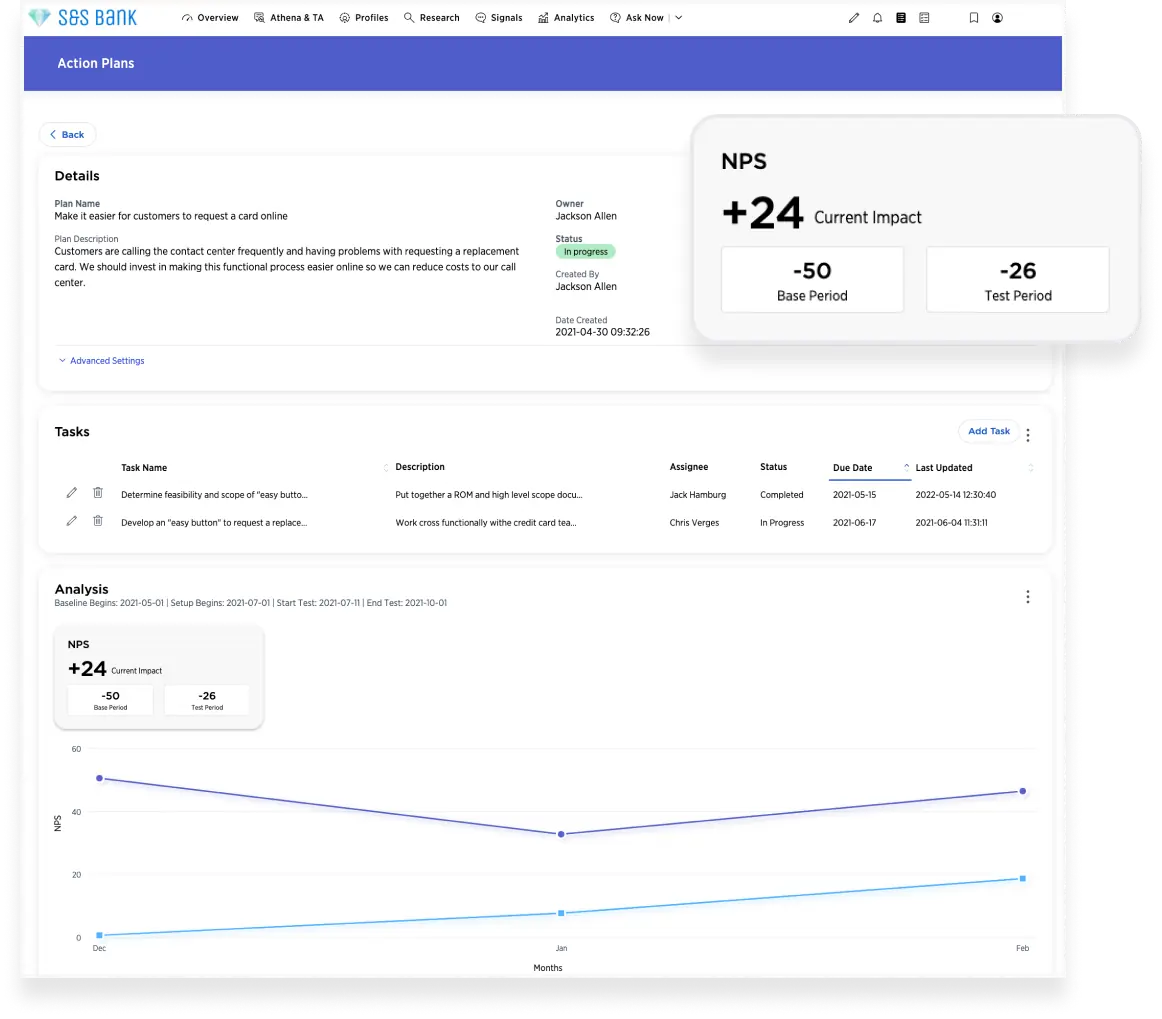
An alert rule matches the response to the right person in the hierarchy, for example the owner of that account or region. That person replies from the app or works a case in Salesforce if the managed package is installed, and the case status flows back to reporting.
On G2, Medallia's lowest sub-scores are ease of setup (7.2) and ease of admin (7.7), which lines up with the need for a dedicated admin.
- Starting price
- Quote only: annual tiers by Experience Data Records (one record per interaction), unlimited users
- Pricing unit
- Experience Data Records, annual tiers
- Users
- Unlimited
- Account view
- TX Profiles for individuals and B2B accounts
- Alert channels
- Web, mobile app, Slack, Workplace
Sprinklr
An enterprise customer experience platform with service, social, insights and marketing suites, where surveys, predicted CSAT and listening data feed cases and action plans.
Fits: a consumer-facing enterprise whose customers talk to it on many digital and social channels, and which wants service, social listening and surveys on one platform.
Sprinklr sells four suites on one platform: Service (a contact center across 30+ channels), Social, Insights (listening, benchmarking and consumer intelligence) and Marketing. Its feedback management covers AI survey creation, automated translation, conversational and web surveys, CSAT and NPS, closed-loop workflows and AI analysis.
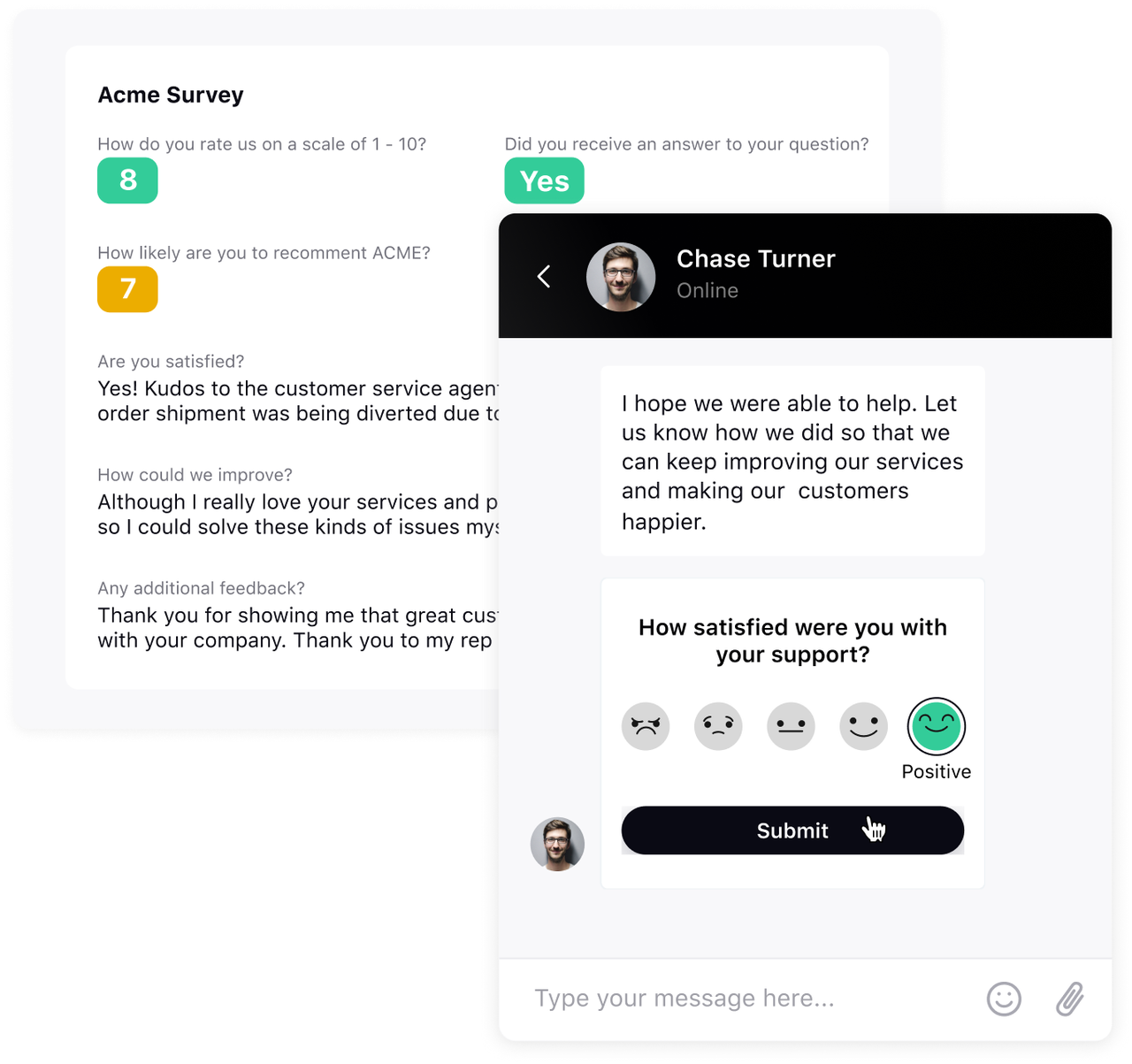
What that team gets. One CSAT survey can be built once and sent across 30+ digital and voice channels as a link, an embed or a bot conversation, with results in one report. CSAT Prediction scores conversations nobody rated, based on intent, sentiment, emotion and reply timing, and predicted low scores can escalate to supervisors. The 26.4 release added Action Plans in limited availability, so teams can turn an insight into action items with owners and deadlines, and Customer Feedback Copilot summarizes survey results. Sprinklr says its AI uses 1,250+ industry-specific models across 150+ languages. Integrations include Salesforce Service Cloud, Microsoft Dynamics 365, HubSpot, Slack, Microsoft Teams and Jira.
What it will miss. Sprinklr's feedback pages talk about brands and consumers, not B2B accounts with several stakeholders. The survey builder offers NPS and CSAT question types but no CES type, and the vendor puts full multi-region rollouts at two to four months.
- your customers reach you on many digital and social channels and you want one survey deployed across all of them
- you want predicted CSAT on every service conversation, not only on the few customers who answer a survey
- you run B2B account feedback: Sprinklr's feedback pages talk about brands and consumers, not account-level roll-ups
- you need CES surveys or a quick start: the survey builder lists no CES question type and full rollouts take two to four months
- Users like
- one place for all customer interactions with strong analytics and reporting
- Users dislike
- feature breadth that overwhelms new users, with a steep learning curve
- Source: G2, 731 reviews
How a low score is handled
Surveys can trigger automatically on conditions such as sentiment, order value or a closed case. Critical answers create cases, alerts and workflow triggers routed to the right team, and predicted low CSAT escalates to a supervisor before any survey comes back.
Pricing is quote-based and depends on named users by role, modules, channel and message volume, services and AI consumption, with terms of 12, 24 or 36 months.
- Starting price
- Quote only: priced by users, modules, channel volume and AI use, on 12 to 36 month terms; no trial
- Survey types
- NPS (0 to 10), CSAT, no CES
- Rollout
- 2 to 4 months for multi-region (vendor)
- Integrations
- Salesforce, Dynamics 365, HubSpot, Slack, Jira
- Suites
- Service, Social, Insights, Marketing
Feedback analytics on data you already collect
Many teams don't lack feedback. They lack the time to read it. Feedback analytics tools sit on top of the surveys, tickets and reviews you already have.
Chattermill
A feedback analytics layer that tags every survey answer, ticket, review and call with themes and sentiment, ranks themes by their effect on NPS or sentiment and alerts teams when something changes.
Fits: a CX, support or product team with thousands of survey comments, tickets and app reviews a month, and no analyst who can read them all.
Chattermill imports feedback from survey tools (including Qualtrics, Medallia, SurveyMonkey and Typeform), help desks (Zendesk, Intercom, Freshdesk, Kustomer, Gorgias), app stores and data warehouses such as Snowflake and Databricks, about 100 connectors in total.
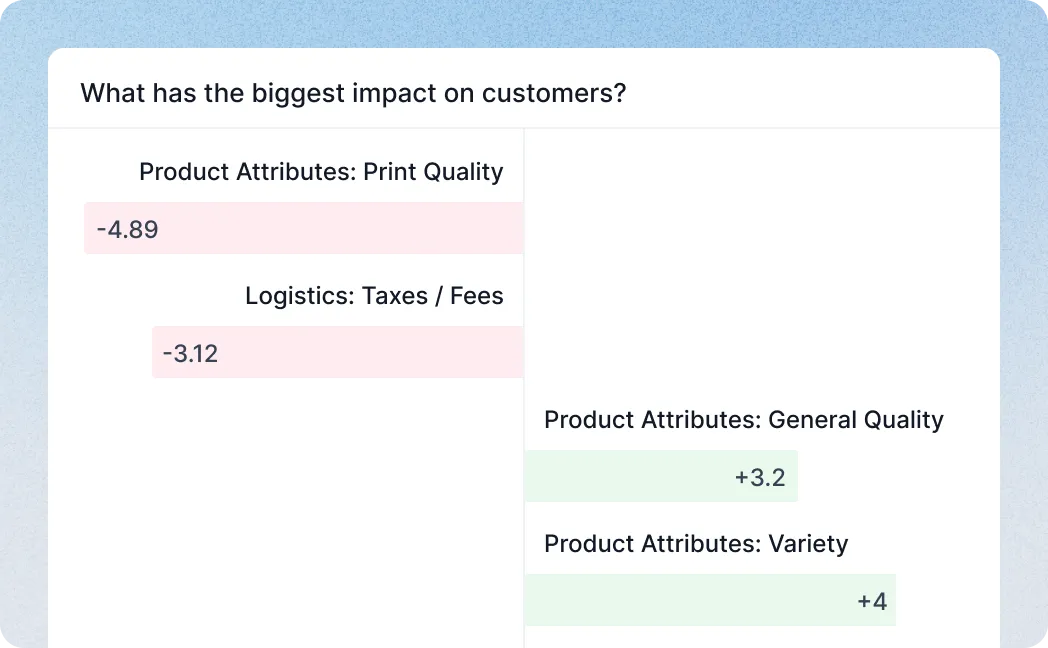
What that team gets. Its Lyra AI tags every comment with aspect-based sentiment, so one comment can carry several themes, each with its own sentiment. The theme list is built with your stakeholders and trained on your own verbatims. Impact Analysis shows which themes push NPS, net sentiment or average score up or down, with filters by segment and channel and the customer quotes behind each theme. Anomaly detection flags sentiment drops, volume spikes and theme mentions, and sends alerts to Slack, email or Jira. Slack workflows can also fire on a metric change, new feedback in a theme or a scheduled report.
What it will miss. It doesn't send surveys, and it doesn't manage follow-ups with individual customers. The Zendesk connector imports only CSAT responses that include a comment (needs Suite Growth or higher, with a backfill of up to the last 3,000 responses), one way and hourly, and the Salesforce doc tells you to contact your account manager for setup.
- you already collect feedback in surveys, Zendesk, Intercom and app reviews and nobody has time to read it
- you want theme-level drivers of NPS with the customer quotes behind each theme
- you need to send surveys: Chattermill analyzes feedback you collect elsewhere
- you want insights written back to your CRM: the Salesforce doc gives no setup detail and the Zendesk import is one-way
- Users like
- sentiment analysis plus Slack and Zendesk integrations, with good support
- Users dislike
- a learning curve: dashboards can feel crowded and changing the category structure is hard
- Source: G2, 218 reviews
How an issue is handled
Chattermill works one level above the individual customer. When complaints about a theme jump, the anomaly alert goes to the owning team in Slack or becomes a Jira ticket, and the team marks the issue resolved when the fix ships.
A CSM still needs another tool to reply to the person who left the comment. Pair it with your help desk or CS platform for one-to-one follow-up.
- Starting price
- No public price: the pricing page leads to a demo request
- Tagging
- Aspect-based sentiment per comment
- Alerts
- Slack, email, Jira
- Zendesk import
- CSAT with comments, hourly, one-way
- Metrics analyzed
- NPS, net sentiment, average score
Account-level feedback for B2B teams
In B2B, one unhappy champion at a key account matters more than ten happy users at a small one. This program type scores accounts, not respondents.
CustomerGauge
A B2B feedback platform that rolls answers from several contacts into one account-level NPS, ties it to account revenue and opens follow-up cases with owners.
Fits: a B2B company where each customer has several decision makers and users, renewals are large, and the CS team wants feedback tied to revenue at risk.
CustomerGauge runs NPS programs for B2B accounts and treats NPS as its main metric. Surveys go out by email, Slack, WhatsApp, in-app pop-ups, documentation pop-ups, end-of-call IVR and AI-led interviews.
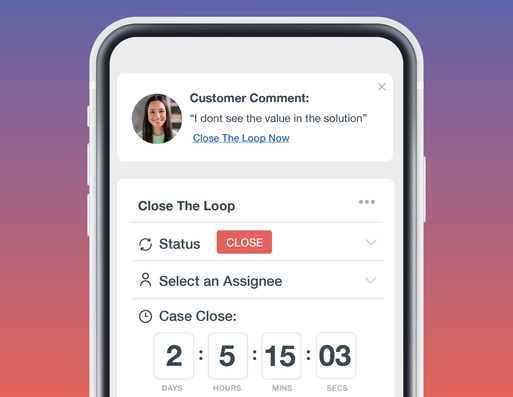
What that team gets. Account-Centric NPS rolls answers from several stakeholders into one account-level score, shown in an account hierarchy. Revenue-Based NPS ties that score to account revenue, so the dashboard shows dollars at risk and safe, plus how much revenue has no feedback at all. Follow-up cases are created automatically with an owner and an urgency flag, and a case dashboard shows open actions and stalled cases. Integrations cover Salesforce, Microsoft Dynamics 365, Gainsight (creating CTAs and timeline activities and updating health scores), ServiceNow, Jira and webhooks. Its Gaige AI summarizes accounts, ranks drivers by dollars at risk and drafts replies for reps.
What it will miss. Pricing starts at $24K a year, which is a lot for a team running one NPS survey. The stakeholder weighting behind the account score isn't documented publicly, so ask for it in the demo.
- your customers are accounts with several decision makers and you want one account score tied to revenue
- you want feedback, cases and health updates pushed into Salesforce or Gainsight
- you are a small team: pricing starts at $24K a year
- you need deep custom reporting or CES: reviewers call reporting limited and the survey pages focus on NPS
- Users like
- responsive support and a focus on revenue-linked customer feedback
- Users dislike
- reporting is limited to what the tool's settings allow
- Source: G2, 50 reviews
How a low score is handled
A detractor answer creates a case for the account owner with an urgency level. The owner sees it in the case dashboard or the mobile app, real-time alerts arrive in Slack, and the case and score can flow into Salesforce or Gainsight so the CSM works it where they already plan the account.
CustomerGauge says half of its clients close the loop within 48 hours. Treat that as a vendor benchmark, not a promise for your team.
- Starting price
- From $24K per year: flat platform fee with unlimited surveys, users and integrations; paid 60 to 90 day pilot
- Account view
- Account-Centric NPS with account hierarchy
- Integrations
- Salesforce, Dynamics 365, Gainsight, ServiceNow, Jira
- Pricing
- Flat annual fee, unlimited users
- Pilot
- Paid, 60 to 90 days on a set of accounts
Survey tools for lean CX programs
Smaller teams usually need surveys at the right moment, answers in their CRM and an alert when a score drops. Among the customer feedback apps in this guide, Survicate is the one with a published self-serve price, from $114 per month billed annually for 250 responses a month; HubSpot's NPS, CSAT and CES surveys need Service Hub Professional at $90 per seat. The limit of both is the same: they score people, not accounts.
Survicate
A survey tool for NPS, CSAT and CES across email, website, in-product and mobile, with AI topic tagging, low-score alerts and syncs to HubSpot, Salesforce and Intercom.
Fits: a SaaS company with a small CS or product team that wants NPS, CSAT and CES running in the product, by email and on the website this month.
Survicate sends surveys through email, website widgets, in-product and mobile SDKs, links and chat surveys via Intercom or Braze. It covers NPS, CSAT and CES with targeting by user attributes and events.
What that team gets. The Research Hub and Feedback Analytics tag answers by auto-generated topics and sentiment, and an AI research chat answers questions about the results. Slack and email alerts fire on negative or low-score answers. The HubSpot integration maps survey questions to contact properties, creates or updates contacts by email and writes timeline events, and can store NPS as a 0 to 10 value. Growth includes 25+ integrations, one dashboard and 10 seats; Pro adds advanced logic, 10 dashboards and Pro integrations; Enterprise adds SAML SSO, access logs and custom legal terms. The free trial runs 10 days with up to 25 responses.
What it will miss. Survicate scores respondents, not accounts, so a B2B team has to roll answers up to accounts in its CRM. Anonymous responses can't sync to HubSpot, and email surveys only identify respondents when they go out through HubSpot marketing emails or include an email attribute.
- you want NPS, CSAT and CES surveys running inside your product and email this week, with a published price
- you run HubSpot and want survey answers written to contact properties and the timeline
- you need an account-level score across several contacts: Survicate scores respondents, not accounts
- you want case management for follow-ups: it alerts and syncs, but tasks live in your CRM or help desk
- Users like
- an approachable survey builder with in-product targeting and quick support
- Users dislike
- limited dashboard control, such as no date filter across surveys
- Source: G2, 201 reviews

How a low score is handled
A detractor answer triggers a Slack or email alert to the owner you defined, and the answer lands on the HubSpot contact. The follow-up task itself lives in your CRM or help desk, so set up a HubSpot workflow or a Zendesk trigger on the synced property.
One Survicate workspace connects to one HubSpot account, which matters for companies running several HubSpot portals.
- Starting price
- Growth from $114 per month billed annually (250 responses a month), Pro from $349, Enterprise from $569; 10-day free trial
- Metrics
- NPS, CSAT, CES
- Channels
- Email, website, in-product, mobile, link
- Growth plan
- 250 responses a month, 1 dashboard
- Pro / Enterprise
- From $349 / $569 per month
CX inside your support and CRM stack
For many B2B teams, the experience is mostly support tickets and account management. A help desk such as Zendesk handles the request in front of you, from $55 per agent per month billed annually, and a CRM such as HubSpot stores who the customer is, what they bought and every ticket and deal. Neither measures satisfaction on its own until you switch on its surveys, so if your team already works in one of them, start there before adding a suite.
Zendesk
A customer service suite that asks for CSAT after each solved ticket, scores every conversation with AutoQA (add-on) and reports on service quality across human and AI agents.
Fits: a company where most customer contact runs through support, and the CX question is how good each conversation was.
Zendesk asks for CSAT after a ticket is solved and scores service quality with Zendesk QA.
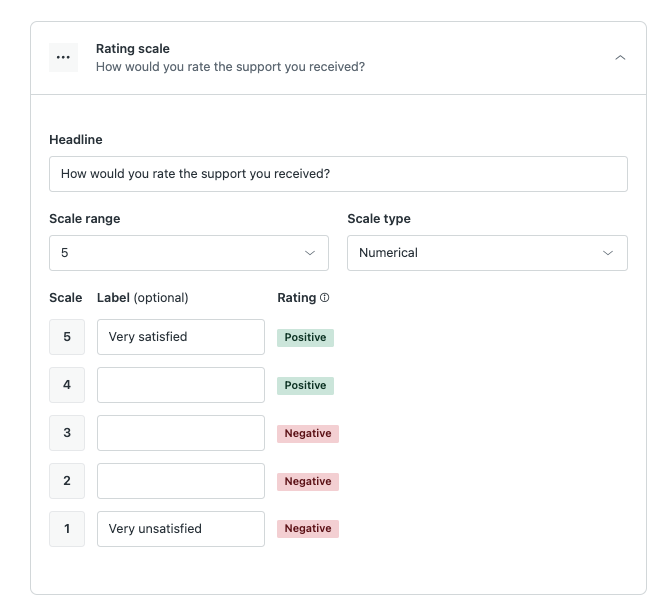
What that team gets. The CSAT survey can be customized: headline, a 1 to 2, 1 to 3 or 1 to 5 scale, numbers, emoji or custom text labels, an optional open question and an optional list of reasons for a bad rating. Email surveys go out one day after a ticket is solved; messaging surveys appear right away. Zendesk QA's AutoQA scores 100% of conversations, including AI agent, voice and outsourced conversations, on categories such as tone and solution offered, and Spotlight flags churn risks and escalations. Analytics cover human and AI service, with natural-language questions in Analyst Copilot.
What it will miss. The survey is ticket CSAT, not relationship NPS across an account. Zendesk's help center lists CSAT for Suite Growth and up and for Support Professional and up, not for Suite Team, and QA and Copilot are add-ons on top of the suite price.
- support is where most customer experience happens and your team already works in Zendesk
- you want every conversation quality-scored, not only the ones a customer rates
- you need relationship NPS across accounts: Zendesk's survey is ticket CSAT
- you are on Suite Team and want CSAT: the help center lists CSAT for Suite Growth and up
- Users like
- one workspace for email, chat, social and phone, with powerful Explore reporting
- Users dislike
- Explore reporting has a steep learning curve, and advanced options sit in higher plans
- Source: G2, 6,700 reviews
How a low score is handled
A bad CSAT rating comes back with the customer's comment and, if you turned it on, the reason they picked from your list. A team lead can follow up on that ticket, and AutoQA shows whether the conversation itself was the problem.
Autoscoring runs only after a ticket is solved or closed and needs at least one customer and one agent message, so it doesn't rate history from before it was switched on.
- Starting price
- From $55 per agent per month billed annually on Suite Team ($69 monthly); QA and Copilot are add-ons
- CSAT scale
- 1 to 2, 1 to 3 or 1 to 5
- Survey timing
- Email one day after solve, messaging right after
- QA
- AutoQA on 100% of conversations (add-on)
- Suite Professional
- $115 per agent per month billed annually
HubSpot Service Hub
HubSpot Service Hub adds NPS, CSAT and CES surveys, a help desk and a customer success workspace to the CRM your team already uses.
Fits: a B2B company that runs sales, service and customer success in HubSpot and wants feedback on the same contact and company records.
HubSpot offers prebuilt NPS, CES and CSAT surveys sent by email or web link in several languages, with results flowing to dashboards, Slack and Jira.
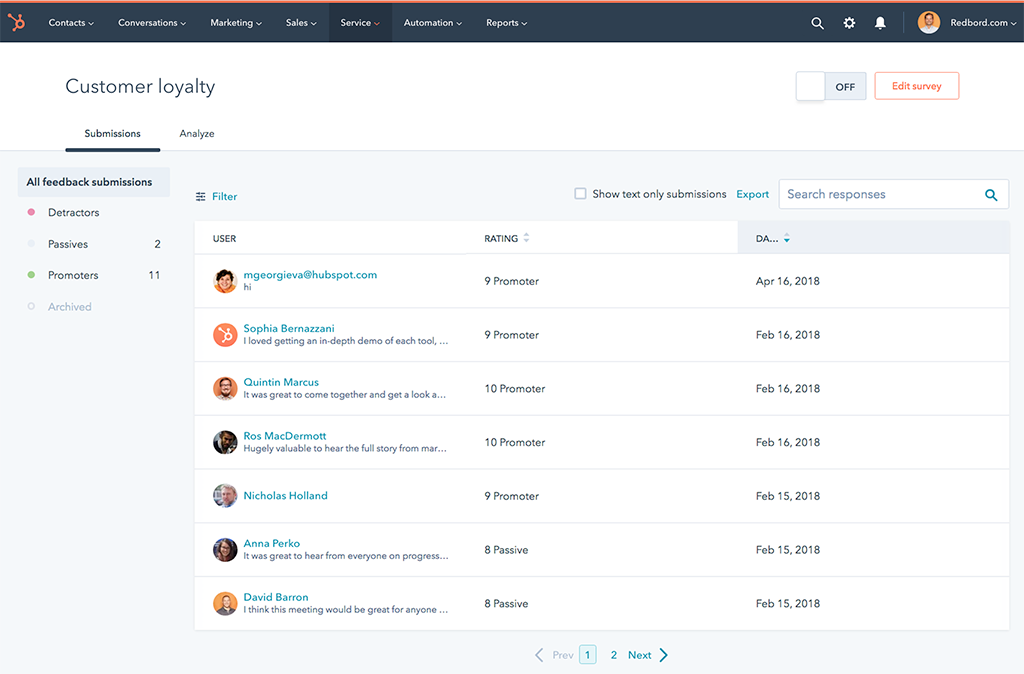
What that team gets. Responses live under Service, Feedback Surveys, with a Responses tab you can filter by date, company, comments and contact properties, and an Analyze tab that splits detractors, passives and promoters. With a connected inbox you can reply to a single CSAT or NPS answer from the Responses tab. Answers are stored with the contact, next to its company, deals and tickets, and the customer success workspace is part of the same Professional plan. Professional includes 50 NPS, 50 CES and 100 CSAT surveys; Enterprise adds branching logic, custom survey URLs and comparative analytics.
What it will miss. Feedback surveys aren't on Free or Starter. Text analytics are lighter than in a CX suite, and reviewers name missing features and limited customization most often.
- your contacts, companies, deals and tickets already live in HubSpot, so survey answers need no sync
- you want one seat price that covers the help desk, surveys and the customer success workspace
- you need surveys on a small budget: they start on Professional at $90 per seat per month plus a $1,500 onboarding fee
- you need branching survey logic or comparative analytics: those are Enterprise features at $150 per seat
- Users like
- ease of use and the CRM integration
- Users dislike
- missing features, limited customization and cost
- Source: G2, 3,018 reviews
How a low score is handled
A detractor answer shows up in the Responses tab with the contact and company attached, and the account owner can reply from there when an inbox is connected. Results also flow to dashboards and Slack, so the team sees low scores without opening the survey tool.
HubSpot also lists a Send survey workflow action for surveys set to the workflow delivery method, marked beta in its knowledge base.
- Starting price
- From $90 per seat per month on Professional billed annually (list price $100), plus a $1,500 one-time onboarding fee
- Needs
- Service Hub Professional or Enterprise plus a Service Seat
- Workspaces
- 1 on Professional, up to 5 on Enterprise
- Enterprise adds
- workflow-triggered sequences and multiple health score models
- Surveys on Professional
- 50 NPS, 50 CES, 100 CSAT
- Enterprise
- $150 per seat, $3,500 onboarding
How a closed feedback loop should run for a B2B account
A closed feedback loop for a B2B account needs an owner and a deadline for every step, not just an alert. Every tool above can notify someone; the difference between a loop and a notification is who owns each step and how fast it happens. This is a workable default for B2B accounts; adjust the timing to your contract tiers.
- CX leadRoute every detractor and low CSAT answer to the account owner, with the comment, the account name and its renewal date before launch
- CSMRead the answer, check open tickets and recent changes, and reply personally (not with a template) within 1 business day
- CSMTalk to the contact, agree on a fix, an owner and a date, and write it down where the team can see it within 2 business days
- Support or productFix the ticket, or log the product issue with the customer's own words attached by the agreed date
- CSMTell the customer what changed, then close the case in the CX tool when the fix ships
- CS managerReview open follow-ups, stalled cases and the themes behind them weekly
What customer experience management software costs
Customer experience management software is mostly priced by quote, but each vendor says what the price is based on, and that tells you what will make the bill grow.
| Tool | Priced by | Published starting point (USD) | What makes the bill grow |
|---|---|---|---|
| Qualtrics | Interactions | None, quote only | More interactions and more CX products |
| Medallia | Experience Data Records in annual tiers | None, quote only | More interactions captured; users are unlimited |
| Sprinklr | Users by role, modules, channel volume and AI use | None, quote only | More modules, channels and AI consumption |
| Chattermill | Not published | None, demo only | Not published |
| CustomerGauge | Flat annual platform fee | $24K per year | Not tied to surveys, users or integrations, which are unlimited |
| Survicate | Plan and monthly responses | $114 per month billed annually (Growth) | More responses, dashboards and integrations |
| Zendesk | Agents | $55 per agent per month billed annually (Suite Team) | More agents, the QA and Copilot add-ons, AI resolutions beyond the 5 or 10 included per agent |
| HubSpot Service Hub | Seats plus onboarding | $90 per seat per month billed annually, plus $1,500 onboarding (Professional) | More seats; Enterprise for branching logic |
Seat pricing gets expensive when many people only need to read feedback. Ten account owners on HubSpot Service Hub Professional cost $900 a month on annual billing plus the $1,500 onboarding fee, before anyone sends a survey; Medallia's unlimited users and CustomerGauge's flat fee are built to avoid that line. Volume pricing grows with every touchpoint you survey instead. Survicate's Growth card, for example, is priced for 250 responses a month, so start with the relationship survey and the moments that matter for renewal, then add transactional surveys.
How to choose customer experience management software
Start from the program you will actually run in the next year, not from the longest feature list.
- A CX or VoC team runs programs across many business units and channelsQualtrics or Medallia
- Hundreds of managers or account owners should see their own feedback without seat costsMedallia
- Your customers are B2B accounts with several stakeholders and large renewalsCustomerGauge
- You already have plenty of feedback and nobody to read itChattermill
- You want NPS, CSAT and CES live this month at a published priceSurvicate
- Most customer contact runs through support ticketsZendesk with CSAT and QA
- Your CRM and help desk are HubSpotHubSpot Service Hub Professional
- Consumer-scale service and social channelsSprinklr
Then take the shortlist into demos with the same questions for every vendor:
- Show a detractor answer becoming a task with an owner and a due date, live in the demo
- Can answers from several contacts roll up into one account score, and how are they weighted?
- Which way does data sync with our CRM or customer success platform, and how often?
- What is the price based on, and what happens when we exceed the plan?
- Who on our side configures surveys and workflows, and how long does a rollout take?
- Can we export raw responses and comments if we leave?
If your team already has a customer success platform, check its own survey module before buying a separate tool. Our customer success software guide compares those platforms, and the customer engagement software guide covers tools for the outreach that follows.
FAQ
What is customer experience management software?
Customer experience management software is the system a CX or customer success team uses to hear customers at scale and act on it. In a B2B company that means a relationship NPS survey to every account twice a year, CSAT after support tickets, AI tagging of the comments, and an alert to the account owner when a key contact scores 6 or lower, with the follow-up tracked until it's closed.
What is the difference between CXM software and customer success software?
CXM software measures how customers feel about their experience and routes feedback to owners. Customer success software manages the account after the sale: health scores, playbooks, success plans and renewals. In B2B teams the two work together, with survey scores from the CXM tool feeding the health score in the customer success platform.
How much does customer experience management software cost?
Customer experience management software is mostly priced by quote. Qualtrics prices by interactions, Medallia by Experience Data Records with unlimited users, and Sprinklr by users, modules and volume. Published starting points include Survicate at $114 per month billed annually, Zendesk Suite Team at $55 per agent per month, HubSpot Service Hub Professional at $90 per seat plus a $1,500 onboarding fee, and CustomerGauge from $24K a year.
Is there free customer experience management software?
None of the eight tools in this guide has a free plan with closed-loop features. Survicate offers a 10-day free trial with up to 25 responses, and HubSpot's free and Starter tiers don't include feedback surveys, which start on Service Hub Professional. Very small teams often start with the CSAT survey in their help desk.
What are examples of customer experience management software?
Examples of customer experience management software are enterprise suites such as Qualtrics, Medallia and Sprinklr, feedback analytics tools such as Chattermill, B2B account NPS platforms such as CustomerGauge, survey tools such as Survicate, and the CX features inside help desks and CRMs such as Zendesk and HubSpot Service Hub.
Which CX software is best for B2B companies?
For B2B companies, the best CX software is the one that can score accounts, not just individual respondents, and push follow-ups to the account owner. CustomerGauge is built around account-level NPS tied to revenue, Medallia shows individuals and business accounts on one timeline, and HubSpot Service Hub keeps survey answers on the company record next to deals and tickets.
Related: best voice of customer software compares eight tools by who they hear, where the answer goes and which plan gates it.