Customer success management software is the system where a customer success team keeps the post-sale picture of every account: who the customer is, how healthy the account looks, when it renews and what the team has to do next. It ranges from a free CRM with a few custom fields to platforms like Gainsight and ChurnZero that are sold on quote and take weeks to set up. This guide helps a CS lead decide which kind of tool the team needs before opening a single vendor site.
We read the pricing pages, help centers and G2 listings of nine vendors between October 21 and November 2, 2026. Only two of the nine publish a starting price, so for most of them we describe the price basis instead of guessing a number. If you already know you want a platform and need a ranked comparison, start with our roundup of the best customer success software. This page comes before that decision.
- Decide the jobs first: account view, health, renewals, playbooks, onboarding, reporting and customer commitments. A tool that covers four of them well can be enough.
- A small book of business often runs on a CRM with custom fields and a shared task list. HubSpot's CRM is free with no expiration date.
- Dedicated platforms mostly hide prices. Only HubSpot and Odie (formerly Totango) publish a starting price. ClientSuccess, Gainsight, Vitally, Custify, ChurnZero, Planhat and Velaris quote on request.
- Data freshness differs more than feature lists suggest: Vitally recalculates health hourly, Custify once a day.
- Test any tool for two weeks on 20 real accounts before you sign. The pilot plan below shows how.
- vendors checked
- 9
- publish a starting price (HubSpot, Odie)
- 2 of 9
- jobs the software has to do
- 7
- G2 rating range
- 4.3 to 4.7
What is customer success management software?
Customer success management software helps a team manage customers after the sale. It gathers contract, usage, support and conversation data into one account view, scores how healthy each account is, flags renewals and risk, and gives the CSM a list of next actions. Vendors call it a customer success platform (CSP), a CS tool or simply "customer success software". They all mean the same job.
It's not a sales CRM and it isn't a help desk. A CRM is built around the deal and the pipeline. A help desk is built around the ticket, and our guide to help desk software follows one ticket through eight desks. Customer success software is built around the account over time, which is why renewals, health and playbooks are its center. The overlap is real, though: HubSpot's customer success workspace sits inside its Service Hub, and nearly every platform syncs with Salesforce or HubSpot rather than replacing them.
One distinction saves a lot of demo time. The term covers both a tool for CSMs (the daily workspace) and a tool for leaders (forecasts and reports). Buyers who only ask for the second often end up with a heavy platform that CSMs avoid. Write down who opens it every morning before you compare vendors.
The seven jobs customer success software has to do
Feature lists are long and hard to compare. Seven jobs cover what a CS team needs after the sale. Mark each one covered, partly covered or missing for your current setup, and you'll see what you're buying.
| Job | What the team needs to see | Can a CRM do it? | What a platform adds |
|---|---|---|---|
| Account view | One page per customer with contacts, contract, owner and open issues | Yes, if the CRM holds contract and support data | Usage and ticket data pulled in without manual entry |
| Health | A status per account with the reason behind it | Partly, with a manual field | Weighted scores that update from usage, support and survey data |
| Renewals and risk | Renewal date, amount and which accounts are at risk this quarter | Yes, with deal records | Forecasting and risk flags tied to health |
| Playbooks | A repeatable task list when a trigger fires, such as low usage or a new sponsor | Partly, with workflows | Triggers from health or usage and templates per segment |
| Onboarding | Milestones to first value, with owners and dates | Partly, with tasks | Shared success plans or customer portals |
| Reporting | Retention, expansion and workload per CSM | Basic reports | Segment dashboards and cohorts |
| Commitments | What the team promised each customer, with owner and due date | Rarely, buried in notes | Not a standard category (see the last section) |
Health, playbooks and onboarding are where a CRM usually runs out. Health needs data from outside the CRM, such as product usage, and playbooks need that score to fire. If you can't name where the usage data will come from, a health score will be a guess whichever tool you buy.
Customer-facing plans differ more between vendors than the checklists suggest. Gainsight lets CSMs share a success plan with customer contacts, and the admin has to switch on editing and task ownership for external people. Planhat builds per-company portals that customers can use to complete tasks. Custify offers portal templates for onboarding, renewal and churn prevention. ClientSuccess lists customer portals as an add-on on its Growth package. Ask for the exact package before you count on this one.
For the deeper layer under the health job, see our guides to churn prediction software and customer retention software.
Which kind of tool fits which team?
The useful split isn't brand against brand. It's five kinds of tool, each with a different price basis and a different cost of ownership. The price details below come from each vendor's own pages.
| Kind of tool | Examples | What the price page says | Fits when |
|---|---|---|---|
| Free CRM plus a shared task list | HubSpot CRM | Free with no expiration date and no credit card | One or two CSMs, a small book of accounts, renewals tracked by hand |
| CRM-native customer success workspace | HubSpot Service Hub | Professional from about $90 per seat per month plus a $1,500 onboarding fee; the workspace needs an assigned Service Seat | You already run HubSpot and want health and renewals next to the deals |
| Packaged platform for small and mid-size teams | ClientSuccess, Vitally, Custify, Velaris | No published prices; ClientSuccess caps its packages at 500, 5,000 and unlimited customers; Velaris sells one license with 5 users | A dedicated CS team that wants scored health and playbooks |
| Platform with a deep data model | Gainsight, ChurnZero, Planhat | No published prices; Gainsight Enterprise lists 20 full users and 200 customers per user | A larger team with a CS ops owner and several data sources |
| AI-first customer operating system | Odie (formerly Totango) | Customer Operating System from $1,500 per month, no seat pricing, terms start at one year | You want AI-guided account review across a portfolio and accept a longer term |
The G2 ratings of the eight dedicated platforms and HubSpot Service Hub sit close together: ChurnZero and Custify at 4.7, Gainsight, Vitally, Planhat and Velaris at 4.5, ClientSuccess and Service Hub at 4.4, and Totango at 4.3. Ratings in a range this tight don't separate the tools. The review counts say more about scale. Gainsight has 1,772 reviews and Velaris 126.
- A small book of accounts and no software budgetHubSpot CRM or your current CRM with custom fields, plus a shared task list
- You already pay for HubSpot Service Hub ProfessionalThe customer success workspace in Service Hub
- Health scores that refresh every hour from product usageVitally, which documents an hourly recalculation
- Renewals imported from Salesforce opportunitiesGainsight Renewal Center, which syncs the Salesforce Opportunity object
- A price you can budget without a sales callOdie (Customer Operating System from $1,500 per month) or HubSpot Service Hub
- Customers who complete tasks in a shared spacePlanhat portals, Custify portals or Gainsight success plans shared with customer contacts
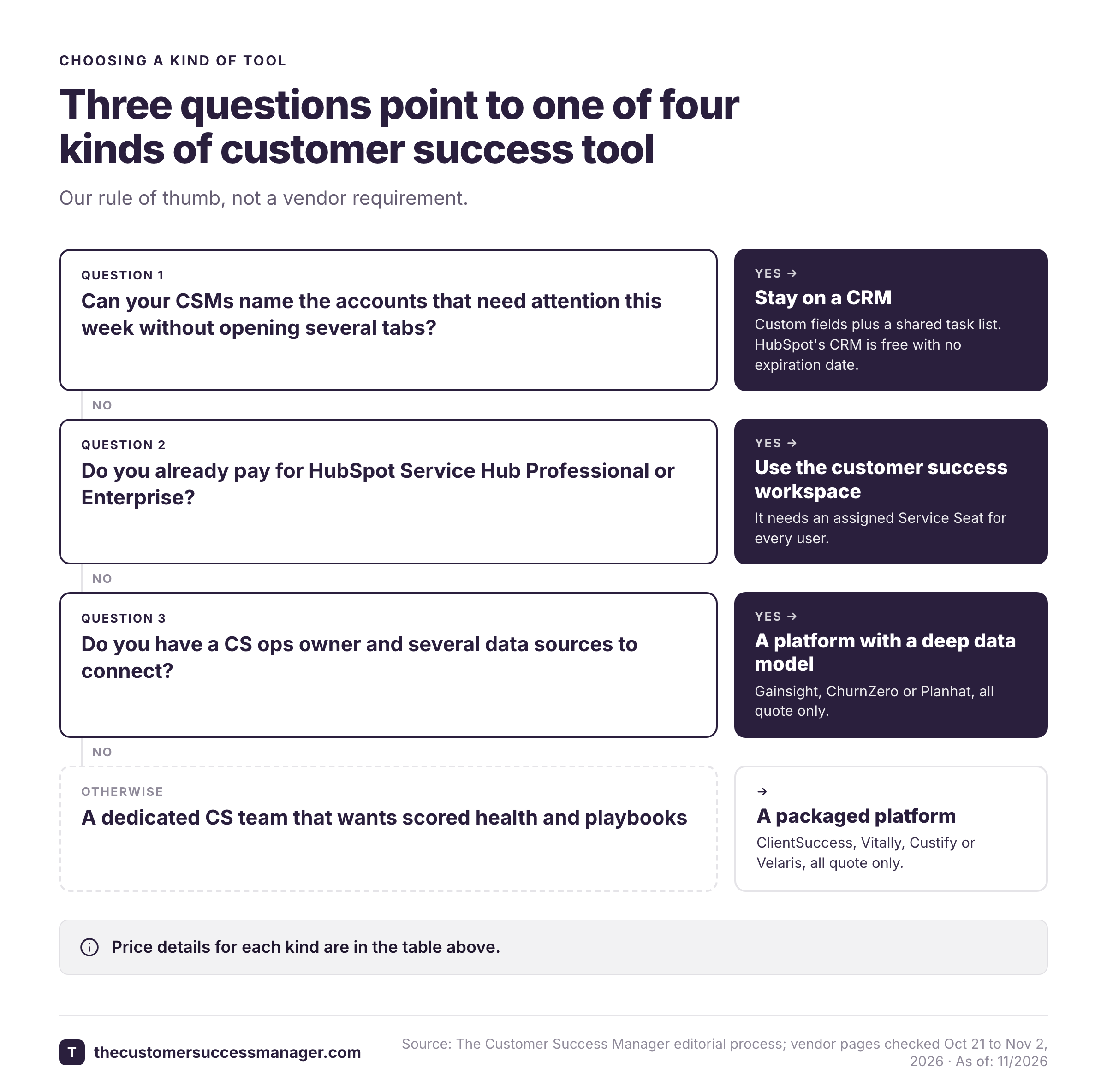
Our rule of thumb, not a vendor figure: move from a CRM to a platform when a CSM can no longer say, without opening three tabs, which accounts need attention this week. Before that point a platform adds a second system to maintain. After it, the manual health field and the spreadsheet are the expensive option.
Vendors also describe how long a rollout takes, and the statements don't line up. ClientSuccess says most customers are implemented in 4 to 6 weeks and larger deployments in 8 to 12. Gainsight advertises Essentials as live in as little as four weeks on one page and two weeks in its navigation. Velaris reviewers on G2 average two months, and Gainsight reviewers about five. Treat the vendor number as the best case, and ask for the data sources it assumes. For a closer look at the largest platform, read our Gainsight review and Gainsight pricing guide.
Customer success management software for SaaS companies
SaaS companies get more out of this software than most, because the data that predicts renewal already exists in digital form: subscription records, seat counts and product events. The catch is getting it into the tool. Three things decide whether a SaaS team gets a working health score.
Subscription and renewal data. Planhat records revenue as deals with line items per company, and renewing means creating a new deal from an existing one. Gainsight's Renewal Center imports the Salesforce Opportunity object and calculates retention figures from existing opportunity records, so multi-year deals need records for the in-between years. Check how the tool models a multi-year contract before you accept a demo dataset.
Product usage events. Planhat accepts Identify, Track and Group calls from Segment and syncs usage from Snowflake and BigQuery. Events with company or user IDs that don't match are dropped, which is why the first week of any rollout is an ID-matching exercise.
Freshness. How often the score updates decides whether a CSM can act on it the same day.
| Tool | How often data or scores refresh | Where it is documented |
|---|---|---|
| Vitally | Health recalculated hourly | Vitally docs |
| Custify | Health scores recalculated once a day, near midnight | Custify knowledge base |
| Gainsight | Risk summary about every 8 hours while risk is active | Gainsight support docs |
| Planhat | Salesforce sync every 10 minutes; Snowflake sync hourly | Planhat help center |
| Velaris | Not published | Velaris pricing and product pages |
ClientSuccess describes itself as positioned for B2B SaaS companies with roughly 5 million to 500 million dollars in ARR, which is a vendor statement, not a market figure. Its Startup package covers up to 500 customers with 10 full licenses.
SaaS teams that sell to many small accounts and few large ones usually need two motions at once: automated outreach for the long tail and named CSMs for the top accounts. Vitally sells three packages, Tech-Touch, Hybrid-Touch and High-Touch, that mirror this split, all on request pricing with the same core features. If your book is mostly product-led, read our guide to customer engagement software as well.
Is there free customer success management software?
Free customer success management software exists only in a narrow sense, and it's mostly a CRM. HubSpot's CRM is free with no expiration date and no credit card, and you can add custom properties for health and renewal date and run follow-ups as tasks. That covers the account view and a manual version of health, renewals and reporting.
It doesn't cover the customer success workspace. HubSpot documents that the workspace comes with Service Hub Professional or Enterprise and needs an assigned Service Seat. Service Hub has a free tier for up to two users, but that's a help desk tier, not a customer success one.
Among the eight dedicated platforms, we found no free plan or self-serve trial on the pricing pages, which ask for a demo or a quote. Vitally's separate email add-on has a 30-day trial, which isn't the same thing. Pricing pages change, so confirm this on the vendor's page the day you decide.
A free start has a real cost: someone has to maintain the fields, the views and the habits. If that someone is a CSM, count the hours. A spreadsheet is a fine pilot for the seven jobs above, but it won't alert anyone when usage drops.
What does customer success management software cost?
Most vendors in this category sell on quote, so cost comes down to understanding the price basis. Each basis rewards a different team shape.
| Vendor | Price basis | Published number |
|---|---|---|
| HubSpot Service Hub | Per seat, with onboarding fee on Professional | Professional from about $90 per seat per month plus $1,500 onboarding |
| Odie (formerly Totango) | Portfolio size and depth of analysis; no seats | Customer Operating System from $1,500 per month; terms start at one year, most customers sign two |
| ClientSuccess | Number of CSMs and modules; three packages | None on its site; annual contracts are 15 to 20 percent below month-to-month per its FAQ; Capterra lists a starting price of $15,000 per feature per year |
| Gainsight | Essentials and Enterprise tiers by full users | None; Essentials includes 10 full users and Enterprise 20 |
| Velaris | One license with 5 users and unlimited viewers; add-ons | None; a custom estimate by team size and customer portfolio |
| Vitally, Custify, ChurnZero, Planhat | Plans or editions on request | None published |
The numbers above show the shapes more than the totals. A per-seat price grows with every CSM. A per-portfolio price grows with the customers you manage. A package with a customer cap, like ClientSuccess, jumps when you cross it. Also ask what sits outside the base price. Gainsight's pricing page lists renewal and expansion forecasting as Enterprise only, while its documentation describes the Renewal Center as an add-on licensed through the account manager, so ask which applies to you. ChurnZero sells its AI agents as an annual subscription on top of the Professional or Enterprise edition, and Custify sells AI credits in packs of 4,000 for $100 on top of the standard package.
For plan-level detail on the two vendors that discuss it publicly, see our Gainsight pricing and ChurnZero pricing guides, and the head-to-head Gainsight vs ChurnZero and Gainsight vs Vitally comparisons.
How to test customer success management software in two weeks
A two-week test of customer success management software on your own data beats a demo on the vendor's. Two weeks and 20 real accounts is enough to learn whether the tool fits, and short enough that the vendor will usually agree to it. The plan below assigns an owner to each step so it doesn't stall in the CS lead's inbox.
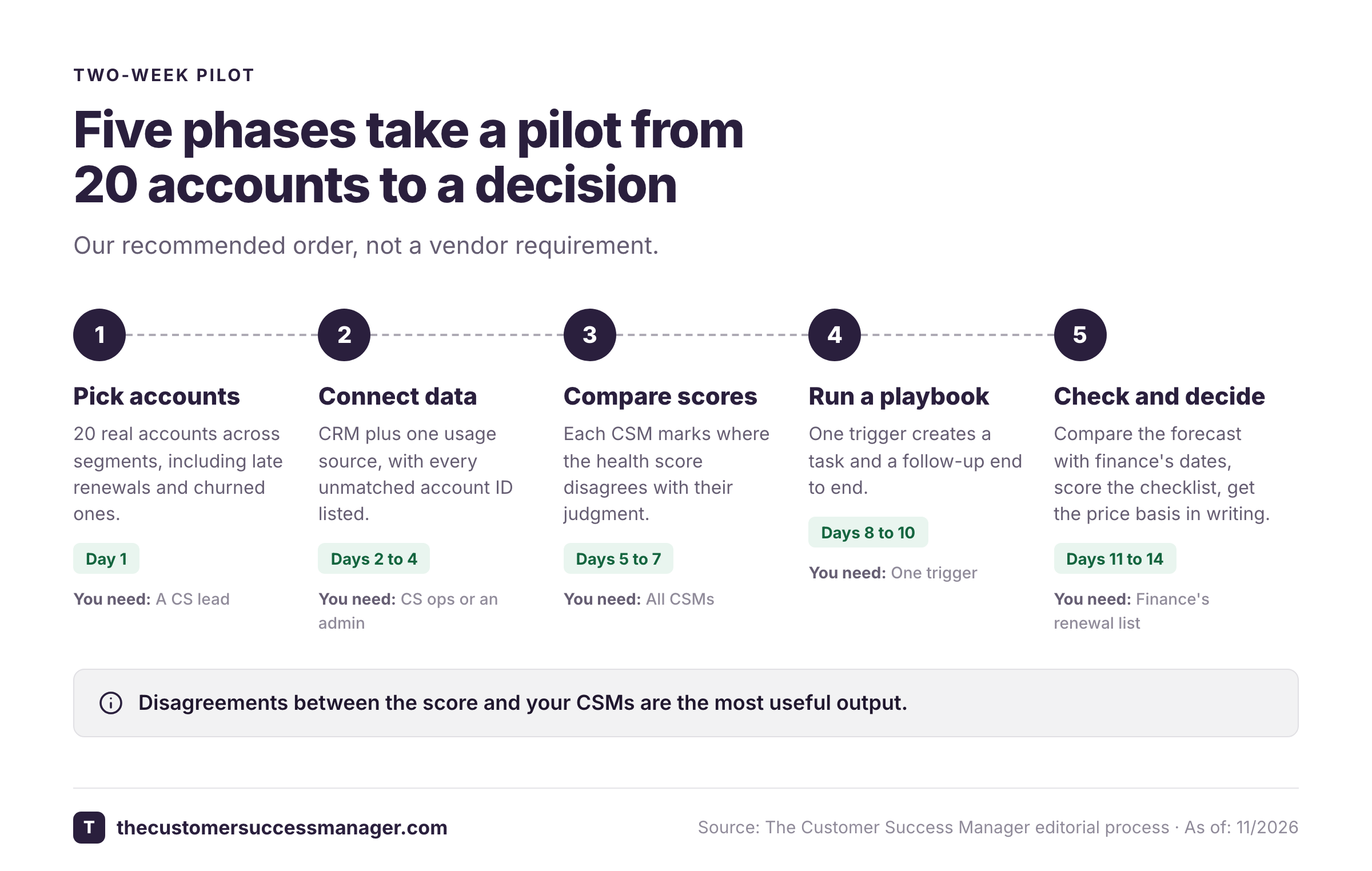
- CS leadPick 20 accounts across segments, including three that renewed late and two that churned last year Day 1
- CS ops or adminConnect the CRM and one usage source, then match account IDs and list every record that fails to match Days 2 to 4
- CSMsReview the health score for each account and mark where it disagrees with their own judgment Days 5 to 7
- CS leadRun one playbook end to end, such as a low-usage trigger that creates a task and a follow-up Days 8 to 10
- CS lead and financeCompare the renewal forecast to the dates and amounts finance already has Days 11 to 12
- CS leadScore the tool against the checklist below and get the price basis in writing Days 13 to 14
The disagreements on days 5 to 7 are the most valuable output. Each one is either a health score that is wrong or a CSM who is. Both are worth knowing before you sign a multi-year contract. If the vendor's own team has to configure everything for the pilot, ask what a normal customer would have done alone.
- Each of the seven jobs is marked covered, partly covered or missing, with an owner
- Health inputs come from systems we actually run (CRM, product usage, support), not manual entry
- The refresh interval is written down and fits how fast we act on it
- Features that sit in a higher tier or add-on (forecasting, portals, AI) are listed with their price
- The price basis is in writing: per seat, per customer, per module or per portfolio, plus onboarding fees and minimum term
- The implementation scope names the data sources and the timeline
- We exported accounts, scores and notes without a support ticket
- A second CSM ran a full week of work in the tool without help
If your team is still building the onboarding side, our customer success plan template and customer success onboarding checklist give you a working structure to test the tool against.
What customer success management software still does not record
The seven jobs describe what the tool knows about the account. A different question is what your team has told the customer. The promise made on a kickoff call, the integration review you said would arrive before a security audit or the date a renewal discount was agreed: these live in meeting notes, email and memory. When a CSM leaves or an account moves, they leave with them. Health scores don't capture them, and success plans track goals and tasks rather than who said what.
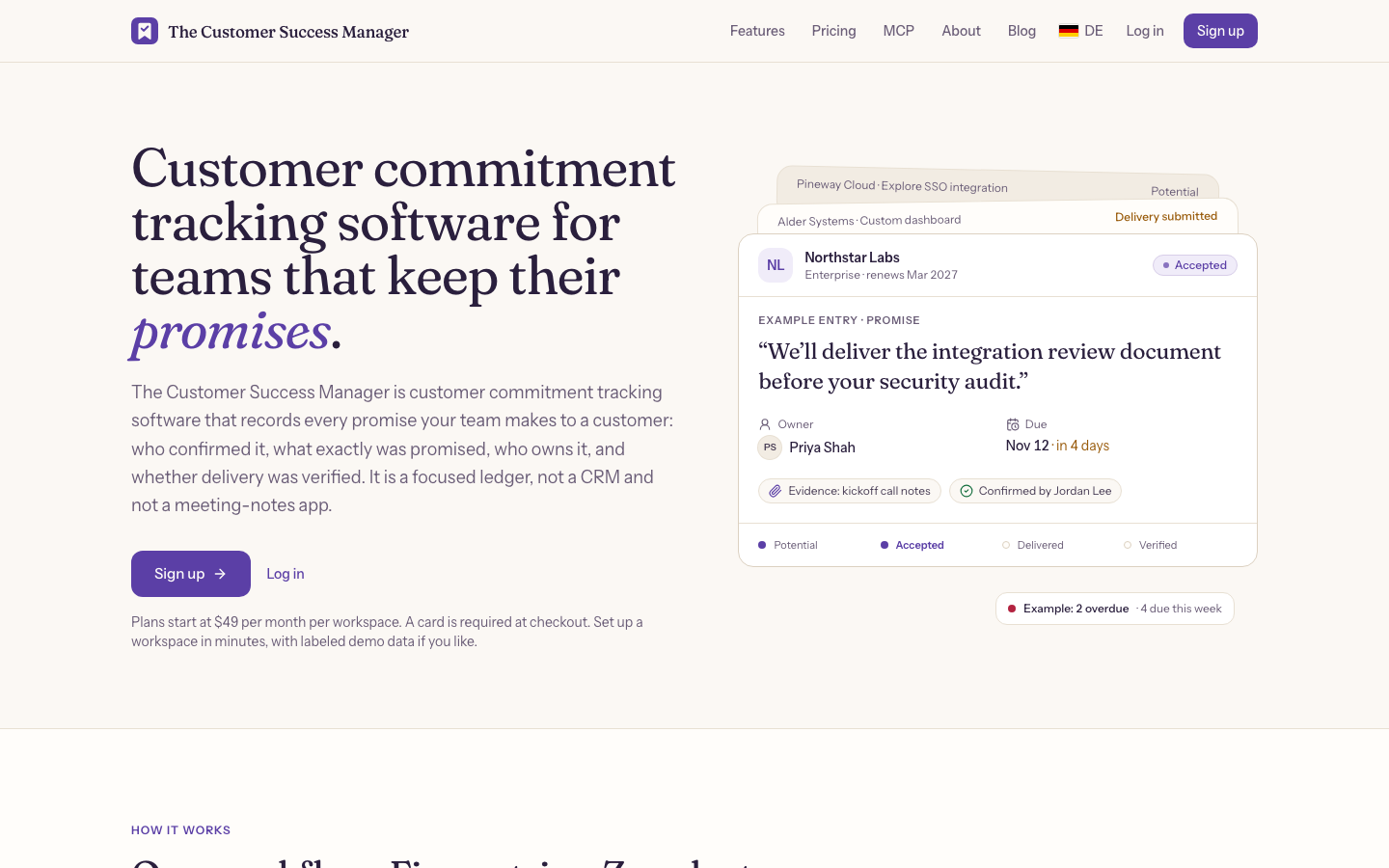
The Customer Success Manager is built for that gap. It keeps a ledger of customer commitments, each with the source evidence, an owner, a due date and a verification step, and the status moves from potential to accepted, delivered and verified. People confirm and verify commitments; nothing is accepted automatically. It isn't a customer success platform and it doesn't replace one. It sits next to whatever you choose above.
FAQ
What is customer success management software?
Customer success management software is a system where a CS team manages customers after the sale. It combines an account view, health scoring, renewal and risk tracking, playbooks, onboarding plans and reporting. Vendors also call it a customer success platform. Examples include Gainsight, ChurnZero, Vitally, Planhat, Custify, ClientSuccess and Velaris.
Is customer success software the same as a CRM?
No. A CRM is built around deals and pipeline, and customer success software is built around the account over time, with health, renewals and playbooks at the center. They work together: most platforms sync with Salesforce or HubSpot, and HubSpot offers a customer success workspace inside Service Hub Professional and Enterprise.
Is there free customer success management software?
Free customer success management software exists only as a CRM in our checks. HubSpot's CRM is free with no expiration date and can hold custom health and renewal fields. HubSpot's customer success workspace needs Service Hub Professional or Enterprise, and the eight dedicated platforms we checked ask for a demo or quote instead of offering a free plan.
How much does customer success management software cost?
Customer success management software cost depends on the price basis. HubSpot Service Hub Professional starts at about $90 per seat per month plus a $1,500 onboarding fee. Odie's Customer Operating System starts at $1,500 per month with a one-year minimum term. Gainsight, ChurnZero, Vitally, Planhat, Custify, ClientSuccess and Velaris quote on request.
When should a company buy customer success software?
A company should buy customer success software when a CSM can no longer tell which accounts need attention this week without opening several tabs, and when you have a usage or CRM data source you can connect. Before that, a CRM with custom fields and a shared task list is usually enough.
How long does implementation take?
Implementation of customer success software takes anywhere from two weeks to several months. Vendor statements range from two to four weeks for Gainsight Essentials to 4 to 6 weeks for most ClientSuccess customers and 8 to 12 weeks for larger deployments. G2 reviewers report longer figures, about two months for Velaris and about five for Gainsight. Ask which data sources the vendor's estimate assumes.